Custom Death Messages
25 Jan 2026
Client Not supported Server Required Dependencies No extras listed Listed on Project page
Check the setup 
CurseForge · Hytale mod
Replaces default death messages with customizable ones using colors, gradients, and placeholders like {player}.
Quick answer
Custom Death Messages targets Hytale. Do not install it as a separate client mod. Enable it on the world host—the local server in singleplayer or the dedicated server in multiplayer. No required dependencies listed for this file.
Where it goes
Do not install it as a separate client mod. Enable it on the world host—the local server in singleplayer or the dedicated server in multiplayer.
Put Hytale mods on the world host or dedicated server. Singleplayer runs a local server too; Hytale does not use separate client mods.
Custom Death Messages. Change the file and its required mods may change too.
This file does not list any required mods. Do not add a library just because a different file uses it.
This file does not list any required or optional project dependencies. Check the creator notes before changing an existing world.
Before you install it
Built for Custom Death Messages. Pick another file and the loader, install side or required mods may change.
Use Custom Death Messages. It targets Hytale; another release may target a different game build or dependency set.
This file does not list any required mods. Do not add a library just because a different file uses it.
Do not install it as a separate client mod. Enable it on the world host—the local server in singleplayer or the dedicated server in multiplayer.
Use the “Get this file” button beside Custom Death Messages. It opens that exact file at the source.
About this project
Custom Death Messages replaces the default death messages with fully customizable ones.
Messages support colors, gradients, and placeholders like {player}, allowing you to create funny, serious, or themed messages for your server.
The plugin is lightweight, easy to configure, and designed to work smoothly without affecting performance.
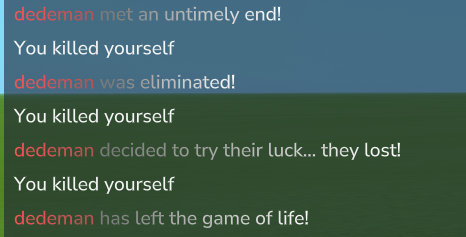
config.json:
{ "messages": [ "<gradient:#F45454:#B65454>{player}</gradient> <gradient:#7B7B7B:#FFFFFF>has met their unfortunate demise!</gradient>", "<gradient:#F45454:#B65454>{player}</gradient> <gradient:#7B7B7B:#FFFFFF>decided to try their luck... they lost!</gradient>", "<gradient:#F45454:#B65454>{player}</gradient> <gradient:#7B7B7B:#FFFFFF>has left the game of life!</gradient>", "<gradient:#F45454:#B65454>{player}</gradient> <gradient:#7B7B7B:#FFFFFF>tried to respawn IRL!</gradient>", "<gradient:#F45454:#B65454>{player}</gradient> <gradient:#7B7B7B:#FFFFFF>forgot this isn’t creative mode!</gradient>", "<gradient:#F45454:#B65454>{player}</gradient> <gradient:#7B7B7B:#FFFFFF>pressed the wrong button!</gradient>", "<gradient:#F45454:#B65454>{player}</gradient> <gradient:#7B7B7B:#FFFFFF>found out the hard way!</gradient>", "<gradient:#F45454:#B65454>{player}</gradient> <gradient:#7B7B7B:#FFFFFF>thought they were immortal!</gradient>", "<gradient:#F45454:#B65454>{player}</gradient> <gradient:#7B7B7B:#FFFFFF>speedran their own death!</gradient>", "<gradient:#F45454:#B65454>{player}</gradient> <gradient:#7B7B7B:#FFFFFF>forgot to read the tutorial!</gradient>", "<gradient:#F45454:#B65454>{player}</gradient> <gradient:#7B7B7B:#FFFFFF>made a very bad decision!</gradient>", "<gradient:#F45454:#B65454>{player}</gradient> <gradient:#7B7B7B:#FFFFFF>was built different… incorrectly!</gradient>", "<gradient:#F45454:#B65454>{player}</gradient> <gradient:#7B7B7B:#FFFFFF>tested gravity. Gravity won!</gradient>", "<gradient:#F45454:#B65454>{player}</gradient> <gradient:#7B7B7B:#FFFFFF>learned why helmets exist!</gradient>", "<gradient:#F45454:#B65454>{player}</gradient> <gradient:#7B7B7B:#FFFFFF>tried to clutch. Failed!</gradient>" ]}
Support:
For help, bug reports, or suggestions, you can join our Discord server.
Project description from CurseForge.
Recent files
25 Jan 2026
Looking for an older file? The official CurseForge project page is in Resources.
 mod
modThe Skylight Zone: Gimme Da' Loot is a Drop-List Addon for (Drops/Lootbags). - It Adds 3 New 'Lootbags' that have the chance to reward the player with Gemstones & Fragment Drops from The Skylight Gemstones Mod to NPCs and Containers.
 mod
modAdds a brand-new Labyrinth Dimension featuring a vast desert surface and an endless maze stretching deep below. Discover unique locations and face a variety of dangerous new enemies as you explore its depths!
 mod
modJourney inside the Frostveil Mountains, fight for your survival inside the freezing cold and uncover the dark secret of the region.