Custom Crow PM
26 Jan 2026
Client Not supported Server Required Dependencies No extras listed Listed on Project page
Check the setup 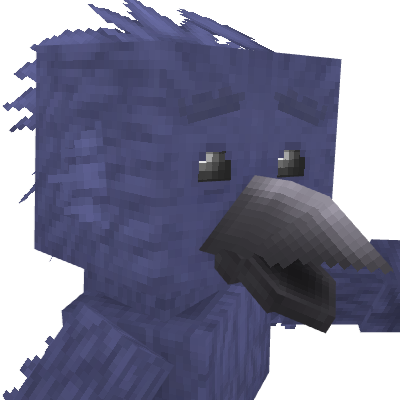
CurseForge · Hytale mod
An Anthropomorphic Crow Playermodel
Quick answer
Anthro Crow Custom Crow PM targets Hytale. Do not install it as a separate client mod. Enable it on the world host—the local server in singleplayer or the dedicated server in multiplayer. No required dependencies listed for this file.
Where it goes
Do not install it as a separate client mod. Enable it on the world host—the local server in singleplayer or the dedicated server in multiplayer.
Put Hytale mods on the world host or dedicated server. Singleplayer runs a local server too; Hytale does not use separate client mods.
Custom Crow PM. Change the file and its required mods may change too.
This file does not list any required mods. Do not add a library just because a different file uses it.
This file does not list any required or optional project dependencies. Check the creator notes before changing an existing world.
Before you install it
Built for Anthro Crow Custom Crow PM. Pick another file and the loader, install side or required mods may change.
Use Custom Crow PM. It targets Hytale; another release may target a different game build or dependency set.
This file does not list any required mods. Do not add a library just because a different file uses it.
Do not install it as a separate client mod. Enable it on the world host—the local server in singleplayer or the dedicated server in multiplayer.
Use the “Get this file” button beside Custom Crow PM. It opens that exact file at the source.
About this project
This mod is just an anthropomorphic crow character that can be used as a players model in-game. That's really it. Spent less than a week creating this character.
This player model comes with vanilla tail and feather "hair" physics, so it can look good while not using any external mods!
For now, to set the playermodel you must have OP enabled (by typing "/op self" in chat) and you must type "/model set Crow_PM self" and it should work.
Pants and leg armor does not work with this model as it uses custom leg proportions, but any other armor or clothing piece should work fine.
To allow customization:
Now that you have a duplicate of the crow player model, you can change the crows texture or clothing.
To change clothing:
You can also change the crows current attachments or textures using this asset editor, so maybe play around with it.
Project description from CurseForge.
Recent files
26 Jan 2026
Looking for an older file? The official CurseForge project page is in Resources.
 mod
modA full Bard class for Hytale with music-based abilities, party support, healing, damage, visual effects and its own Note resource system.
 mod
modThis Plugins add three Buddies to your adventure - they will follow you, fight with you and interact via sounds and chat (AI-featured through LLM).
 mod
modThe Skylight Zone: Gimme Da' Loot (NewDrops+) is a Droptable Addon for (New Items, NPC Drops, Lootbags and more). - It Adds 3 New 'Lootbags' that have the chance to reward the player with Loot. The Mod now Also Includes 28 new NPCs.