Hytale version
Back to mods 
CurseForge · Hytale mod
Automatic Storage
Drop all expedition resources in ONE spot to auto-store everything. Plug & Play. Mods compatibility, flexible options & individual preferences, edit recipes, simple UI, and full localization support.
Choose a version Pick your version below, then grab the matching file.
Quick answer
Which Automatic Storage release should I use?
Latest stable file AutoStorage-1.6.1.jar
Game version 0.7
Mod system Built-in Hytale mod system
Automatic Storage AutoStorage-1.6.1.jar targets 0.7. Do not install it as a separate client mod. Enable it on the world host—the local server in singleplayer or the dedicated server in multiplayer. No required dependencies listed for this file.
Where it goes
Where should Automatic Storage be installed in Hytale?
Do not install it as a separate client mod. Enable it on the world host—the local server in singleplayer or the dedicated server in multiplayer.
Separate client mod Not supported
World host / dedicated server Required
Mod system for this release Built-in Hytale mod system
Required install it here Optional supported, not mandatory Not supported do not install here Source doesn’t say do not assume
Put Hytale mods on the world host or dedicated server. Singleplayer runs a local server too; Hytale does not use separate client mods.
What else does Automatic Storage AutoStorage-1.6.1.jar need?
AutoStorage-1.6.1.jar. Change the file and its required mods may change too.
This file does not list any required mods. Do not add a library just because a different file uses it.
This file does not list any required or optional project dependencies. Check the creator notes before changing an existing world.
Before you install it
Add Automatic Storage without breaking your instance.
Built for Automatic Storage AutoStorage-1.6.1.jar. Pick another file and the loader, install side or required mods may change.
- 01
Stick to this file
Use AutoStorage-1.6.1.jar. It targets 0.7; another release may target a different game build or dependency set.
- 02
Bring the mods it needs
This file does not list any required mods. Do not add a library just because a different file uses it.
- 03
Enable it on the world host
Do not install it as a separate client mod. Enable it on the world host—the local server in singleplayer or the dedicated server in multiplayer.
- 04
Pick the file you checked
Use the “Get this file” button beside AutoStorage-1.6.1.jar. It opens that exact file at the source.
About this project
What does Automatic Storage add?
📦 Automatic Storage: Fast & Easy to Use
AutoStorage is a lightweight, efficient, and powerful mod that automatically sorts items between chests. Drop all your expedition resources in one place, and AutoStorage will handle the rest.
🚀 How It Works
- Craft the Automatic Storage Crate at the Workbench, in the Tinkering tab (Tier 2).
- Place it in your base.
- Put items inside. The AutoStorage crate will distribute them to compatible nearby chests.
- Configure it by crouching and pressing Interact (F by default) while looking at the crate.
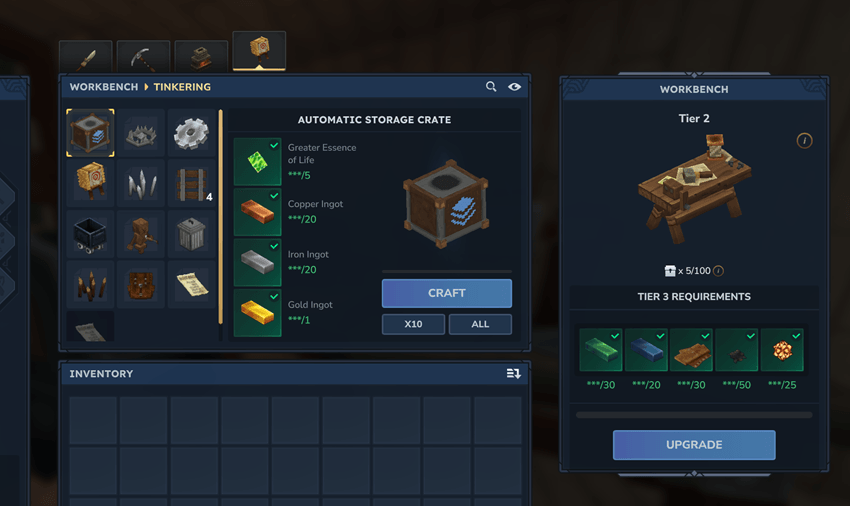
The crafting recipe can be changed in the configuration file.
✨ Features
- 📦 Automatically distributes items to nearby chests (including compatible containers added by other mods)
- 🧠 Smart targeting: items are sent to chests that already contain the same item type
- 🧩 Two sorting modes: exact item ID or item category
- ⏱️ Server-configurable transfer rate, measured in stacks or individual items
- ⚡ Event-driven architecture with bounded safety checks and retries, limiting unnecessary scans
- 🧱 Intelligent transfers that respect your chest organization: existing stacks are filled before empty slots
- 🖥️ In-game UI for configuring each crate (Crouch + F)
- 🎛️ Per-crate sorting mode
- 🔧 Per-crate options such as Use other chests if needed and container exclusions
- 📏 Per-crate horizontal and vertical range controls with + and − buttons
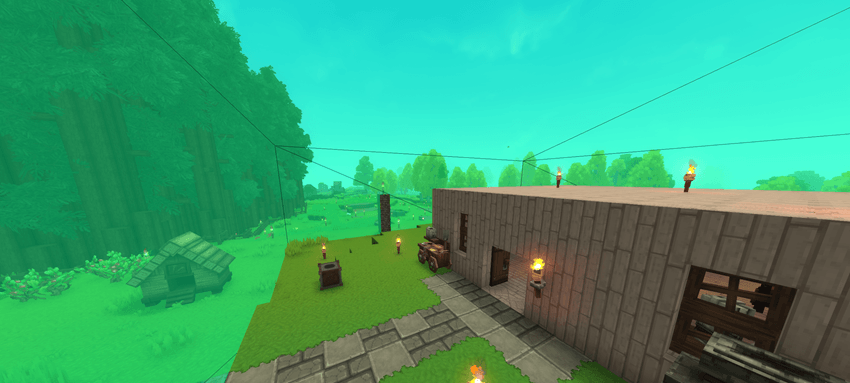
- 🔗 Live linked-chest count and range visualization
- ⚙️ Extensive configuration options for both small and large servers
- 📝 Advanced filtering to control which container block IDs may or may not receive items
- 🛡️ Built-in safeguards against item duplication, optimized for low CPU usage
- 🟢 Compatibility with the SimpleClaims mod to help prevent griefing, and other mods like StorageDrawers.
- 🌍 Localized UI and item names: AR / BG / CS / DE / EL / EN / ES / PE / ET / FR / IT / NL / PL / PT / RU / SK / SV / TR / UK
(Translations are AI-assisted; corrections are welcome!)
🔄 Complete Your Storage Setup
Automatic Collector is the companion to Automatic Storage. Automatic Storage distributes your deposited items among nearby chests; Automatic Collector lets you browse stored items and withdraw a chosen quantity, one stack, or the maximum your inventory can hold.
When both mods are installed, Automatic Collector can use the exact area of the nearest eligible Automatic Storage crate, subject to server range limits and claim protections. The two mods also work independently.
🐞 Bug Reports & Suggestions
Found a bug, have an idea, or want to request a feature?
- ✅ Best option: Join my Discord and post in the appropriate channel.
🧰 Commands
| Command | Description |
|---|---|
/autostorage reload |
Reloads the plugin configuration. Alias: /as reload |
🔐 Permissions
| Feature | Permission | Default |
|---|---|---|
| Use and configure AutoStorage | autostorage.use |
Allowed |
| Craft AutoStorage when permission-based crafting is enabled | autostorage.craft |
Denied |
| Bypass the owner-only configuration restriction | autostorage.config.any |
Denied |
⚙️ Configuration
The UI and configuration examples on this page follow AutoStorage 2.0.0. Choose the file matching your Hytale server version; file availability is listed in the Files tab.
The configuration file is organized into sections.
Every setting can be customized to match your server's needs.
Configuration file: mods/MiniBox_AutoStorage/config.json. Apply changes with /autostorage reload (alias /as reload). An invalid reload keeps the previous valid configuration.
For version 2.0.0: the configuration uses configVersion: 7, and tracked crates use SQLite schema 1. Older or unversioned configuration/database formats are not automatically converted.
radius
The in-game UI allows players to adjust each AutoStorage crate's range up to the server-defined maximum values.
| Key | Description | Default | Range |
|---|---|---|---|
horizontalRadiusMax |
Maximum horizontal range, in blocks | 18 |
1 to 200 |
verticalRadiusMax |
Maximum vertical range, in blocks | 15 |
1 to 200 |
defaultHorizontalRadius |
Default horizontal range when an AutoStorage crate is placed | 14 |
1 to 200 |
defaultVerticalRadius |
Default vertical range when an AutoStorage crate is placed | 6 |
1 to 200 |
Default range per crate
- ↔️ Horizontal: 14 blocks
- ↕️ Vertical: 6 blocks
🔁 transferConfig
Controls how and when items are transferred.
| Key | Description | Default | Range |
|---|---|---|---|
transferImmediate |
When true, transfers begin immediately after the source container changes. When false, the plugin waits for the configured delay after the last interaction. |
true |
true / false |
transferAfterLastInteractionInSeconds |
Delay after the last interaction, in seconds. Requires transferImmediate = false. |
3 |
0 to 60 |
transferOnlyWhenClose |
Transfers items only when the chest is closed. | false |
true / false |
transferMode |
Transfer unit: STACKS moves stacks per iteration; ITEMS moves up to a specified number of individual items per iteration. |
STACKS |
STACKS / ITEMS |
transferAmountPerTransfer |
Number of stacks or items moved during each transfer iteration | 1 |
1 to 1000 |
transferIntervalMs |
Cooldown between successful transfers, in milliseconds | 1000 |
250 to 5000 |
🧩 Sorting Settings
| Key | Description | Default | Range |
|---|---|---|---|
defaultSortingMode |
Global default sorting mode: ITEM_ID matches exact items; ITEM_CATEGORY groups items by category. |
ITEM_ID |
ITEM_ID / ITEM_CATEGORY |
idleRetryMs |
Retry interval when no items are moved, in milliseconds | 5000 |
1000 to 60000 |
idleRetryBackoffMaxMs |
Maximum retry interval after an AutoStorage crate has been idle for a long time, in milliseconds | 60000 |
1000 to 60000 |
targetScanCacheMaxAgeMs |
Maximum cached-scan age in milliseconds; capped by idleRetryBackoffMaxMs | 15000 |
1000 to 60000 |
onlyStorageOwnerCanConfig |
When enabled, configuration is restricted to the owner or a player with autostorage.config.any. | false |
true / false |
🛠️ Crafting
| Key | Description | Default |
|---|---|---|
itemIsCraftable |
Enables or disables crafting for the AutoStorage item | true |
craftRequiresPermission |
Requires a permission to view and craft AutoStorage | false |
craftRequiresPermissionName |
Permission node used when permission-based crafting is enabled | autostorage.craft |
craftOutputQuantity |
Number of AutoStorage crates produced per craft | 1 |
🧪 recipeOverride (Optional)
Optionally overrides the AutoStorage crafting recipe for item ID Furniture_AutoStorage.
When enabled, the plugin generates an item override file and reloads the item asset.
| Key | Description | Default |
|---|---|---|
enabled |
Enables the recipe override | false |
timeSeconds |
Crafting duration, in seconds | 2.0 |
input |
Ingredient list containing itemId and quantity |
— |
benchRequirement |
Workbench requirements containing id, type, categories, and requiredTierLevel |
— |
🎯 targetFilter
Controls which target containers are considered valid.
Filters are evaluated in the following order:
- Deny by exact block ID
- Deny when the ID contains a specified token
- Allow by exact block ID
- Allow when the ID contains a specified token
| Key | Description | Default |
|---|---|---|
allowBlockIdsEnabled |
Enables or disables the allowBlockIds filter |
false |
denyBlockIdsEnabled |
Enables or disables the denyBlockIds filter |
false |
allowIdContainsEnabled |
Enables or disables the allowIdContains filter |
false |
denyIdContainsEnabled |
Enables or disables the denyIdContains filter |
true |
allowBlockIds |
Exact block IDs to allow | [] |
denyBlockIds |
Exact block IDs to deny | [] |
allowIdContains |
Allows a container when its block ID contains one of these tokens | ["chest", "drawer", "storage"] |
denyIdContains |
Denies a container when its block ID contains one of these tokens | ["autostorage", "salvage", "campfire", "furnace", "tannery"] |
📜 Mod Compatibility
| Key | Description | Default |
|---|---|---|
claimModCompatibility |
Enables or disables compatibility with claim-protection mods | true |
📐 Sorting Rules
AutoStorage follows these rules when distributing items:
- ✅ In Same item type mode, destinations must already hold that item type. Same category uses the selected game category. Enable Use other chests if needed to try other included chests when no matching destination can accept the item, including when matching chests are full or reject it.
- ✅ AutoStorage crates never transfer items to one another.
- ✅ Existing stacks are filled before empty slots.
- ✅ Matching destinations are prioritized by the quantity already stored in the selected item/category group, then by distance.
- ✅ Item stack limits are always respected.
- ✅ If the primary target is full, AutoStorage tries another compatible target.
- ✅ Item durability, quality, and metadata are preserved. Existing stacks are merged only when compatible.
🖥️ User Interface
🔓 Opening the UI
Crouch (sneak) and press Interact (F by default) while looking at an AutoStorage crate to open its configuration UI.
When
onlyStorageOwnerCanConfigis enabled, the owner or a player withautostorage.config.anycan configure the crate.
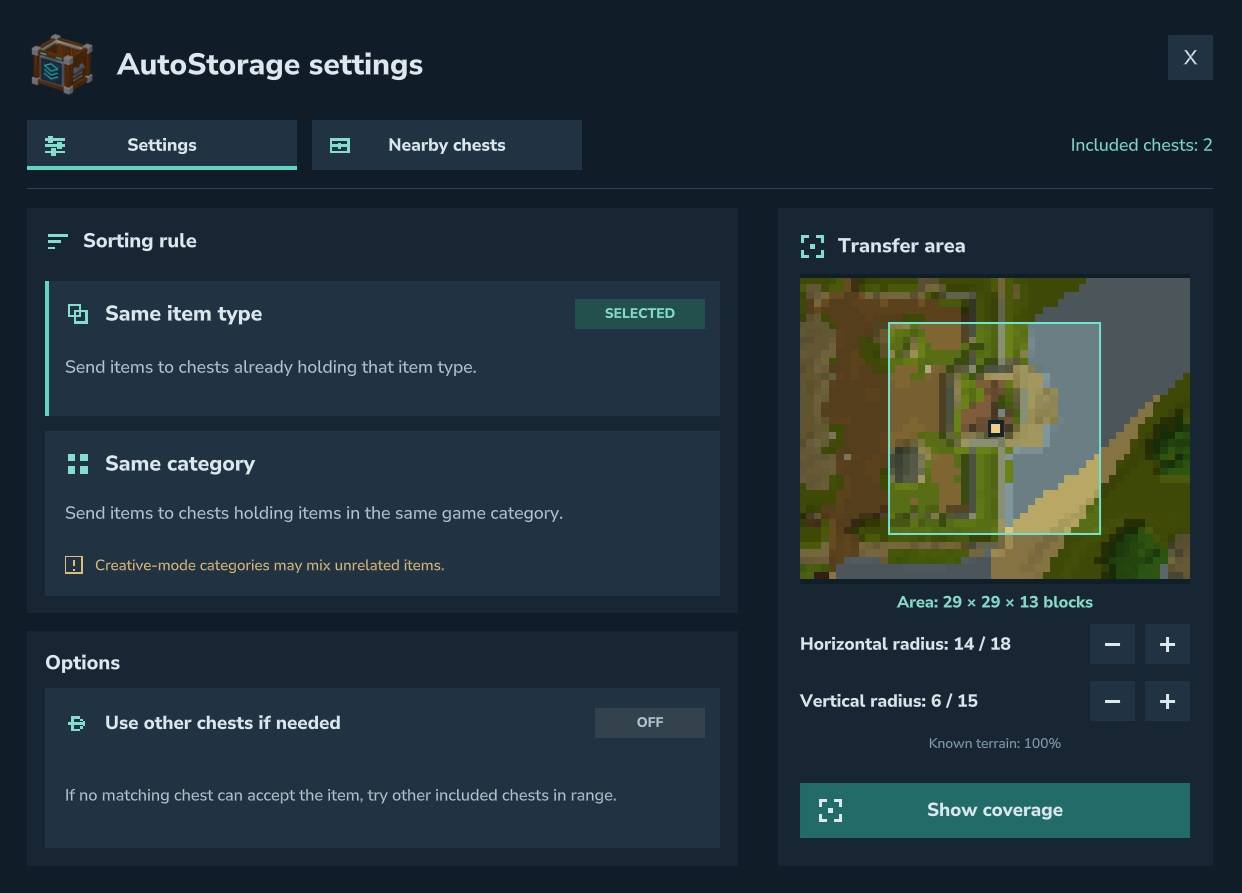
↔️ Show Range
🧾 Sorting Modes
| Mode | Description |
|---|---|
| Same item type | Sorts by exact item ID using strict matching |
| Same category | Uses Hytale's first nonempty creative-library category, with type/item fallbacks. These categories may group unrelated items; the UI displays a warning. |
📏 Range Controls
Each AutoStorage crate has its own search range:
- ↔️ Horizontal range: 1 to
horizontalRadiusMaxblocks (default: 14) - ↕️ Vertical range: 1 to
verticalRadiusMaxblocks (default: 6)
Use the + and − buttons in the UI to adjust these values. Changes are saved automatically. The interface shows the current radius / server maximum and a top-down terrain map. Volume dimensions include both edges (2 × radius + 1); unavailable terrain samples are shown in grey.
✅ The selected sorting mode and range values are saved per crate and override the global defaults.
💾 Persistence
📌 Tracked Crates
Tracked crates are automatically saved to tracked_autostorage.db. The following settings are stored for each crate:
- World and coordinates
- Owner UUID
- Sorting mode
- Horizontal and vertical range
- Ignored target containers
- Use other chests if needed option
🧪 Default Crafting Recipe
✅ Every value can be changed in the configuration file.
| Property | Value |
|---|---|
| Crafting Time | 2 seconds |
| Workbench | Workbench → Tinkering tab (Tier 2+) |
| Storage Capacity | 54 slots |
| Maximum Stack Size | 2 |
📜 Ingredients
- 5× Concentrated Life Essence
- 20× Copper Bar
- 20× Iron Bar
- 1× Gold Bar
🌍 Language Files
The plugin provides localized item names and UI text.
It automatically detects the language selected in your game.
(Translations are machine-assisted; corrections are welcome!)
🧩 Check Out My Other Mods
Explore the other MiniBox mods for Hytale:
- 💛 Shared Life — Share health and linked deaths in co-op, with configurable healing and optional shared inventories.
- 📥 Automatic Collector — Browse nearby storage and withdraw a quantity, one stack, or the maximum your inventory can hold.
- 🔥 Open Inventory & Inspect Gear — Open player inventories and inspect equipment with configurable permissions.
- ⛏️ Escape Rope: Quick Exit from a Cave — Use a rope to return to the surface when a safe destination is available.
👉 I try to keep my mods easy to use, lightweight, configurable, and server-friendly.
Project description from CurseForge.
Pick your setup
Automatic Storage releases for each Hytale build.
Choose the version and loader you play, then open the matching release.
Hytale version
0.6
1 loader buildHytale version
0.5
1 loader buildCheck the dependencies, then try the file in a copied instance before changing a world you care about.
Recent files
Automatic Storage releases and Hytale builds
AutoStorage-1.6.1.jar
13 Oct 2026
Client Not supported Server Required Dependencies No extras listed Listed on Project page
Check the 0.7 setup 0.7 release
AutoStorage-1.6.0.jar
27 Aug 2026
Client Not supported Server Required Dependencies No extras listed Listed on Project page
Check the 0.6 setup 0.6 release
AutoStorage-1.5.3.jar
24 Jul 2026
Client Not supported Server Required Dependencies No extras listed Listed on Project page
Check the 0.5 setup 0.5 release
AutoStorage-1.5.2.jar
20 Jun 2026
Client Not supported Server Required Dependencies No extras listed Listed on Project page
Check the 0.5 setup 0.5 release
AutoStorage-1.5.2-v2.jar
20 Jun 2026
Client Not supported Server Required Dependencies No extras listed Listed on Project page
Check the 0.5 setup AutoStorage-1.5.2-v1.jar
17 Jun 2026
Client Not supported Server Required Dependencies No extras listed Listed on Project page
Check the 0.5 setup AutoStorage-1.5.1.jar
4 Jun 2026
Client Not supported Server Required Dependencies No extras listed Listed on Project page
Check the 0.5 setup 0.5 release
AutoStorage-1.5.0.jar
28 Apr 2026
Client Not supported Server Required Dependencies No extras listed Listed on Project page
Check the setup AutoStorage-1.4.3.jar
3 Apr 2026
Client Not supported Server Required Dependencies No extras listed Listed on Project page
Check the setup AutoStorage-1.4.2.jar
30 Mar 2026
Client Not supported Server Required Dependencies No extras listed Listed on Project page
Check the setup AutoStorage-1.4.2-Pre-Release.jar
5 Mar 2026
Client Not supported Server Required Dependencies No extras listed Listed on Project page
Check the setup AutoStorage-1.4.1.jar
24 Feb 2026
Client Not supported Server Required Dependencies No extras listed Listed on Project page
Check the setup Looking for an older file? The official CurseForge project page is in Resources.