ItemPinBoard-1.0.1.jar
29 Jan 2026
Client Not supported Server Required Dependencies No extras listed Listed on Project page
Check the setup 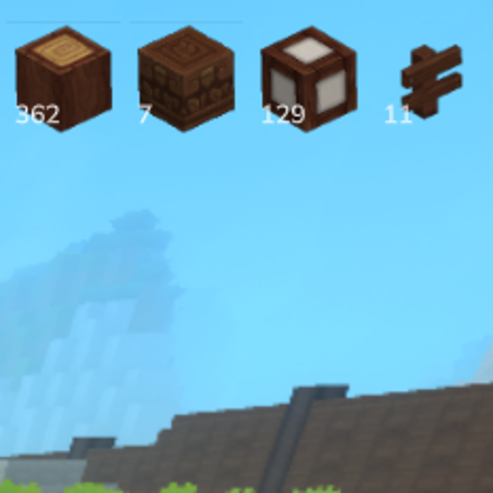
CurseForge · Hytale mod
Pin any item to your HUD to keep track of resources at a glance -- other mods can integrate via a simple API to display their own pinned items.
Quick answer
Item Pin Board ItemPinBoard-1.0.1.jar targets Hytale. Do not install it as a separate client mod. Enable it on the world host—the local server in singleplayer or the dedicated server in multiplayer. No required dependencies listed for this file.
Where it goes
Do not install it as a separate client mod. Enable it on the world host—the local server in singleplayer or the dedicated server in multiplayer.
Put Hytale mods on the world host or dedicated server. Singleplayer runs a local server too; Hytale does not use separate client mods.
ItemPinBoard-1.0.1.jar. Change the file and its required mods may change too.
This file does not list any required mods. Do not add a library just because a different file uses it.
This file does not list any required or optional project dependencies. Check the creator notes before changing an existing world.
Before you install it
Built for Item Pin Board ItemPinBoard-1.0.1.jar. Pick another file and the loader, install side or required mods may change.
Use ItemPinBoard-1.0.1.jar. It targets Hytale; another release may target a different game build or dependency set.
This file does not list any required mods. Do not add a library just because a different file uses it.
Do not install it as a separate client mod. Enable it on the world host—the local server in singleplayer or the dedicated server in multiplayer.
Use the “Get this file” button beside ItemPinBoard-1.0.1.jar. It opens that exact file at the source.
About this project
ItemPinBoard
ItemPinBoard is a server-side Hytale mod that adds a persistent HUD overlay for tracking items. Players can pin any item to their screen and
always see its icon and quantity -- perfect for gathering resources, preparing crafting materials, or keeping track of what's needed. The HUD
position, scale, and visibility are fully customizable per player, and everything is saved across server restarts.
Commands
All interaction runs through a single command:
API for Mod Developers
Other mods can use the ItemPinBoardAPI to pin items to a player's HUD. Each mod's pins are tracked separately, and players can toggle
visibility per mod in settings. The modId parameter identifies which mod a pin belongs to -- this way multiple mods can pin the same item
independently, and players can show or hide pins per mod. Since Hytale uses isolated classloaders, ItemPinBoard publishes its classloader via
System.getProperties(), so other mods can integrate through reflection without a compile-time dependency -- making ItemPinBoard fully
optional.
ItemPinBoardAPI api = ItemPinBoardAPI.get();
api.pin(player, playerRef, "Stone", 64, "YourModId");
api.update(player, playerRef, "Stone", 32, "YourModId");
api.unpin(player, playerRef, "Stone", "YourModId");
api.unpinAll(player, playerRef, "YourModId");
api.getItems(playerUuid, "YourModId");
api.isPinned(playerUuid, "Stone", "YourModId");
Project description from CurseForge.
Recent files
29 Jan 2026
27 Jan 2026
Looking for an older file? The official CurseForge project page is in Resources.
 mod
modStitch focused changes into Hytale assets with a standalone, embeddable patcher built for clean cross-mod compatibility.
 mod
modPlay some classic games with your friends.
 mod
modAdds animated icons to NPC enities. Extention Plugin for QuestLines