Trackers.jar
29 Jan 2026
Client Not supported Server Required Dependencies No extras listed Listed on Project page
Check the setup 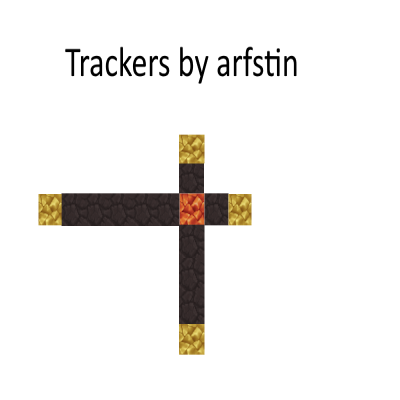
CurseForge · Hytale mod
This is a tracking plugin based on the trackers that were used in McPvP and McTeams back in the day. A tracker can find if a player is within a given range for a given direction using a player built structure.
Quick answer
Trackers for PvP/Raiding Trackers.jar targets Hytale. Do not install it as a separate client mod. Enable it on the world host—the local server in singleplayer or the dedicated server in multiplayer. No required dependencies listed for this file.
Where it goes
Do not install it as a separate client mod. Enable it on the world host—the local server in singleplayer or the dedicated server in multiplayer.
Put Hytale mods on the world host or dedicated server. Singleplayer runs a local server too; Hytale does not use separate client mods.
Trackers.jar. Change the file and its required mods may change too.
This file does not list any required mods. Do not add a library just because a different file uses it.
This file does not list any required or optional project dependencies. Check the creator notes before changing an existing world.
Before you install it
Built for Trackers for PvP/Raiding Trackers.jar. Pick another file and the loader, install side or required mods may change.
Use Trackers.jar. It targets Hytale; another release may target a different game build or dependency set.
This file does not list any required mods. Do not add a library just because a different file uses it.
Do not install it as a separate client mod. Enable it on the world host—the local server in singleplayer or the dedicated server in multiplayer.
Use the “Get this file” button beside Trackers.jar. It opens that exact file at the source.
About this project
Track players based on the built-in coordinate system and player-made "tracker" structure
This is a plugin based on the trackers from McPvP and McTeams from back in the day, which allows you to track players in a given distance from the tracker. Tracking does not give exact coordinates, but you can narrow down the coordinates precisely, given that a player is there long enough. I'll give a brief explanation of how they work. I'll start with providing an image of a basic tracker: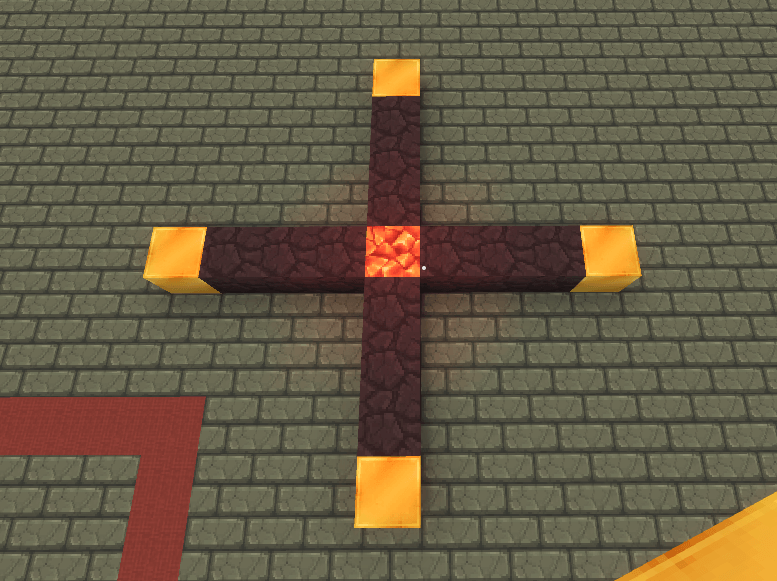
A tracker consists of a red crystal block at the center (at least for now), volcanic rock in the direction you want to track, which can be one direction or all 4, and then is capped off with a Smooth Gold Brick (Changed from Yellow Crystal Block). Each piece of volcanic rock will track 25 blocks, and the same goes for the yellow crystal block. What this means is that this tracker will track 200 blocks in any direction.
There are two commands that can be used, /track all, which displays all names of players who are within the distance of the tracker for that particular direction.
The second command is /track (playerName), which will track a given player and let you know if they are within the tracking distance. This is used to narrow down a player's coordinates. Trackers can be placed right next to one another, which means you can stagger them next to one another to quickly find a rough estimate. What you can do to narrow the coordinates even further is move the red crystal block along the tracker until the player is no longer found, to find the 25 block region they are in. Heres an example of a horizontally "stacked" tracker:
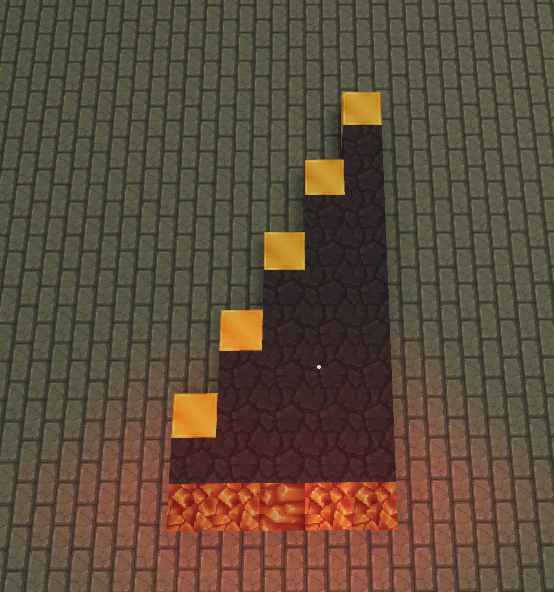
This is a readout of the commands; the first highlighted box is /track all (there is only one player in range) and the second is /track test1 as the player I was looking to track is named test1: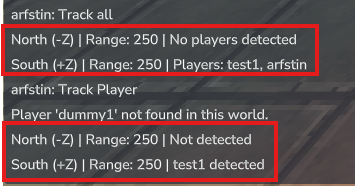
Here is a video from McPvP, which explains this, and is exactly how this functions in Hytale: https://www.youtube.com/watch?v=DLZCd31IOrg
This plugin is intended to be used on PvP servers that do not have claim protection for full raiding, but could be used on protected servers.
I am planning at some point to add to "temp" trackers as well, which disappear on use and track shorter distances for more precision.
Feel free and please use this plugin in any capacity on your server or private worlds, and let me know if you do so, I can join and do some raids!
Any questions or suggestions, please feel free to comment and let me know.
Project description from CurseForge.
Recent files
29 Jan 2026
29 Jan 2026
Looking for an older file? The official CurseForge project page is in Resources.