Hytale version
Back to mods 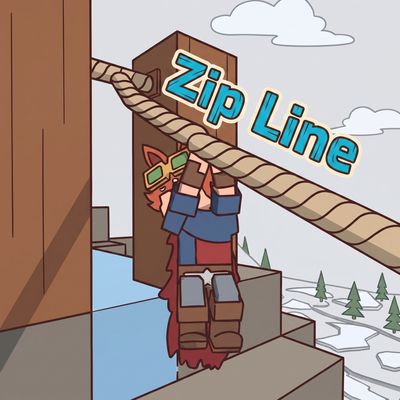
CurseForge · Hytale mod
Zip Line Plugin
Its a plugin that implements a Zip Line
Choose a version Pick your version below, then grab the matching file.
Quick answer
Which Zip Line Plugin release should I use?
Latest stable file ZipLinePlugin-0.1.6.jar
Game version 0.6
Mod system Built-in Hytale mod system
Zip Line Plugin ZipLinePlugin-0.1.6.jar targets 0.6. Do not install it as a separate client mod. Enable it on the world host—the local server in singleplayer or the dedicated server in multiplayer. No required dependencies listed for this file.
Where it goes
Where should Zip Line Plugin be installed in Hytale?
Do not install it as a separate client mod. Enable it on the world host—the local server in singleplayer or the dedicated server in multiplayer.
Separate client mod Not supported
World host / dedicated server Required
Mod system for this release Built-in Hytale mod system
Required install it here Optional supported, not mandatory Not supported do not install here Source doesn’t say do not assume
Put Hytale mods on the world host or dedicated server. Singleplayer runs a local server too; Hytale does not use separate client mods.
What else does Zip Line Plugin ZipLinePlugin-0.1.6.jar need?
ZipLinePlugin-0.1.6.jar. Change the file and its required mods may change too.
This file does not list any required mods. Do not add a library just because a different file uses it.
This file does not list any required or optional project dependencies. Check the creator notes before changing an existing world.
Before you install it
Add Zip Line Plugin without breaking your instance.
Built for Zip Line Plugin ZipLinePlugin-0.1.6.jar. Pick another file and the loader, install side or required mods may change.
- 01
Stick to this file
Use ZipLinePlugin-0.1.6.jar. It targets 0.6; another release may target a different game build or dependency set.
- 02
Bring the mods it needs
This file does not list any required mods. Do not add a library just because a different file uses it.
- 03
Enable it on the world host
Do not install it as a separate client mod. Enable it on the world host—the local server in singleplayer or the dedicated server in multiplayer.
- 04
Pick the file you checked
Use the “Get this file” button beside ZipLinePlugin-0.1.6.jar. It opens that exact file at the source.
About this project
What does Zip Line Plugin add?
ZIP LINE PLUGIN
This plugin implements a zip line. This is a perfect craftable for adventure mode.
(It's my first mod, any errors please comment)
For visual reasons, if you place it at too steep an angle, it won't allow you to connect it; make sure you find the right angle.
You can get on at any point on the rope, and if you want to get off you just have to crouch (crt)
I hope you find it useful
Items
- Zip Line Support: With two of them you can form a zip line; they have to be facing each other (there are limitations on the angles at which you can place them to connect them).
- Guide Line: It is used to connect two supports and is what forms the zip line; to connect it you will also need to have enough "ingredient fiber," which will depend on how far apart they are.
- Tensor: You can use it to change the speed of the zip line.
! Technical
- Compatible with other Plugins
It does not cause conflicts with other plugins (animation problem solved, it no longer rewrites player.json)
- Restrictions on angles to place it
Support A has to be away from support B at least 10 blocks away and 5 blocks high. Make sure they are on the same axis facing each other (diagonal does not work). There is a maximum height limitation if a zip line is too inclined, but the positions that accept you are quite a few, it is a matter of finding the correct angle.
Project description from CurseForge.
Pick your setup
Zip Line Plugin releases for each Hytale build.
Choose the version and loader you play, then open the matching release.
Check the dependencies, then try the file in a copied instance before changing a world you care about.
Recent files
Zip Line Plugin releases and Hytale builds
ZipLinePlugin-0.1.6.jar
27 Aug 2026
Client Not supported Server Required Dependencies No extras listed Listed on Project page
Check the 0.6 setup 0.6 release
ZipLinePlugin-0.1.3.jar
26 Mar 2026
Client Not supported Server Required Dependencies No extras listed Listed on Project page
Check the setup Looking for an older file? The official CurseForge project page is in Resources.