Quick answer
Which Ore Miner release should I use?
Latest stable file OreMiner-1.0.7.jar
Game version Not listed
Mod system Built-in Hytale mod system
Ore Miner OreMiner-1.0.7.jar targets Hytale. Do not install it as a separate client mod. Enable it on the world host—the local server in singleplayer or the dedicated server in multiplayer. No required dependencies listed for this file.
Where it goes
Where should Ore Miner be installed in Hytale?
Do not install it as a separate client mod. Enable it on the world host—the local server in singleplayer or the dedicated server in multiplayer.
Separate client mod Not supported
World host / dedicated server Required
Mod system for this release Built-in Hytale mod system
Required install it here Optional supported, not mandatory Not supported do not install here Source doesn’t say do not assume
Put Hytale mods on the world host or dedicated server. Singleplayer runs a local server too; Hytale does not use separate client mods.
What else does Ore Miner OreMiner-1.0.7.jar need?
OreMiner-1.0.7.jar. Change the file and its required mods may change too.
This file does not list any required mods. Do not add a library just because a different file uses it.
This file does not list any required or optional project dependencies. Check the creator notes before changing an existing world.
Before you install it
Add Ore Miner without breaking your instance.
Built for Ore Miner OreMiner-1.0.7.jar. Pick another file and the loader, install side or required mods may change.
- 01
Stick to this file
Use OreMiner-1.0.7.jar. It targets Hytale; another release may target a different game build or dependency set.
- 02
Bring the mods it needs
This file does not list any required mods. Do not add a library just because a different file uses it.
- 03
Enable it on the world host
Do not install it as a separate client mod. Enable it on the world host—the local server in singleplayer or the dedicated server in multiplayer.
- 04
Pick the file you checked
Use the “Get this file” button beside OreMiner-1.0.7.jar. It opens that exact file at the source.
About this project
What does Ore Miner add?
OreMiner - Automated Mining Machine for Hytale
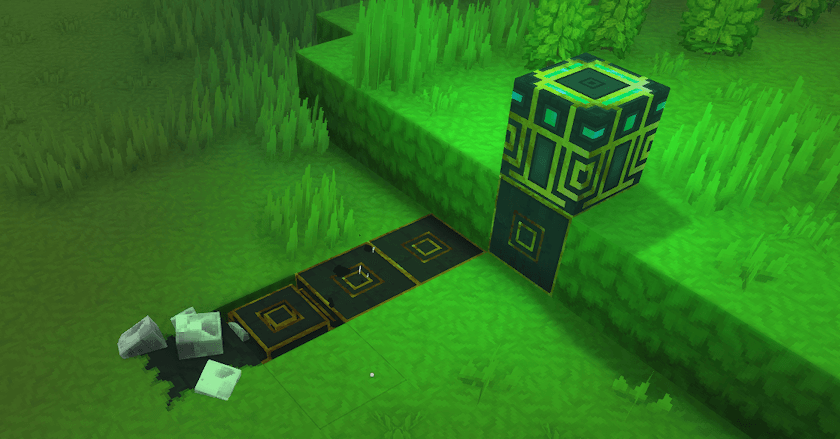
OreMiner is a powerful automation mod for Hytale that brings industrial-scale mining to your world! Place down a mining machine and watch as it automatically excavates minerals, processes ores, and collects resources with intelligent pathfinding.
✨ Key Features
🏭 Automated Mining Operations
- Smart Pathfinding: Mines in efficient spiral patterns using optimized A* algorithms
- Multi-Quadrant System: Divides mining area into quadrants for systematic excavation
- Layer-by-Layer Mining: Progressively mines deeper while maintaining structural integrity
- Pipe Management: Automatically places and retracts mining pipes as needed
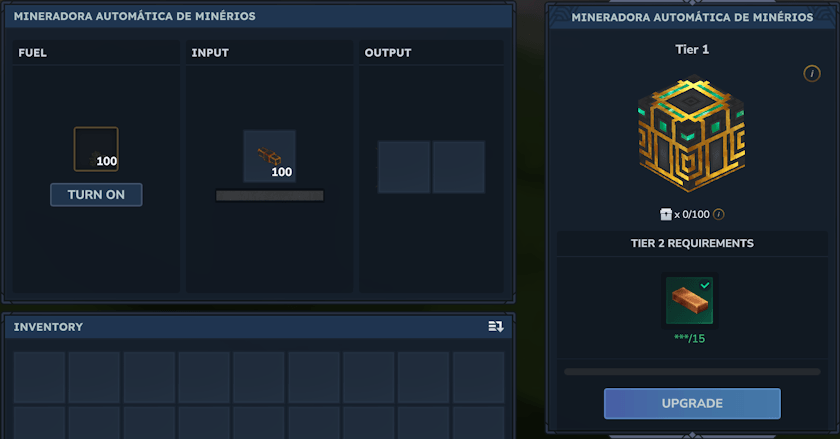
⚙️ Tiered Progression System 4 Upgrade Tiers: Each tier increases mining radius and efficiency
- Tier 1: 5-block radius (Basic) single block porcess
- Tier 2: 7-block radius (Improved) double block porcess
- Tier 3: 9-block radius (Advanced) triple block porcess
- Tier 4: 11-block radius (Industrial) quadruple block porcess
🔧 Intelligent Resource Processing
- Real Block Drops: Uses game's actual drop system for authentic resource collection
- Configurable Drop Tables: Customize what each block drops via JSON configuration
- Variable Quantities: Set min/max drop amounts for balanced progression
- Slot Management: Intelligently distributes items to input/output slots
- Future plan: Add auto ejection.
🎮 Player-Friendly Features
- Easy Setup: Just place the machine and add mining pipes and fuel
- Automatic Storage: Resources go directly into the machine's inventory
- Visual Feedback: See pipes extend and retract as mining progresses
- World Persistence: Machines save state between server restarts
- Multi-World Support: Works across all your worlds
Transform your mining operations from manual labor to automated industry with OreMiner!
Project description from CurseForge.
Recent files
Ore Miner releases and Hytale builds
17 Feb 2026
Client Not supported Server Required Dependencies No extras listed Listed on Project page
Check the setup → 14 Feb 2026
Client Not supported Server Required Dependencies No extras listed Listed on Project page
Check the setup → 6 Feb 2026
Client Not supported Server Required Dependencies No extras listed Listed on Project page
Check the setup → 1 Feb 2026
Client Not supported Server Required Dependencies No extras listed Listed on Project page
Check the setup → 31 Jan 2026
Client Not supported Server Required Dependencies No extras listed Listed on Project page
Check the setup → 31 Jan 2026
Client Not supported Server Required Dependencies No extras listed Listed on Project page
Check the setup → 31 Jan 2026
Client Not supported Server Required Dependencies No extras listed Listed on Project page
Check the setup → 30 Jan 2026
Client Not supported Server Required Dependencies No extras listed Listed on Project page
Check the setup → 30 Jan 2026
Client Not supported Server Required Dependencies No extras listed Listed on Project page
Check the setup →