Hytale version
Back to mods 
CurseForge · Hytale mod
Escape Rope : Quick Exit a Cave
Quick exit a cave by using a rope to get out of these caves
Choose a version Pick your version below, then grab the matching file.
Quick answer
Which Escape Rope : Quick Exit a Cave release should I use?
Latest stable file Escape Rope-1.1.0.jar
Game version 0.6
Mod system Built-in Hytale mod system
Escape Rope : Quick Exit a Cave Escape Rope-1.1.0.jar targets 0.6. Do not install it as a separate client mod. Enable it on the world host—the local server in singleplayer or the dedicated server in multiplayer. No required dependencies listed for this file.
Where it goes
Where should Escape Rope : Quick Exit a Cave be installed in Hytale?
Do not install it as a separate client mod. Enable it on the world host—the local server in singleplayer or the dedicated server in multiplayer.
Separate client mod Not supported
World host / dedicated server Required
Mod system for this release Built-in Hytale mod system
Required install it here Optional supported, not mandatory Not supported do not install here Source doesn’t say do not assume
Put Hytale mods on the world host or dedicated server. Singleplayer runs a local server too; Hytale does not use separate client mods.
What else does Escape Rope : Quick Exit a Cave Escape Rope-1.1.0.jar need?
Escape Rope-1.1.0.jar. Change the file and its required mods may change too.
This file does not list any required mods. Do not add a library just because a different file uses it.
This file does not list any required or optional project dependencies. Check the creator notes before changing an existing world.
Before you install it
Add Escape Rope : Quick Exit a Cave without breaking your instance.
Built for Escape Rope : Quick Exit a Cave Escape Rope-1.1.0.jar. Pick another file and the loader, install side or required mods may change.
- 01
Stick to this file
Use Escape Rope-1.1.0.jar. It targets 0.6; another release may target a different game build or dependency set.
- 02
Bring the mods it needs
This file does not list any required mods. Do not add a library just because a different file uses it.
- 03
Enable it on the world host
Do not install it as a separate client mod. Enable it on the world host—the local server in singleplayer or the dedicated server in multiplayer.
- 04
Pick the file you checked
Use the “Get this file” button beside Escape Rope-1.1.0.jar. It opens that exact file at the source.
About this project
What does Escape Rope : Quick Exit a Cave add?
🧗 Escape Rope : Quick Exit a Cave
**Escape Rope** is a **simple** and **configurable** mod that lets players teleport to the surface from caves. Use the rope, wait the cast, and escape safely.
🚀 How it works ?
Craft the Escape Rope (if crafting is enabled).
Use it with Right click to start casting.
Teleport to the surface if a safe spot is found.
The rope is consumed
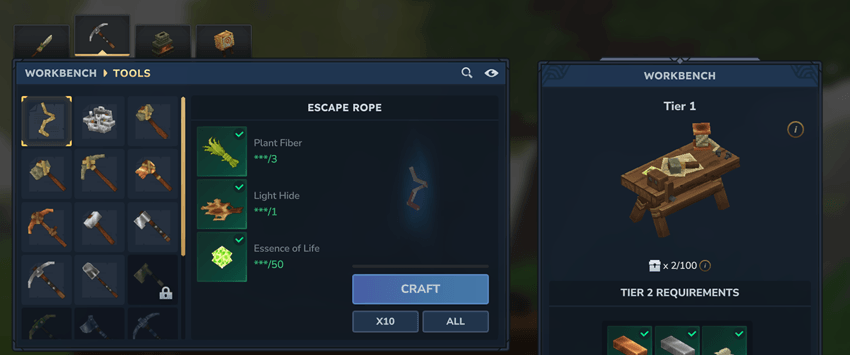
✨ Features
- 🧗 Quick escape to the surface from caves
- ⏱️ Configurable cast time
- 🛑 Optional cancel on damage
- 🧭 Layer limit check (only works below a configurable height, can be disable)
- ✅ Safe landing checks (air at feet/head, solid below, no fluids)
- 🧪 Configurable crafting recipe and bench tier
- 📦 Configurable max stack size
- ✨ Particles effects
- 🧩 Usable with a command, admin command to escape someone with permission
🧰 Command
| Command | Description |
|---|---|
/escape |
Triggers the teleport (debug, no item required) |
/escape reload |
Reloads the plugin configuration |
/escape [player] |
Teleports another player |
🔐 Permissions (defaults)
| Feature | Permission |
|---|---|
Use /escape |
escaperope.use |
Use /escape [player] |
escaperope.other |
Use /escape reload |
escaperope.reload |
Permissions are fully editable in the config.
⚙️ Configuration
The configuration file is generated on server startup.
main
| Key | Description | Default |
|---|---|---|
LayerLimitEnabled |
Enable the layer height check | true |
LayerLimit |
Maximum Y level for rope use | 115 |
CastTimeSeconds |
Cast duration in seconds | 2.0 |
CancelOnDamage |
Cancel if the player takes damage | true |
ConsumeOnUse |
Consumes item in Adventure | true |
EscapeCommandAllowedForEveryone |
Allow everyone to use /escape |
false |
MessagePrefix |
Prefix for all messages | [Escape Rope] |
CraftEnabled |
Enable crafting for the item | true |
🧰 commands
| Key | Description | Default |
|---|---|---|
Enabled |
Register the main command | true |
Name |
Main command name | escape |
Aliases |
Aliases for the main command | [] |
ReloadName |
Subcommand name for reload | reload |
ReloadAliases |
Aliases for reload | [] |
🔐 permissions
| Key | Description | Default |
|---|---|---|
EscapeSelf |
Permission for /escape |
minibox.escaperope.command.escape |
EscapeOther |
Permission for /escape <player> |
minibox.escaperope.command.escape.other |
EscapeReload |
Permission for /escape reload |
minibox.escaperope.command.escape.reload |
📦 item
| Key | Description | Default |
|---|---|---|
MaxStack |
Max stack size | 1 |
| undefined |
🧪 overrideRecipe
Only used when
CraftEnabled = true. IfEnabled = false, the default recipe values are used (no override).
| Key | Description | Default |
|---|---|---|
Enabled |
Enable recipe generation | false |
TimeSeconds |
Crafting duration in seconds | 1.0 |
OutputQuantity |
Output amount | 1 |
BenchId |
Workbench id | Workbench |
BenchType |
Workbench type | Crafting |
BenchCategories |
Workbench categories | [ "Workbench_Tools" ] |
BenchRequiredTierLevel |
Required bench tier | 0 |
Input |
Ingredients list | see below |
Default ingredients
- 3 * Fibers
- 1 * Light Hide
- 50 * Life Essences
🌍 Language Files
The plugin provides localized item names and messages.
Current languages: EN, FR, ES, PT, IT, DE, TR, UA, RU, AR. (translated by ChatGPT sorry)
Project description from CurseForge.
Pick your setup
Escape Rope : Quick Exit a Cave releases for each Hytale build.
Choose the version and loader you play, then open the matching release.
Hytale version
0.5
1 loader buildCheck the dependencies, then try the file in a copied instance before changing a world you care about.
Recent files
Escape Rope : Quick Exit a Cave releases and Hytale builds
Escape Rope-1.1.0.jar
27 Aug 2026
Client Not supported Server Required Dependencies No extras listed Listed on Project page
Check the 0.6 setup 0.6 release
Escape Rope-1.1.0.jar
25 Jul 2026
Client Not supported Server Required Dependencies No extras listed Listed on Project page
Check the 0.5 setup 0.5 release
Escape Rope-1.0.5.jar
27 Apr 2026
Client Not supported Server Required Dependencies No extras listed Listed on Project page
Check the setup Escape Rope-1.0.5.jar
27 Apr 2026
Client Not supported Server Required Dependencies No extras listed Listed on Project page
Check the setup Escape Rope-1.0.4.jar
22 Feb 2026
Client Not supported Server Required Dependencies No extras listed Listed on Project page
Check the setup Escape Rope-1.0.3.jar
20 Feb 2026
Client Not supported Server Required Dependencies No extras listed Listed on Project page
Check the setup Escape Rope-1.0.2.jar
13 Feb 2026
Client Not supported Server Required Dependencies No extras listed Listed on Project page
Check the setup Escape Rope-1.0.1.jar
2 Feb 2026
Client Not supported Server Required Dependencies No extras listed Listed on Project page
Check the setup Escape Rope-1.0.0.jar
31 Jan 2026
Client Not supported Server Required Dependencies No extras listed Listed on Project page
Check the setup Looking for an older file? The official CurseForge project page is in Resources.