Hytale version
Back to mods 
CurseForge · Hytale mod
Hyguns Plugin
The Hyguns Plugin is a mod designed to help you add complex systems to your weapon mods with no code from you
Choose a version Pick your version below, then grab the matching file.
Quick answer
Which Hyguns Plugin release should I use?
Latest stable file HygunsPlugin-6.0.0
Game version 0.6
Mod system Built-in Hytale mod system
Hyguns Plugin HygunsPlugin-6.0.0 targets 0.6. Do not install it as a separate client mod. Enable it on the world host—the local server in singleplayer or the dedicated server in multiplayer. No required dependencies listed for this file.
Where it goes
Where should Hyguns Plugin be installed in Hytale?
Do not install it as a separate client mod. Enable it on the world host—the local server in singleplayer or the dedicated server in multiplayer.
Separate client mod Not supported
World host / dedicated server Required
Mod system for this release Built-in Hytale mod system
Required install it here Optional supported, not mandatory Not supported do not install here Source doesn’t say do not assume
Put Hytale mods on the world host or dedicated server. Singleplayer runs a local server too; Hytale does not use separate client mods.
What else does Hyguns Plugin HygunsPlugin-6.0.0 need?
HygunsPlugin-6.0.0. Change the file and its required mods may change too.
This file does not list any required mods. Do not add a library just because a different file uses it.
This file does not list any required or optional project dependencies. Check the creator notes before changing an existing world.
Before you install it
Add Hyguns Plugin without breaking your instance.
Built for Hyguns Plugin HygunsPlugin-6.0.0. Pick another file and the loader, install side or required mods may change.
- 01
Stick to this file
Use HygunsPlugin-6.0.0. It targets 0.6; another release may target a different game build or dependency set.
- 02
Bring the mods it needs
This file does not list any required mods. Do not add a library just because a different file uses it.
- 03
Enable it on the world host
Do not install it as a separate client mod. Enable it on the world host—the local server in singleplayer or the dedicated server in multiplayer.
- 04
Pick the file you checked
Use the “Get this file” button beside HygunsPlugin-6.0.0. It opens that exact file at the source.
About this project
What does Hyguns Plugin add?
The HyGuns Plugin is a mod created by the HyGuns team which allows the easy addition of complex gun systems to your weapon mod with zero coding from you.
HyGuns plugin is a configurable firearm framework for Hytale content packs.
It gives you a full gun and ammo pipeline instead of a single hardcoded weapon set. You can build pistols, rifles, shotguns, sniper rifles, flamethrowers, special ammo variants, custom projectile behavior, and ammo-driven weapon logic inside your own pack.
Features
- Custom guns with configurable magazine, reload, recoil, spread, damage, burst, and fire cooldown settings
- Custom ammo items with their own icons, ammo families, weapon class restrictions, and stack behavior
- Ammo selection UI for weapons that support multiple ammo variants
- Ammo-based weapon overrides for damage, spread, projectile count, penetration, fire cooldown, and more
- Custom projectile configs, including guided projectiles and wall penetration
- Ammo hit interactions for special effects such as teleport, status effects, and other scripted impact behavior
- Repair flow for weapons, including repair kit content
For Content Creators
The HyGuns Plugin includes 4 Template Weapons which you can copy in the asset editor to get started creating your own weapons
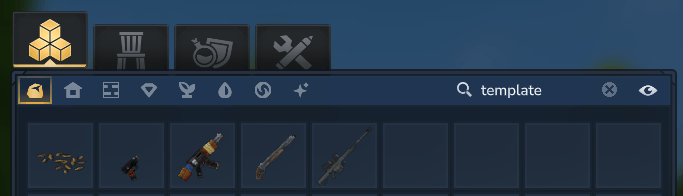
HyGuns is built for pack authors who want to create their own weapons instead of editing source code.
- Weapon settings live under
HyGuns.Settings - Ammo settings live under
HyGuns.AmmoSettings - Special ammo can change how the same weapon behaves without duplicating the weapon item
Documentation
Full documentation, setup guides, migration notes, and setting reference:
The wiki includes:
- Quick start setup
- Full weapon setting reference
- Full ammo setting reference
Project description from CurseForge.
Pick your setup
Hyguns Plugin releases for each Hytale build.
Choose the version and loader you play, then open the matching release.
Check the dependencies, then try the file in a copied instance before changing a world you care about.
Recent files
Hyguns Plugin releases and Hytale builds
HygunsPlugin-6.0.0
5 Sept 2026
Client Not supported Server Required Dependencies No extras listed Listed on Project page
Check the 0.6 setup 0.6 release
HygunsPlugin-5.1.0.jar
21 Jun 2026
Client Not supported Server Required Dependencies No extras listed Listed on Project page
Check the setup HygunsPlugin-5.0.0
26 May 2026
Client Not supported Server Required Dependencies No extras listed Listed on Project page
Check the setup HygunsPlugin-4.1.3
16 Apr 2026
Client Not supported Server Required Dependencies No extras listed Listed on Project page
Check the setup HygunsPlugin-4.1.2
11 Apr 2026
Client Not supported Server Required Dependencies No extras listed Listed on Project page
Check the setup HygunsPlugin-4.1.1
9 Apr 2026
Client Not supported Server Required Dependencies No extras listed Listed on Project page
Check the setup HygunsPlugin-4.1.0
9 Apr 2026
Client Not supported Server Required Dependencies No extras listed Listed on Project page
Check the setup HygunsPlugin-3.6.2
30 Mar 2026
Client Not supported Server Required Dependencies No extras listed Listed on Project page
Check the setup HygunsPlugin-3.6.1
15 Mar 2026
Client Not supported Server Required Dependencies No extras listed Listed on Project page
Check the setup HygunsPlugin-3.6.0
13 Mar 2026
Client Not supported Server Required Dependencies No extras listed Listed on Project page
Check the setup HygunsPlugin-3.5.2
7 Mar 2026
Client Not supported Server Required Dependencies No extras listed Listed on Project page
Check the setup HygunsPlugin-3.5.1
25 Feb 2026
Client Not supported Server Required Dependencies No extras listed Listed on Project page
Check the setup Looking for an older file? The official CurseForge project page is in Resources.
 mod
mod CurseForge · Hytale
Alec's Tamework!
Mob taming framework and asset patcher. Breeding, traits, leveling, tame management UI, easier interaction chains, capture/spawn items that store metadata, ownership/tamed status, lots of behavior components and more!
 mod
mod CurseForge · Hytale
LevelingCore
A modern, flexible leveling system for Hytale
 mod
mod CurseForge · Hytale
RuneCore
A modular and extensible magic engine for Hytale that introduces elemental essences, custom RPG combat attributes, and persistent status effects.