admin-utils-1.0.jar
5 Feb 2026
Client Not supported Server Required Dependencies No extras listed Listed on Project page
Check the setup 
CurseForge · Hytale mod
Admin Utils for Hytale Servers like Essentials
Quick answer
AdminUtils admin-utils-1.0.jar targets Hytale. Do not install it as a separate client mod. Enable it on the world host—the local server in singleplayer or the dedicated server in multiplayer. No required dependencies listed for this file.
Where it goes
Do not install it as a separate client mod. Enable it on the world host—the local server in singleplayer or the dedicated server in multiplayer.
Put Hytale mods on the world host or dedicated server. Singleplayer runs a local server too; Hytale does not use separate client mods.
admin-utils-1.0.jar. Change the file and its required mods may change too.
This file does not list any required mods. Do not add a library just because a different file uses it.
This file does not list any required or optional project dependencies. Check the creator notes before changing an existing world.
Before you install it
Built for AdminUtils admin-utils-1.0.jar. Pick another file and the loader, install side or required mods may change.
Use admin-utils-1.0.jar. It targets Hytale; another release may target a different game build or dependency set.
This file does not list any required mods. Do not add a library just because a different file uses it.
Do not install it as a separate client mod. Enable it on the world host—the local server in singleplayer or the dedicated server in multiplayer.
Use the “Get this file” button beside admin-utils-1.0.jar. It opens that exact file at the source.
About this project
| Command | Alias | Description | Permission |
|---|---|---|---|
| Plugin Management | |||
/adminutils |
/au, adm, admutils, autils, adutils |
Shows general plugin information or base command. | adminutils.use |
/adminutils reload |
/au r |
Reloads the plugin configuration and all its data files. | adminutils.use.reload |
/adminutils help |
- | Displays the plugin help menu. | adminutils.use |
| Player Utilities | |||
/fly [--speed=10] |
- | Toggles flight mode. Optional speed (0.1 to 100.0). | adminutils.use.fly |
/vanish |
- | Makes you invisible to players without administrator permissions. | adminutils.use.players.vanish.self |
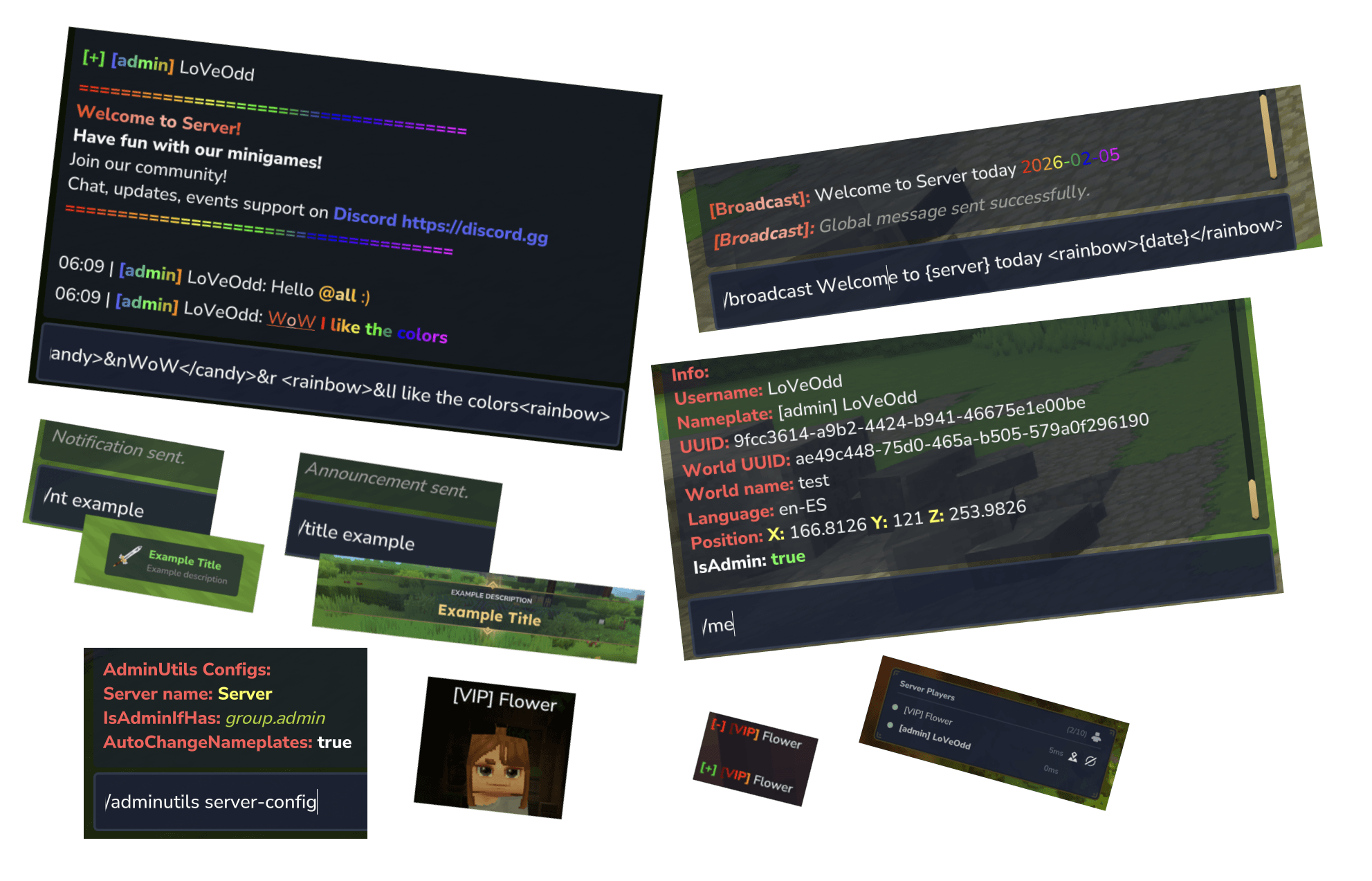
/me |
- | Displays detailed technical information about your user (UUID, Position, World, etc.). | adminutils.use.players.me |
/players |
/online, /plls |
Lists all connected players (shows real name and nickname). | adminutils.use.players.list |
/bheal <player> |
- | Fully heals (health and stamina) the specified player. | adminutils.use.players.heal.other |
/plugin |
/mods |
Shows the list of plugins/mods installed on the server. | adminutils.use.plugins.list |
/server-config |
- | Displays the current AdminUtils plugin configuration. | adminutils.use.players.serverconfig |
| Chat & Messaging | |||
/chat broadcast <message> |
/bdc |
Sends a global message to all players. | adminutils.use.chat.broadcast |
/chat message <player> <message> |
/msg, /tell, /w |
Sends a private message to a specific player. | adminutils.use.chat.message-chat |
/chat reply <message> |
/r |
Replies to the last private message received. | adminutils.use.chat.reply-message-chat |
/chat clearchat |
/cc |
Clear your chat. | adminutils.use.chat.clear |
/chat servermessage <player|all> <message> |
/smsg |
Sends a message from the console to the player (or everyone). | adminutils.use.chat.server-message-chat |
| NameTag Management | |||
/nametag custom <name> [--show-rank] |
/name custom |
Changes your own name tag. | adminutils.use.nametag.custom.self |
/nametag custom <player> <name> [--show-rank] |
- | Changes another player's name tag. | adminutils.use.nametag.custom.other |
/nametag reset |
/name reset |
Resets your name tag to the original. | adminutils.use.nametag.reset.self |
/nametag reset <player> |
- | Resets another player's name tag. | adminutils.use.nametag.reset.other |
/nametag hide |
/name hide |
Hides your name tag. | adminutils.use.nametag.hide.self |
/nametag hide <player> |
- | Hides another player's name tag. | adminutils.use.nametag.hide.other |
/nametag show |
/name show |
Shows your name tag. | adminutils.use.nametag.show.self |
/nametag show <player> |
- | Shows another player's name tag. | adminutils.use.nametag.show.other |
/nametag info <name> |
/name info |
Reveals the real name of a player with a custom name. | adminutils.use.nametag.info.all |
| Announcements (Chat) | |||
/announcement <id> |
/ann, /ads |
Sends a configured announcement to all players. | adminutils.use.announcement.all |
/announcement list |
/ann ls |
Lists available announcement IDs. | adminutils.use.announcements.list |
/announcement reload [--confirm] |
- | Reloads the announcements configuration. | adminutils.use.title.reload |
| Notifications (Pop-up) | |||
/notification <id> |
/nt |
Sends a pop-up notification to the entire server. | adminutils.use.notifications.all |
/notification <player> <id> |
- | Sends a pop-up notification to a specific player. | adminutils.use.notifications.player |
/notification list |
/nt ls |
Lists available notification IDs. | adminutils.use.notifications.list |
/notification reload [--confirm] |
- | Reloads the notifications configuration. | adminutils.use.notifications.reload |
| Titles (Screen) | |||
/title <id> |
- | Displays a title on screen to the entire server. | adminutils.use.title.all |
/title <world|player> <target_id> <title_id> |
- | Displays a title to a specific world or player. | adminutils.use.title.other |
/title list |
/title ls |
Lists available title IDs. | adminutils.use.title.list |
/title reload [--confirm] |
- | Reloads the titles configuration. | adminutils.use.title.reload |
commands.json)The commands.json file controls whether each command can be executed globally (without the /adminutils prefix).
enableGlobalCommand (boolean)true, you can use commands like /fly, /vanish, or /chat directly. If set to false, they must be executed as subcommands (e.g., /adminutils fly).Announcement, notification, and title commands read their content from individual .json files in their respective folders. The IDs used in commands correspond to the filename without the extension.
announcements/ (Chat Announcements)messages (list of lines, supports colors and gradients), intervalSeconds (0 for manual only; if a value is provided, it will broadcast automatically at that interval), enabled (enables/disables the announcement)./announcement reload --confirm applies changes without restarting.notifications/ (Pop-up Notifications)title, description, titleColorHex, descriptionColorHex, icon (Item/Icon ID)./notification reload --confirm.titles/ (Screen Titles)title, description, icon, duration, fadeInDuration, fadeOutDuration./title reload --confirm.config.json influence?The config.json file defines global plugin parameters:
serverName (string): The server name used in messages and info screens. Referenceable via the {server} placeholder.serverColorHex (string): Hex color associated with the server name.welcomeMessage (string[]): List of lines shown as a welcome message. Supports formatting (colors, bold, links).isAdminIfHasPermission (string[]): List of permissions that define a player as an "admin" for plugin logic (e.g., seeing vanished players).& codes.@<username> or @all highlights the name for the mentioned person and triggers a notification sound.config.json./tpa, /tpaccept, /tpahere, /tpadeny, /tpacancel, and /rtp./test-tp -> /tp world test).config.json credentials.Project description from CurseForge.
Recent files
5 Feb 2026
Looking for an older file? The official CurseForge project page is in Resources.