AuctionPlugin-1.0.0.jar
1 Feb 2026
Client Not supported Server Required Dependencies No extras listed Listed on Project page
Check the setup 
CurseForge · Hytale mod
AuctionPlugin is a complete auction house solution for Hytale featuring item listings with automatic expiration, player storage, multi-language interface (RU/EN), economy plugin integration, and user-friendly UI for trading items.
Quick answer
AuctionPlugin-1.0.0.jar targets Hytale. Do not install it as a separate client mod. Enable it on the world host—the local server in singleplayer or the dedicated server in multiplayer. No required dependencies listed for this file.
Where it goes
Do not install it as a separate client mod. Enable it on the world host—the local server in singleplayer or the dedicated server in multiplayer.
Put Hytale mods on the world host or dedicated server. Singleplayer runs a local server too; Hytale does not use separate client mods.
AuctionPlugin-1.0.0.jar. Change the file and its required mods may change too.
This file does not list any required mods. Do not add a library just because a different file uses it.
This file does not list any required or optional project dependencies. Check the creator notes before changing an existing world.
Before you install it
Built for AuctionPlugin-1.0.0.jar. Pick another file and the loader, install side or required mods may change.
Use AuctionPlugin-1.0.0.jar. It targets Hytale; another release may target a different game build or dependency set.
This file does not list any required mods. Do not add a library just because a different file uses it.
Do not install it as a separate client mod. Enable it on the world host—the local server in singleplayer or the dedicated server in multiplayer.
Use the “Get this file” button beside AuctionPlugin-1.0.0.jar. It opens that exact file at the source.
About this project
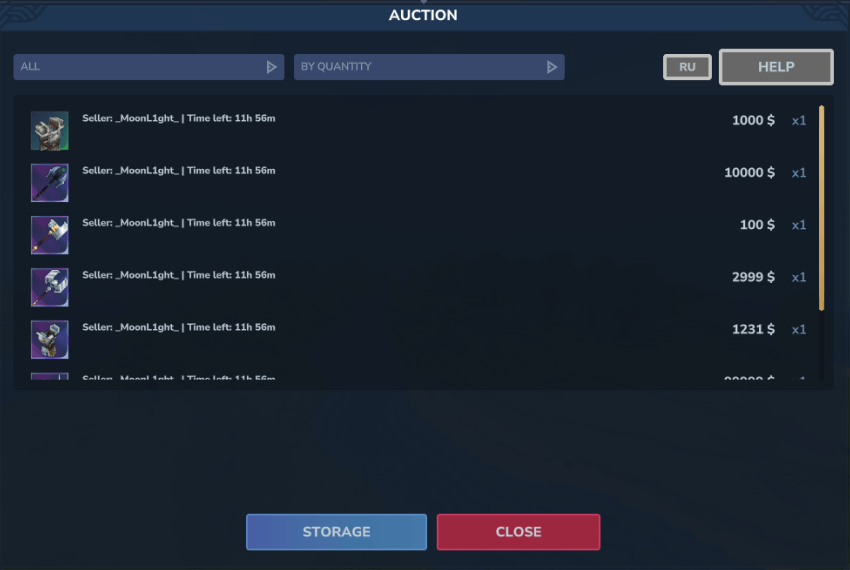
AuctionPlugin is a comprehensive auction house system for Hytale servers that enables players to buy and sell items through an intuitive UI, with automatic listing expiration, storage management, and multi-language support.
Why use it?
Complete trading system — Players can create listings, browse items by category, purchase from other players, and manage their storage all through a user-friendly interface.
Automatic management — Listings automatically expire after 12 hours (configurable) and items are returned to seller's storage, keeping the auction house active and clean.
Multi-economy support — Works with EconomySystem, EliteEssentials, or uses built-in economy. Automatically detects and integrates with available economy plugins.
Multi-language interface — Full Russian and English support with in-game language switching. Players can toggle between languages with a single click.
Storage system — Purchased items are automatically sent to player storage, which can be accessed anytime. Sellers can manage their active listings and remove them if needed.
All transactions are conducted on the server using in-game currency and do not affect real funds in any way.
Auction System
Item listings — Players can create listings by placing an item in hand and using /auction sell. Set price and quantity, then the item is listed for other players to purchase.
10 Categories — All, Plants, Decoration, Weapons, Armor, Potions, Food, Recipes, Ingredients, Tools, Blocks. Filter listings by category to find what you need.
3 Sort options — Sort by Quantity, Price (High to Low), or Price (Low to High). Find the best deals quickly.
Listing information — Each listing shows seller name, time remaining, price, and quantity. Clear information for informed purchasing decisions.
Automatic expiration — Listings expire after 12 hours (configurable in config.json). Expired items are automatically returned to seller's storage.
Seller management — Sellers can view and remove their own listings. Clicking on your own listing opens a management page with "Remove Lot" and "Back" options.
Storage System
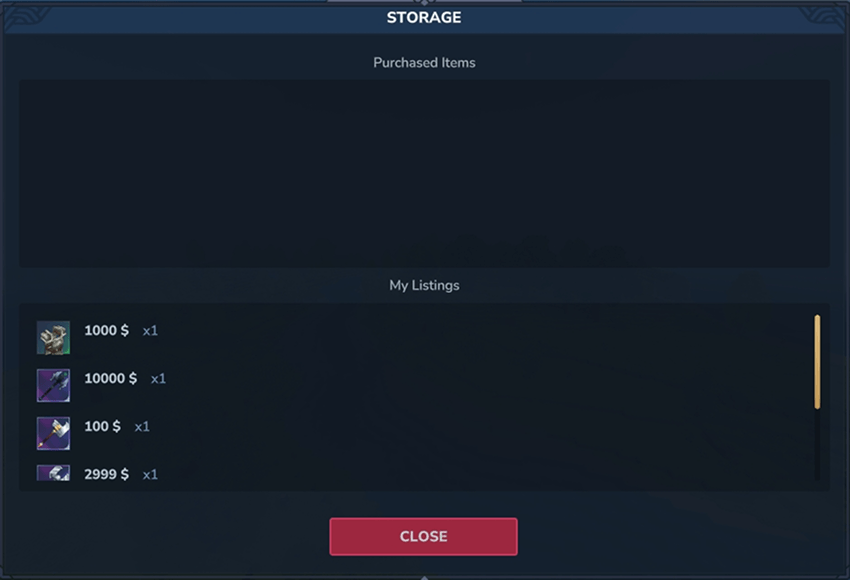
Player storage — All purchased items are automatically sent to player storage. Access storage from the main auction page or use /auction storage.
Storage management — View all items in storage, withdraw items to inventory. Items are organized by type and quantity.
My listings — View your active listings in storage page. See which items are currently for sale.
Economy Integration
Multi-provider support — Automatically detects and uses EconomySystem, EliteEssentials, or falls back to built-in economy system.
Seamless integration — No configuration needed. Plugin automatically finds and connects to available economy plugins using reflection.
Currency symbol — Configurable currency symbol in config.json (default: $). Displayed in all price fields and confirmations.
Localization
Dual language support — Full Russian and English translations for all UI elements, messages, and notifications.
In-game switching — Language toggle button in the main UI. Switch between RU and EN instantly without restarting.
Localized messages — All purchase confirmations, error messages, and help text are fully localized.
UI & Interface
Main auction page — Browse all listings with category filters and sort options. Clean, organized display of available items.
Create listing page — Simple interface for creating new listings. Place item in hand, set price, and create.
Purchase confirmation — Confirmation dialog showing item details, price, and quantity before purchase.
Storage page — View and manage your storage items. Withdraw items to inventory with one click.
Help page — Complete guide on how to use the auction system, commands, and features.
Seller page — Special interface for sellers to manage their listings. Remove listings and return items to storage.
Data Management
JSON storage — All auction listings and storage data are saved in JSON format in mods/AuctionPlugin/ directory.
Automatic migration — Old .txt format data is automatically migrated to JSON on first load.
Persistent data — All listings and storage persist across server restarts.
Commands
Command Description
/auction Open the main auction page
/auction sell Open the create listing page
/auction help Open the help page
/auction storage Open your storage page
/ac Alias for /auction
/ac sell Alias for /auction sell
/ac help Alias for /auction help
Dependencies
None required — runs standalone.
EconomySystem (optional) — for economy integration
EliteEssentials (optional) — for economy integration
Support
For issues, questions, or feature requests, check the documentation or contact the developer.
Project description from CurseForge.
Recent files
1 Feb 2026
Looking for an older file? The official CurseForge project page is in Resources.
 mod
modPlay some classic games with your friends.
 mod
modAdds animated icons to NPC enities. Extention Plugin for QuestLines
 mod
modBuild custom in-game interfaces for your Hytale server — no Java, no rebuilds, no restarts