Hytale version
Back to mods 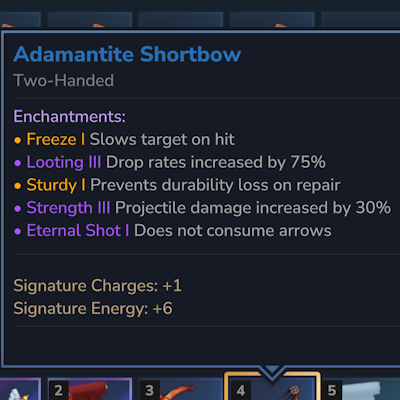
CurseForge · Hytale mod
DynamicTooltipsLib
A Library that adds dynamic and per-Item Tooltip and Name changes as well as texture overrides
Choose a version Pick your version below, then grab the matching file.
Quick answer
Which DynamicTooltipsLib release should I use?
Latest stable file DynamicTooltipsLib-1.6.2.jar
Game version 0.6
Mod system Built-in Hytale mod system
DynamicTooltipsLib-1.6.2.jar targets 0.6. Do not install it as a separate client mod. Enable it on the world host—the local server in singleplayer or the dedicated server in multiplayer. No required dependencies listed for this file.
Where it goes
Where should DynamicTooltipsLib be installed in Hytale?
Do not install it as a separate client mod. Enable it on the world host—the local server in singleplayer or the dedicated server in multiplayer.
Separate client mod Not supported
World host / dedicated server Required
Mod system for this release Built-in Hytale mod system
Required install it here Optional supported, not mandatory Not supported do not install here Source doesn’t say do not assume
Put Hytale mods on the world host or dedicated server. Singleplayer runs a local server too; Hytale does not use separate client mods.
What else does DynamicTooltipsLib-1.6.2.jar need?
DynamicTooltipsLib-1.6.2.jar. Change the file and its required mods may change too.
This file does not list any required mods. Do not add a library just because a different file uses it.
This file does not list any required or optional project dependencies. Check the creator notes before changing an existing world.
Before you install it
Add DynamicTooltipsLib without breaking your instance.
Built for DynamicTooltipsLib-1.6.2.jar. Pick another file and the loader, install side or required mods may change.
- 01
Stick to this file
Use DynamicTooltipsLib-1.6.2.jar. It targets 0.6; another release may target a different game build or dependency set.
- 02
Bring the mods it needs
This file does not list any required mods. Do not add a library just because a different file uses it.
- 03
Enable it on the world host
Do not install it as a separate client mod. Enable it on the world host—the local server in singleplayer or the dedicated server in multiplayer.
- 04
Pick the file you checked
Use the “Get this file” button beside DynamicTooltipsLib-1.6.2.jar. It opens that exact file at the source.
About this project
What does DynamicTooltipsLib add?
This mod is now mostly redundant, as Hytale has implemented a native way to change per-item tooltips. I will keep it updated for compatibility, but it will likely not receive new features.
Github documentation
This Library uses virtual Item IDs to change the visuals and Tooltips of Items at runtime while keeping mod compatibility. It manages modification requests for all mods that use it to prevent editing conflicts and minimize performance impact.
Why use this lib over direct source integration?
This library is designed to let different mods modify the same item without issues. By integrating the source code directly into your own mod, you risk creating compatibility conflicts with any other mod using that same logic. It is already used by a lot of players and other mods. 
Example usage:
Gradle Setup (via CurseMaven):
Add the repository and dependency to your build.gradle:
repositories {
    maven { url "[https://cursemaven.com](https://cursemaven.com)" }
}
dependencies {
    implementation "curse.maven:dynamictooltipslib-1459711:<fileid>"
}
Replace <fileid> with the ID found at the end of the file's CurseForge URL.
Here is a minimalistic example, please see Github for the full and up-to-date documentation
import org.herolias.tooltips.api.*;
import javax.annotation.Nonnull;
import javax.annotation.Nullable;

public class MyTooltipProvider implements TooltipProvider {

    @Nonnull
    @Override
    public String getProviderId() {
        return "my-mod:stats";
    }

    @Override
    public int getPriority() {
        return TooltipPriority.DEFAULT; // 100
    }

    @Nullable
    @Override
    public TooltipData getTooltipData(@Nonnull String itemId, @Nullable String metadata) {
        if (metadata == null || !metadata.contains("\"my_data\"")) {
            return null; // Nothing to contribute
        }

        return TooltipData.builder()
                .hashInput("my_data:v1")  // REQUIRED — must be stable & unique per state
                .addLine("<color is=\"#55FF55\">+10 Speed</color>")
                .build();
    }
}
Incompatibility
If the Soft Packets mod is installed, Items may show as invalid Item in certain scenarios for a short time
Project description from CurseForge.
Pick your setup
DynamicTooltipsLib releases for each Hytale build.
Choose the version and loader you play, then open the matching release.
Hytale version
0.5
1 loader buildCheck the dependencies, then try the file in a copied instance before changing a world you care about.
Recent files
DynamicTooltipsLib releases and Hytale builds
DynamicTooltipsLib-1.6.2.jar
27 Aug 2026
Client Not supported Server Required Dependencies No extras listed Listed on Project page
Check the 0.6 setup 0.6 release
DynamicTooltipsLib-1.6.1.jar
26 May 2026
Client Not supported Server Required Dependencies No extras listed Listed on Project page
Check the 0.5 setup 0.5 release
DynamicTooltipsLib-1.6.1-pre-release.jar
11 May 2026
Client Not supported Server Required Dependencies No extras listed Listed on Project page
Check the setup DynamicTooltipsLib-1.6.0.jar
17 Apr 2026
Client Not supported Server Required Dependencies No extras listed Listed on Project page
Check the setup DynamicTooltipsLib-1.6.0.jar
11 Apr 2026
Client Not supported Server Required Dependencies No extras listed Listed on Project page
Check the setup DynamicTooltipsLib-1.5.2.jar
26 Mar 2026
Client Not supported Server Required Dependencies No extras listed Listed on Project page
Check the setup DynamicTooltipsLib-1.5.2.jar
19 Mar 2026
Client Not supported Server Required Dependencies No extras listed Listed on Project page
Check the setup DynamicTooltipsLib-1.5.1.jar
2 Mar 2026
Client Not supported Server Required Dependencies No extras listed Listed on Project page
Check the setup DynamicTooltipsLib-1.5.1.jar
28 Feb 2026
Client Not supported Server Required Dependencies No extras listed Listed on Project page
Check the setup DynamicTooltipsLib-1.5.0.jar
24 Feb 2026
Client Not supported Server Required Dependencies No extras listed Listed on Project page
Check the setup DynamicTooltipsLib-1.4.2.jar
22 Feb 2026
Client Not supported Server Required Dependencies No extras listed Listed on Project page
Check the setup DynamicTooltipsLib-1.4.1.jar
21 Feb 2026
Client Not supported Server Required Dependencies No extras listed Listed on Project page
Check the setup Looking for an older file? The official CurseForge project page is in Resources.