Hytale version
Back to mods 
CurseForge · Hytale mod
ControlledLights
Automates the linking and control of in-game lights through interactive switches, allowing players to create persistent lighting networks dynamically.
Choose a version Pick your version below, then grab the matching file.
Quick answer
Which ControlledLights release should I use?
Latest stable file ControlledLights-2.1.1.jar
Game version 0.5
Mod system Built-in Hytale mod system
ControlledLights-2.1.1.jar targets 0.5. Do not install it as a separate client mod. Enable it on the world host—the local server in singleplayer or the dedicated server in multiplayer. No required dependencies listed for this file.
Where it goes
Where should ControlledLights be installed in Hytale?
Do not install it as a separate client mod. Enable it on the world host—the local server in singleplayer or the dedicated server in multiplayer.
Separate client mod Not supported
World host / dedicated server Required
Mod system for this release Built-in Hytale mod system
Required install it here Optional supported, not mandatory Not supported do not install here Source doesn’t say do not assume
Put Hytale mods on the world host or dedicated server. Singleplayer runs a local server too; Hytale does not use separate client mods.
What else does ControlledLights-2.1.1.jar need?
ControlledLights-2.1.1.jar. Change the file and its required mods may change too.
This file does not list any required mods. Do not add a library just because a different file uses it.
This file does not list any required or optional project dependencies. Check the creator notes before changing an existing world.
Before you install it
Add ControlledLights without breaking your instance.
Built for ControlledLights-2.1.1.jar. Pick another file and the loader, install side or required mods may change.
- 01
Stick to this file
Use ControlledLights-2.1.1.jar. It targets 0.5; another release may target a different game build or dependency set.
- 02
Bring the mods it needs
This file does not list any required mods. Do not add a library just because a different file uses it.
- 03
Enable it on the world host
Do not install it as a separate client mod. Enable it on the world host—the local server in singleplayer or the dedicated server in multiplayer.
- 04
Pick the file you checked
Use the “Get this file” button beside ControlledLights-2.1.1.jar. It opens that exact file at the source.
About this project
What does ControlledLights add?
CONTROLLED LIGHTS 2.1.1 (5.0.0)
Light Network Controller is a utility mod that allows players to create interactive lighting systems by linking switches to multiple light blocks in the world. With an intuitive selection system, you can choose lights, connect them to a controller, and toggle them all simultaneously using a single switch.
Warning:
If you have the previous version 1.0.0, the light networks you created will be lost.
Crafting Station

WorkBench

Bench_Architects
Items:

Controller

Switch
**)
) **and more....
**and more....
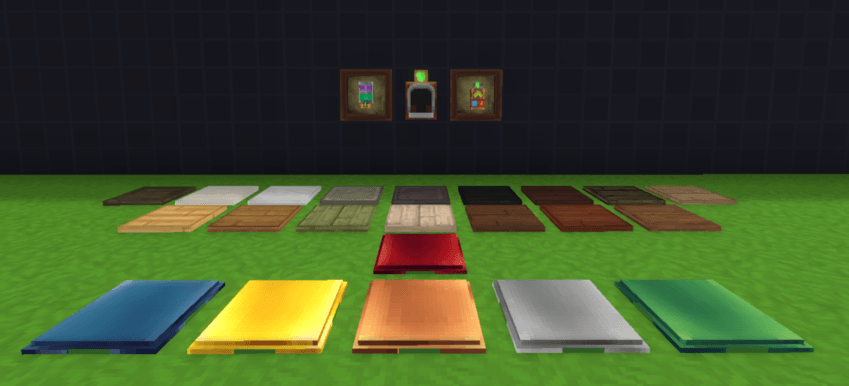
Pressure Plate - Rocks and Woods
**
 **and more…
Toggle Pressure Plate - Metals

Switch Controller
How it works
Controller:
F - Open interface
right click - Select and Link
Switch Controller:
F - Switch
left click - Link
Switches:
F - Switch
Light-emitting blocks
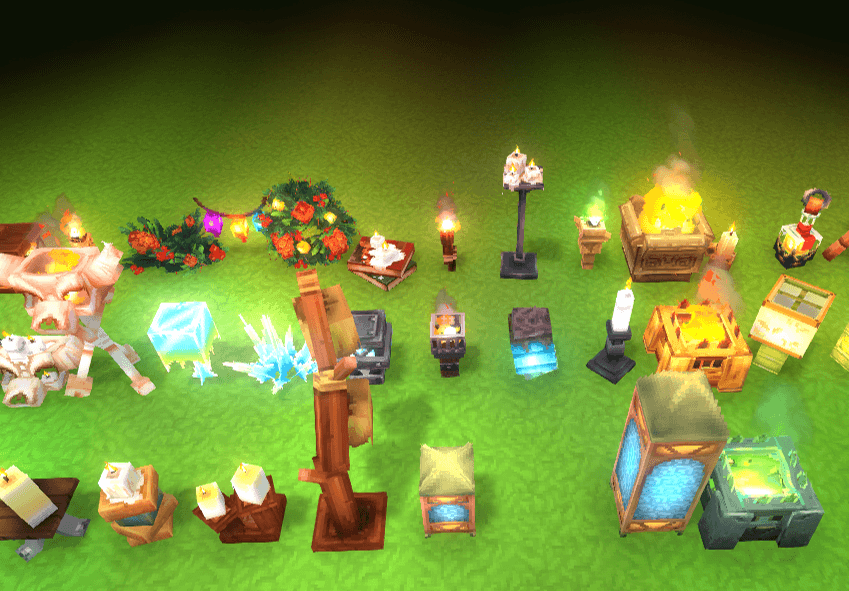
It works on all interactive light blocks.
Sample:
Compatible with:
- Macaw's Hy Lights and Lamps
- Colored Lights
- Simple streetlight Pack
Multiplayer?
I tried to make each player’s local lights interactable for other players, but the tests I ran were very limited—mainly because I don’t have friends lol. If you notice any errors, please mention them in the comments section; you’d really help me fix some issues.
undefined
NOTE:
This project will be on hold. I have many more ideas I wanted to add to this mod, but for now I’ll focus on working on other projects. Don’t worry—there will still be updates, but only for bug fixes or if Hytale gets updated to a new version. However, there won’t be any new content updates over the next few months.
undefined
For Modders:
How do I make your mod with interactive light blocks work with ControlledLight?.
Just one thing:
Having two block states, "On" and "Off".
Mod repository (Github):
https://github.com/DanoruH/Controlled-Lights.git

pdt: Trataré de solucionar algunos bugs que mencionen, pero no ganatizo que sean 100% resueltos xd.
Project description from CurseForge.
Pick your setup
ControlledLights releases for each Hytale build.
Choose the version and loader you play, then open the matching release.
Check the dependencies, then try the file in a copied instance before changing a world you care about.
Recent files
ControlledLights releases and Hytale builds
ControlledLights-2.1.1.jar
8 Jun 2026
Client Not supported Server Required Dependencies No extras listed Listed on Project page
Check the 0.5 setup 0.5 release
ControlledLights-2.0.1.jar
18 May 2026
Client Not supported Server Required Dependencies No extras listed Listed on Project page
Check the setup ControlledLights-2.0.0.jar
3 May 2026
Client Not supported Server Required Dependencies No extras listed Listed on Project page
Check the setup ControlledLights-1.0.0.jar
13 Feb 2026
Client Not supported Server Required Dependencies No extras listed Listed on Project page
Check the setup Looking for an older file? The official CurseForge project page is in Resources.