FactionsX-1.3.jar
15 Mar 2026
Client Not supported Server Required Dependencies No extras listed Listed on Project page
Check the setup 
CurseForge · Hytale mod
A smooth, modern and powerful Factions plugin.
Quick answer
FactionsX | Simple. Modern. Powerful. FactionsX-1.3.jar targets Hytale. Do not install it as a separate client mod. Enable it on the world host—the local server in singleplayer or the dedicated server in multiplayer. No required dependencies listed for this file.
Where it goes
Do not install it as a separate client mod. Enable it on the world host—the local server in singleplayer or the dedicated server in multiplayer.
Put Hytale mods on the world host or dedicated server. Singleplayer runs a local server too; Hytale does not use separate client mods.
FactionsX-1.3.jar. Change the file and its required mods may change too.
This file does not list any required mods. Do not add a library just because a different file uses it.
This file does not list any required or optional project dependencies. Check the creator notes before changing an existing world.
Before you install it
Built for FactionsX | Simple. Modern. Powerful. FactionsX-1.3.jar. Pick another file and the loader, install side or required mods may change.
Use FactionsX-1.3.jar. It targets Hytale; another release may target a different game build or dependency set.
This file does not list any required mods. Do not add a library just because a different file uses it.
Do not install it as a separate client mod. Enable it on the world host—the local server in singleplayer or the dedicated server in multiplayer.
Use the “Get this file” button beside FactionsX-1.3.jar. It opens that exact file at the source.
About this project
Tired of buggy, bloated, and featureless factions plugins?
FactionsX is the solution.
Built to bring back the classic Minecraft Factions experience, FactionsX focuses on what actually matters: smooth gameplay, clean mechanics, and territory-based war, without unnecessary gimmicks or pointless extras.
Classic & Simple Factions Feel — Claim, conquer, raid, and dominate like the golden era of factions
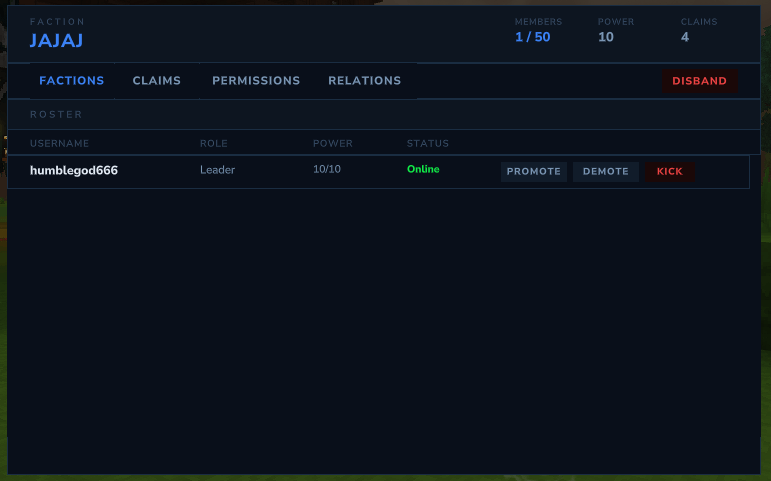
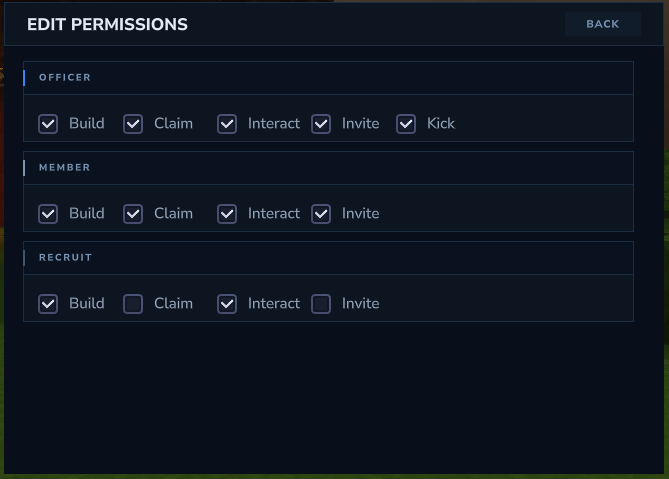
Modern Smooth UI — Clean, polished interfaces designed for players, not spreadsheets
Optimized Performance — Lightweight, fast, and built to run smoothly even on busy servers
No Unnecessary Features — Just pure factions, done right
Active Development — Constant updates, improvements, and long-term support
OrbisGuard Integration — Avoid players be able to claim OrbisGuard regions, also avoid players losing power in certain regions!
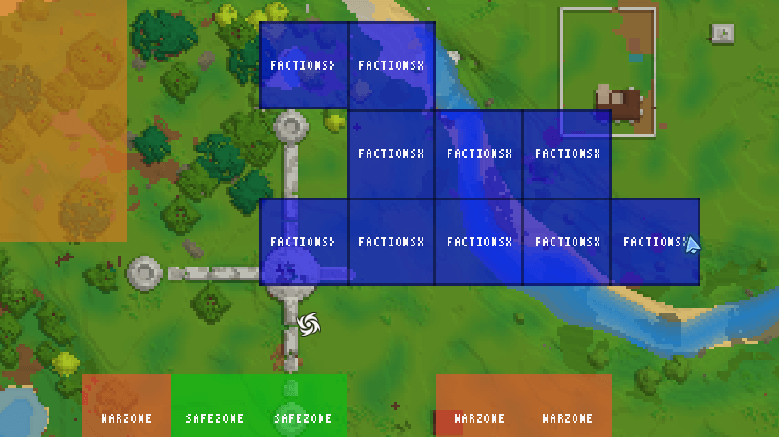
World Map — Able to see FactionsX claims and OrbisGuard regions in the world map!
Whether you're running a competitive PvP server or a classic factions community, FactionsX delivers the factions core your server deserves.
/f — Open faction menu (factionsx.main)
/f create <factionname> — Create a new faction (factionsx.create)
/f disband — Disband your faction (factionsx.disband)
/f invite <player> — Invite a player (factionsx.invite)
/f kick <player> — Kick a member (factionsx.kick)
/f claim — Claim land for your faction (factionsx.claim)
/f unclaim — Unclaim land (factionsx.unclaim)
/f unclaimall — Unclaim all faction land (factionsx.unclaimall)
/f overclaim — Overclaim enemy territory (factionsx.overclaim)
/f map — View the faction map (factionsx.map)
/f list — List all factions (factionsx.list)
/f info <factionname> — View faction information (factionsx.info)
/f enemy <factionname> — Declare an enemy (factionsx.enemy)
/f ally <factionname> — Ally another faction (factionsx.ally)
/f neutral <factionname> — Set faction neutral (factionsx.neutral)
/f c — Toggle faction chat (factionsx.factionchat)
/f g — Switch to global chat (factionsx.generalchat)
/f a — Switch to ally chat (factionsx.allychat)
/f sethome — Set your faction home (factionsx.sethome)
/f home — Teleport to faction home (factionsx.home)
Miscellaneous
/f pvp — Toggle PvP between faction members (factionsx.pvp)
/f setcolor — Change your faction’s display color (factionsx.setcolor)
/f bypass — Bypass claim protection and faction restrictions (factionsx.bypass)
/f warzone — Manage warzones (factionsx.warzone)
/f safezone — Manage safezones (factionsx.safezone)
/f chatspy — Spy on faction and ally chats (factionsx.chatspy)
Permissions for each command are available through /help in-game.
Project description from CurseForge.
Recent files
15 Mar 2026
5 Mar 2026
1 Mar 2026
1 Mar 2026
27 Feb 2026
22 Feb 2026
19 Feb 2026
18 Feb 2026
18 Feb 2026
17 Feb 2026
17 Feb 2026
Looking for an older file? The official CurseForge project page is in Resources.