ParkourMaker-1.3.1-all.jar
31 Mar 2026
Client Not supported Server Required Dependencies No extras listed Listed on Project page
Check the setup 
CurseForge · Hytale mod
A parkour maker Hytale server (or single player, etc.,) plugin created to make it easy and fun to build and share parkour for others to experience (or add parkour as a mini game) with advanced features and more planned.
Quick answer
Parkour Maker ParkourMaker-1.3.1-all.jar targets Hytale. Do not install it as a separate client mod. Enable it on the world host—the local server in singleplayer or the dedicated server in multiplayer. No required dependencies listed for this file.
Where it goes
Do not install it as a separate client mod. Enable it on the world host—the local server in singleplayer or the dedicated server in multiplayer.
Put Hytale mods on the world host or dedicated server. Singleplayer runs a local server too; Hytale does not use separate client mods.
ParkourMaker-1.3.1-all.jar. Change the file and its required mods may change too.
This file does not list any required mods. Do not add a library just because a different file uses it.
This file does not list any required or optional project dependencies. Check the creator notes before changing an existing world.
Before you install it
Built for Parkour Maker ParkourMaker-1.3.1-all.jar. Pick another file and the loader, install side or required mods may change.
Use ParkourMaker-1.3.1-all.jar. It targets Hytale; another release may target a different game build or dependency set.
This file does not list any required mods. Do not add a library just because a different file uses it.
Do not install it as a separate client mod. Enable it on the world host—the local server in singleplayer or the dedicated server in multiplayer.
Use the “Get this file” button beside ParkourMaker-1.3.1-all.jar. It opens that exact file at the source.
About this project




Parkour Maker is parkour maker Hytale server (or single player, etc.,) plugin created to make it easy and fun to build & share parkour for others to experience (or add parkour as a mini game) with advanced features.
ParkourMaker is currently NOT compatible with update 5. We are working on a large update; check back in the future for newer versions.
Dependency: MultipleHUD - recommended to install to prevent custom hud related disconnect errors.
Note: Parkour Maker Versions are tested on released versions of Hytale only. We update as quickly as possible after a new Hytale full release is dropped. If you are trying to run it on a pre-release version, it could have unexpected behaviors.
While Hytale provides the creative tools to build, we are providing the necessities for parkour including checkpoints, timers, leaderboards, practice mode, level browser, collaboration, and more.
Planned Features: We have a lot more planned Hytale Parkour features to come so feel free to leave a comment if you want to help shape what comes next.
/pkm join user).Parkour Maker makes it easier to start parkour themed Hytale servers, add parkour as a mini game to an existing server, or create single-player/friend parkour worlds to manually share.
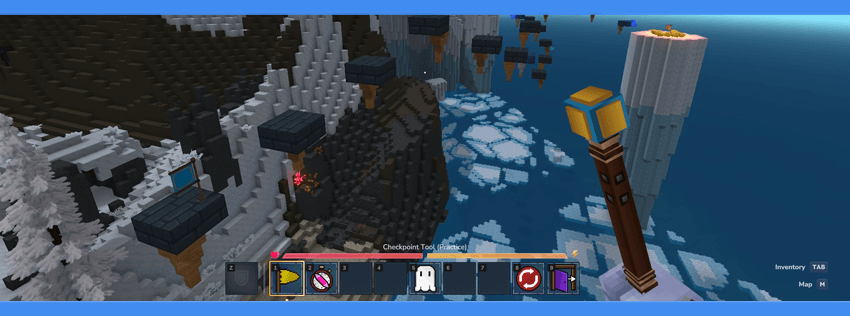
We have broken this down into different Hytale parkour sections: creator, player, and server owner (or world owner if it is a single-player world).
Please note that Parkour Maker itself does not mess with permissions so you need to setup the initial permissions onto groups (and setup a default group with play/browse/create permissions, etc.) as the server owner (or /op self and friends to create a single-player map with full access).
Assuming you have permissions from the owner, or have /op self, you will be able to use /pkm browse or the browse tool to play and create Hytale Parkour levels. You can use /pkm to see the in game command list (and scroll down for commands here).
Note: Hovering over items in your toolbar or creative menu will provide you with in-game hints for what different Parkour Maker tools can do. Several of them have left/right/F key actions.

Creators:
Please note, these are all possible features that Parkour Maker ships with in Hytale, but there could be slight variations depending on how the server using it has set it up.
Creating a Hytale Parkour map (level) adds it to your editor browser and automatically teleports you to it on creation.
You can set a parkour level name & description.
You get to select the Hytale world type (default, flat, void (empty)) WGV2/modded gen coming soon.
If you know a cool Hytale seed you want to use, you can also set the seed.
You have the option of Parkour map center locations being default (spawn), random, or custom XYZ coordinates to start. This influences the boundary box of your level which is centered around the map center.
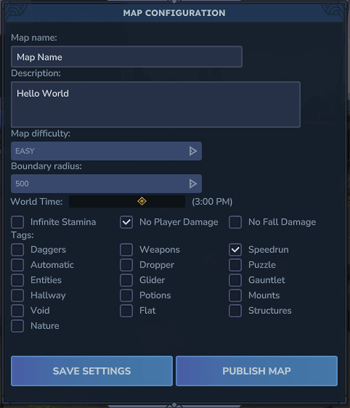
Once inside the parkour level editor, you'll have access to more config options in the config menu.
Config: Toggle settings for fall damage, infinite stamina, and disabling all damage (more to come).
Config: Select a parkour difficulty rating.
Config: Select descriptive tags that relate to your parkour level.
Pick the time of day for your Hytale map.
Set the boundary box radius size for your parkour level (note: when a player reaches the box, it will prevent them from going further in the world. The visual box can only be seen in the editor).
Inside the Hytale parkour level editor, you'll have access to several custom blocks and tools for things like placing a proper start point, checkpoints (beds are built in to work as well), kill floor, and a finish line.
Hovering over items in your toolbar or creative menu will provide you with in-game hints.
In the creative inventory you will have a new Parkour Maker tab that has all the custom Parkour Maker assets.
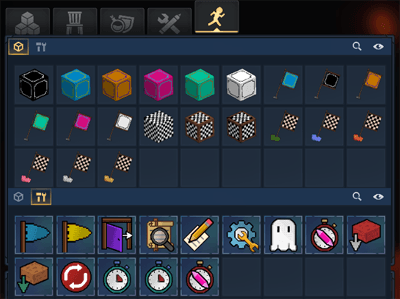
In the hotbar, you will also have the ability to switch to test mode (which swaps in a checkpoint item with the ability to place temporary personal checkpoints when pressing the use (F) key so you can test various jumps with ease).
Tip: you have the ability to use all the Hytale builder tools and "air placement" comes in handy for placing jumps easier (in the creative mode quick settings).
More features to come.
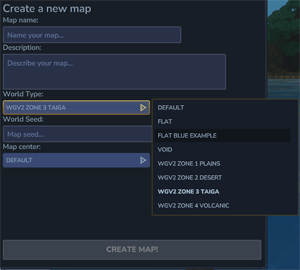
To use WGV2 and other moddable generation for Hytale Parkour building, there is a customizable world type list.
Note: WGV2 is slower and takes more resources.
/instances in creative mode to find the mod instance to include in the config file.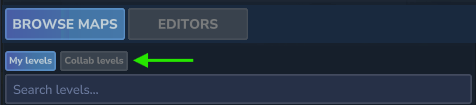
If you would like to collaborate on a level map:
/pkm collab add PLAYERUSERNAME/pkm collab remove PLAYERUSERNAME (this will instantly kick the player from the instance).Players:
Please note, these are all possible features that Parkour Maker ships with in Hytale, but there could be slight variations depending on how the server using it has set it up.
To play parkour with friends or other users, have someone join a level map and use the command /pkm join USER (in the future it will be easier to find levels with players online and also play in private mode).
Assuming you have permissions, you'll have access to the parkour browser tool, this is the easiest way to access everything (magnifying glass tool in hotbar).
You can use the browser to access various details about parkour maps, leaderboards, and select which level to play.
You can also use various commands to pull up menus as well such as: /pkm leaderboard + /pkm browse & /pkm play #####
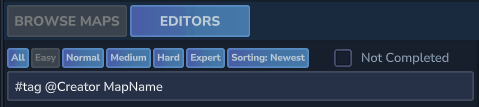
Using the search bar, you can narrow levels down by #tags, @creators, and level names (find tags by looking in the details of various levels).
There are various filters such as parkour difficulty and which maps are not complete (above the search bar).
There is also a sorting button to sort the Parkour levels in various ways like newest, last updated, most played, and most completed..
On the right side, you'll find all the details about the parkour maps including the level code (good for sharing codes with others for easy /pkm play #####), description, titles, play count, tags, etc. You can also see your completion time and ranking.
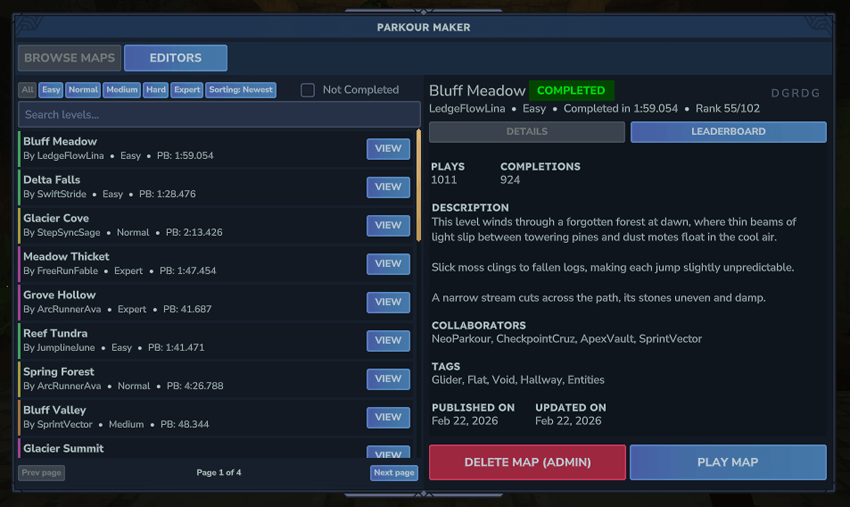
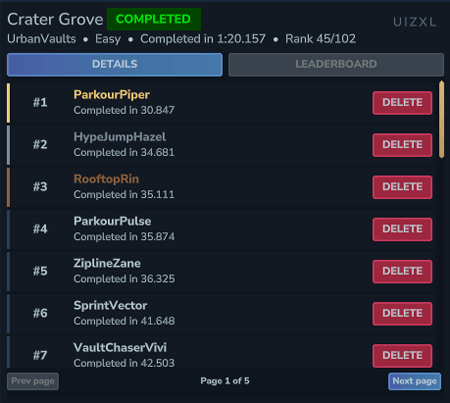
If you click on the leaderboard button, you can find the leaderboard for each parkour level.
The play map button (on the bottom right) will take you into the Hytale parkour level to play.
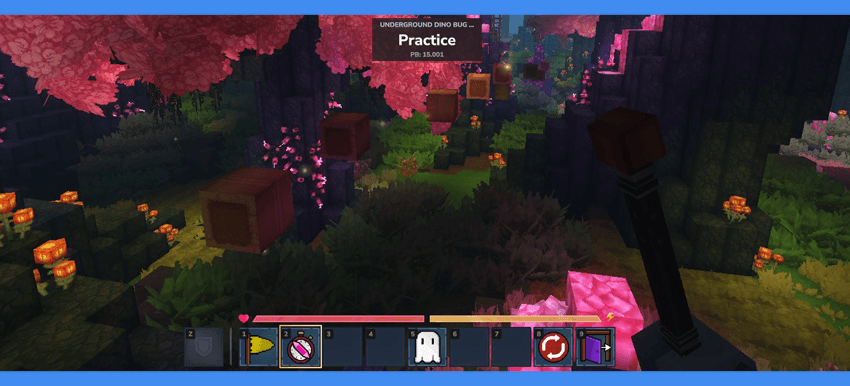
Once inside a level, your hotbar will be filled with various parkour play tools.
Hovering over items in your toolbar will provide you with in-game hints.
The checkpoint tool will respawn to last checkpoint. The ghost invisibility tool will toggle the visibility of other players. Start over tool will take you to the start of the map. Leave map is the browser tool but has a "leave button" (or you can navigate to other maps/editors).
Using the parkour practice mode clock will turn on practice mode. Using F on the clock in practice will turn on flight. This will also change the checkpoint flag to yellow (which is used to place checkpoints anywhere with this tool by pushing F). Interacting with the clock again will toggle practice off.
Hitting checkpoints will alert you in chat, and when you finish a level you will see your time on top and in chat. If you had a PB the chat will let you know as well.
Admin/Server Owners:
By default, Parkour Maker uses SQLITE database (this works out of the box and does not need you to do anything special to have it working). We have also included the ability to use POSTGRES database. Please use Google to learn about POSTGRES databases if you need help using that option.
Reminder: Parkour Maker itself does not mess with permissions so you need to setup the initial permissions onto groups (and setup a default group with play/browse/create permissions, etc.) as the server owner (or /op self and friends to create a single-player map with full access).
If you have full op access or permissions, you will be able to delete levels and also delete player records in case you think someone is hacking. In the future we will have more admin/moderation control.
parkourmaker.commands - Access /pkmparkourmaker.commands.create - Create mapsparkourmaker.commands.play - Player and join mapsparkourmaker.commands.edit - Edit mapsparkourmaker.commands.browse - Browse mapsparkourmaker.commands.reload - Reload/Sync mapsparkourmaker.invisibility.bypass- See invisible players in mapsparkourmaker.commands.delete - Delete maps using the UIparkourmaker.commands.leaderboard.delete - Delete player records using the UIparkourmaker.commands.globalconfig - Edit global configurationparkourmaker.commands.mapradius - Increase/Decrease map sizeparkourmaker.commands.version - Show version numberAll commands can be aliased with /pkm
/parkourmaker create - Create a map/parkourmaker leave - Leave current map/parkourmaker play <code> - Play a map using the map code/parkourmaker edit <code> - Enter map editor using map code/parkourmaker test <code> - Enter map editor in test mode using map code/parkourmaker join <player> - Join somebody else's map/parkourmaker config - Open map configuration/parkourmaker reload - Reload/Sync maps/parkourmaker collaboration - Manage map collaborators/parkourmaker leaderboard - Open map leaderboard/parkourmaker browse - Open map browser/parkourmaker editors - Open map editors/parkourmaker globalconfig - Edit global configuration (W.I.P.)/parkourmaker build-kit - Gives builder kit/parkourmaker version - Puts version number in chatDifficultyTags - The list of selectable difficulties in editorsTags - The list of selectable tags in editorsFallbackLocation - The location where players fallback if they do not have a return locationDatabase - The database information to store map metadata for the browser and leaderboardsStyling - Various styling properties for the UIBoundaryRadiusOptions - List of boundary radius options (the buildable/playable size of the Parkour map. If a user runs into the boundary, it will push them back).Click the spoiler below to see the sample default config.json
Global config
{ "DifficultyTags": [ "Easy", "Normal", "Medium", "Hard", "Expert" ], "Tags": [ "Daggers", "Weapons", ... ], "FallbackLocation": { "Transform": { "X": 50, "Y": 122, "Z": 50, "Pitch": 0, "Yaw": 0, "Roll": 0.0 }, "WorldName": "default" }, "Database": { "DatabaseType": "POSTGRES", // SQLITE (default) or POSTGRES "SQLite": { "File": "parkourmaker.db" }, "Postgres": { "Host": "localhost", "Port": 5432, "Database": "parkourmaker", "Schema": "public", "User": "postgres", "Password": "password" } }, "Styling": { "Difficulties": { "Easy": { "BrowserColor": "#41A064" }, "Medium": { "BrowserColor": "#A06E41" }, "Expert": { "BrowserColor": "#A0418D" }, "Hard": { "BrowserColor": "#9E4040" }, "Normal": { "BrowserColor": "#A09841" } } }, "BoundaryRadiusOptions": [ 100, 250, 500, 1000, 2000 ] }
Note: Parkour Maker Versions are tested on released versions of Hytale only. We update as quickly as possible after a new Hytale full release is dropped. If you are trying to run it on a pre-release version, it could have unexpected behaviors.
Dependency: MultipleHUD - recommended to install to prevent custom hud related disconnect errors.
ParkourMaker(version).jar file into the Mods folder (of either your server or your single player world).Feel free to include this plugin/mod in other Curseforge modpacks, servers, parkour world downloads, etc., and use this mod in videos. It would be highly appreciated to link back to this plugin/mod page but not required.
Do NOT re-upload this plugin/mod by itself to any other websites, etc.
Do NOT claim it as your own.
undefined
Follow us to keep an eye out for more upcoming mods.
Use creator code caldera to help support our mod creation.
undefined
undefined
⭐ Hytale Parkour
Check out our Parkour Maker mod to build custom parkour and share your levels at:
https://hytaleparkour.com.
Find cool seeds to use for Hytale parkour builds or Procedural Parkour at:
https://besthytaleseeds.com.

undefined
Project description from CurseForge.
Recent files
31 Mar 2026
30 Mar 2026
21 Mar 2026
3 Mar 2026
28 Feb 2026
28 Feb 2026
24 Feb 2026
23 Feb 2026
Looking for an older file? The official CurseForge project page is in Resources.