Quick answer
Which Admin Panel release should I use?
Latest stable file AdminUI-1.0.0.jar
Game version Not listed
Mod system Built-in Hytale mod system
Admin Panel AdminUI-1.0.0.jar targets Hytale. Do not install it as a separate client mod. Enable it on the world host—the local server in singleplayer or the dedicated server in multiplayer. No required dependencies listed for this file.
Where it goes
Where should Admin Panel be installed in Hytale?
Do not install it as a separate client mod. Enable it on the world host—the local server in singleplayer or the dedicated server in multiplayer.
Separate client mod Not supported
World host / dedicated server Required
Mod system for this release Built-in Hytale mod system
Required install it here Optional supported, not mandatory Not supported do not install here Source doesn’t say do not assume
Put Hytale mods on the world host or dedicated server. Singleplayer runs a local server too; Hytale does not use separate client mods.
What else does Admin Panel AdminUI-1.0.0.jar need?
AdminUI-1.0.0.jar. Change the file and its required mods may change too.
This file does not list any required mods. Do not add a library just because a different file uses it.
This file does not list any required or optional project dependencies. Check the creator notes before changing an existing world.
Before you install it
Add Admin Panel without breaking your instance.
Built for Admin Panel AdminUI-1.0.0.jar. Pick another file and the loader, install side or required mods may change.
- 01
Stick to this file
Use AdminUI-1.0.0.jar. It targets Hytale; another release may target a different game build or dependency set.
- 02
Bring the mods it needs
This file does not list any required mods. Do not add a library just because a different file uses it.
- 03
Enable it on the world host
Do not install it as a separate client mod. Enable it on the world host—the local server in singleplayer or the dedicated server in multiplayer.
- 04
Pick the file you checked
Use the “Get this file” button beside AdminUI-1.0.0.jar. It opens that exact file at the source.
About this project
What does Admin Panel add?
Admin Panel
What It Is
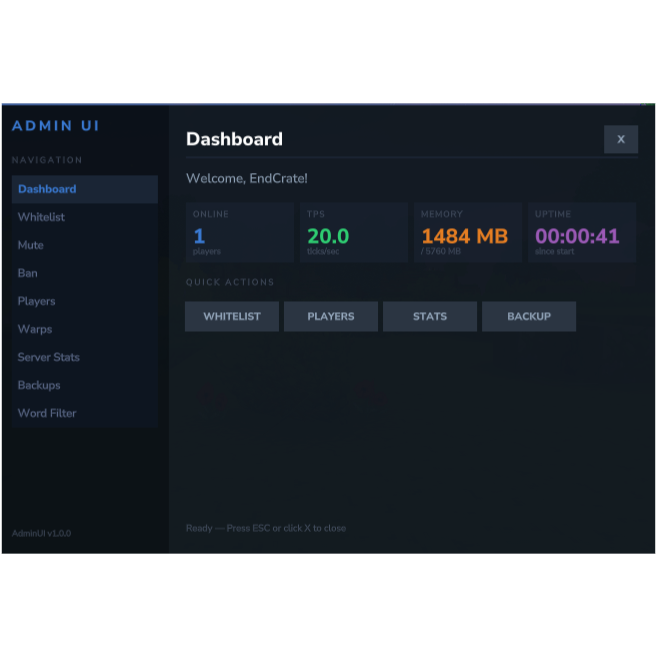
A comprehensive Hytale server admin panel plugin that provides a sleek GUI-based interface for server management. Access everything through /admin or its subcommands.
Modules & Features
1. Dashboard (/admin)
- Central hub showing live server stats: online players, TPS, memory usage, and uptime
- Quick action buttons to jump to any module
- Sidebar navigation to all pages
2. Whitelist Management (/admin wl)
- Toggle whitelist on/off
- Add/remove players from the whitelist
- Displays all currently whitelisted players (resolves online player names, shows UUIDs for offline)
3. Mute Management (/admin m)
- Permanently mute a player with a reason
- Temp mute with duration (
30m, 2h, 7d, etc.)
- Unmute players
- View all active mutes with remaining time
- Actually enforced — muted players' chat messages are blocked, and they see the reason + remaining time
4. Ban Management (/admin b)
- Ban a player with a reason
- Unban players
- Uses the server's built-in ban system
5. Player Management (/admin p)
- See all online players
- Look up a player to view: name, health, location, gamemode, IP, ping
- Teleport to a player or teleport them to you
- View a player's full inventory (36 storage + hotbar slots, 5 equipment slots)
- Clear a player's inventory
6. Warp Management (/admin w)
- Create warps at your current location
- Teleport to any warp
- Delete warps
- View all available warps
7. Server Stats (/admin st)
- Detailed live stats: player count, max players, TPS, memory used/free, uptime, Java version
8. Backup Management (/admin bk)
- Trigger server world save
- View backup history, count, and disk usage
9. Word Filter (/admin wf)
- Add blocked words or wildcard patterns (e.g.,
sh*t)
- Remove individual words or clear all
- View all blocked words with count
- Actually enforced — messages containing blocked words are silently cancelled and the sender is notified
How to Use
- Install: Place the built JAR into your Hytale server's
plugins folder
- Start server: Plugin auto-initializes MuteManager and WordFilterManager (data saved to
plugins/AdminUI/)
- Open the panel: Type /admin in-game to open the dashboard GUI
- Direct access: Use subcommands to jump straight to a module:
- /admin wl — Whitelist
- /admin m — Mute
- /admin b — Ban
- /admin p — Players
- /admin w — Warps
- /admin st — Stats
- /admin bk — Backup
- /admin wf — Word Filter
- /admin help — List all commands
- Navigate: Use sidebar buttons or Back/Close buttons on any page
Data Persistence
- Mutes saved to
plugins/AdminUI/mutes.json (survives restarts, auto-expires timed mutes)
- Word filter saved to
plugins/AdminUI/wordfilter.json
Project description from CurseForge.
Recent files
Admin Panel releases and Hytale builds
2 Mar 2026
Client Not supported Server Required Dependencies No extras listed Listed on Project page
Check the setup →