Hytale version
Back to mods 
CurseForge · Hytale mod
RGB Lights
Advanced Dynamic Lighting Mod! Adds UI Controlled RGB Lighting!
Choose a version Pick your version below, then grab the matching file.
Quick answer
Which RGB Lights release should I use?
Latest stable file rgblights-1.1.5.jar
Game version 0.6
Mod system Built-in Hytale mod system
RGB Lights rgblights-1.1.5.jar targets 0.6. Do not install it as a separate client mod. Enable it on the world host—the local server in singleplayer or the dedicated server in multiplayer. No required dependencies listed for this file.
Where it goes
Where should RGB Lights be installed in Hytale?
Do not install it as a separate client mod. Enable it on the world host—the local server in singleplayer or the dedicated server in multiplayer.
Separate client mod Not supported
World host / dedicated server Required
Mod system for this release Built-in Hytale mod system
Required install it here Optional supported, not mandatory Not supported do not install here Source doesn’t say do not assume
Put Hytale mods on the world host or dedicated server. Singleplayer runs a local server too; Hytale does not use separate client mods.
What else does RGB Lights rgblights-1.1.5.jar need?
rgblights-1.1.5.jar. Change the file and its required mods may change too.
This file does not list any required mods. Do not add a library just because a different file uses it.
This file does not list any required or optional project dependencies. Check the creator notes before changing an existing world.
Before you install it
Add RGB Lights without breaking your instance.
Built for RGB Lights rgblights-1.1.5.jar. Pick another file and the loader, install side or required mods may change.
- 01
Stick to this file
Use rgblights-1.1.5.jar. It targets 0.6; another release may target a different game build or dependency set.
- 02
Bring the mods it needs
This file does not list any required mods. Do not add a library just because a different file uses it.
- 03
Enable it on the world host
Do not install it as a separate client mod. Enable it on the world host—the local server in singleplayer or the dedicated server in multiplayer.
- 04
Pick the file you checked
Use the “Get this file” button beside rgblights-1.1.5.jar. It opens that exact file at the source.
About this project
What does RGB Lights add?
Works Underwater and in Off-Hand Slots
Can be Deconstructed in the Salvagers Workbench
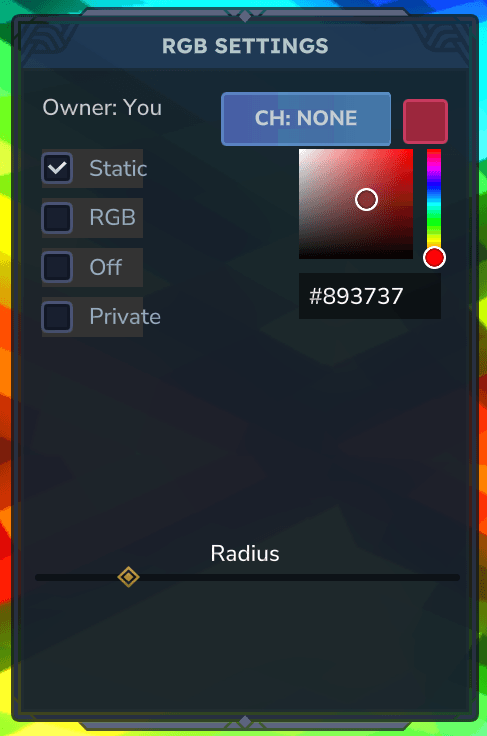
UI Menu:
Has 10 Channels per Player, which allows Syncing multiple Lights Together!
Has a Private Toggle, which Prevents other Players from Editing.
While Holding or Looking at a placed RGB Item, you can press the Use Key (F) to open the UI Menu!
Static Mode
Has a Color Picker!
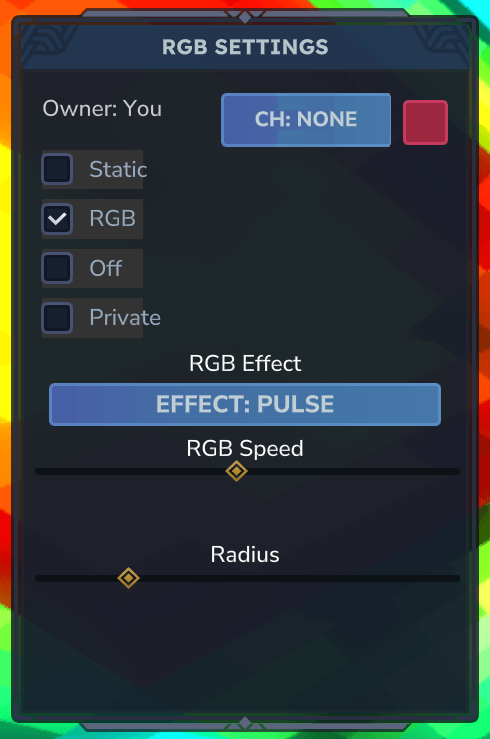
RGB Mode
Has 3 Effects
- Pulse - Spreads Light Smoothly
- Fade - Fades Light In and out
- Strobe - Changes Color in Steps
Custom RGB Workbench:
Craftable with the normal Workbench
Has 4 Categories:
- Vanilla
- Custom Blocks
- Projectiles
- Other
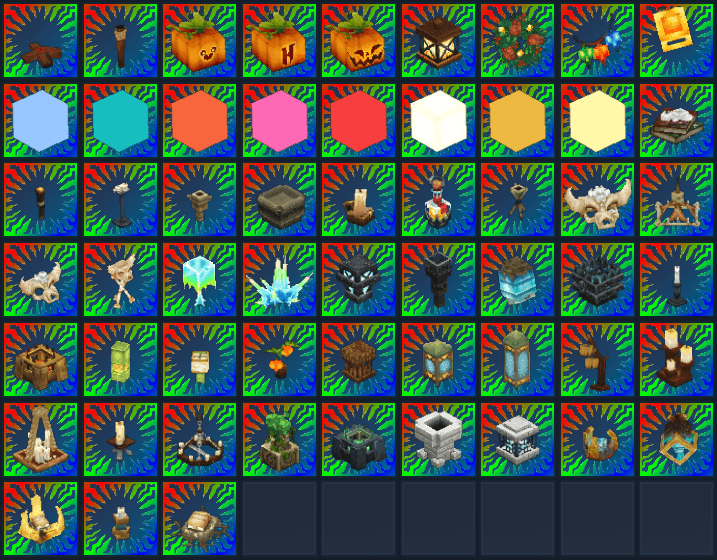
Vanilla
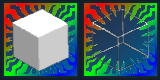
Include RGB Variants of ALL Vanilla Light Sources
Custom Blocks
Only 2 Custom Blocks so far,
Many More planned!
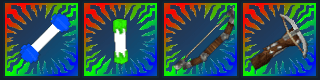
Projectiles
Throwable Glowsticks
Bows Attach a Light to Crude Arrows they Fire!
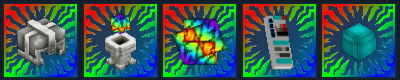
Other
In order of Left to Right
Helmet - Emits Light when Worn
Pylon - Scans for RGB Blocks in a 128 Radius
Scanned Blocks Emit a Vertical Beam matching its Light Color
Core - Used to Craft ALL RGB Items!
Remote - Used to Edit RGB Channel Settings
Soul - A Floating Fireball Pet that follows you and Emits Light
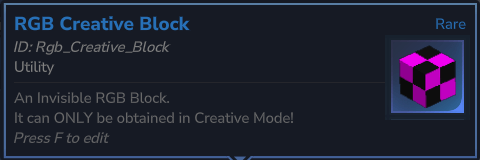
Creative Only Items
RGB Creative Block
An Invisible RGB Block, ONLY obtainable in Creative Mode!
The Icon looks like that so it's not Invisible in the Inventory
Mod Compatibility
Compatible with:
- ControlledLight by Danoru
Future Plans:
- More Custom RGB Blocks
- Possibly allow Dropped Items to emit Light
- Possibly Nerf Offhand Capabilities...
- Possibly new Types of RGB Items
- Possibly change Glowsticks to Drop instead of Despawn (let me know what you think)
If you encounter any bugs, leave a Comment detailing the cause, and I'll try to Reproduce it and Fix it.
If you have a good idea for other RGB Blocks, Projectiles, or whatever, then let me know in a Comment.
Project description from CurseForge.
Pick your setup
RGB Lights releases for each Hytale build.
Choose the version and loader you play, then open the matching release.
Hytale version
0.5
1 loader buildCheck the dependencies, then try the file in a copied instance before changing a world you care about.
Recent files
RGB Lights releases and Hytale builds
rgblights-1.1.5.jar
28 Aug 2026
Client Not supported Server Required Dependencies No extras listed Listed on Project page
Check the 0.6 setup 0.6 release
rgblights-1.1.4.jar
18 Jul 2026
Client Not supported Server Required Dependencies No extras listed Listed on Project page
Check the 0.5 setup 0.5 release
rgblights-1.1.3.jar
17 Jul 2026
Client Not supported Server Required Dependencies No extras listed Listed on Project page
Check the 0.5 setup 0.5 release
rgblights-1.1.2.jar
7 Jun 2026
Client Not supported Server Required Dependencies No extras listed Listed on Project page
Check the 0.5 setup 0.5 release
rgblights-1.1.1.jar
28 May 2026
Client Not supported Server Required Dependencies No extras listed Listed on Project page
Check the 0.5 setup 0.5 release
rgblights-1.1.0.jar
4 Apr 2026
Client Not supported Server Required Dependencies No extras listed Listed on Project page
Check the setup rgblights-1.0.2.jar
13 Mar 2026
Client Not supported Server Required Dependencies No extras listed Listed on Project page
Check the setup rgblights-1.0.1.jar
8 Mar 2026
Client Not supported Server Required Dependencies No extras listed Listed on Project page
Check the setup rgblights-1.0.0.jar
7 Mar 2026
Client Not supported Server Required Dependencies No extras listed Listed on Project page
Check the setup Looking for an older file? The official CurseForge project page is in Resources.