
Hytale version
Back to mods 
CurseForge · Hytale mod
NeoBag
NeoBag adds a virtual backpack system with upgradeable storage, permissions, and an easy-to-use GUI
Choose a version Pick your version below, then grab the matching file.
Quick answer
Which NeoBag release should I use?
Latest stable file NeoBag-1.1.8.jar
Game version 0.7
Mod system Built-in Hytale mod system
NeoBag-1.1.8.jar targets 0.7. Do not install it as a separate client mod. Enable it on the world host—the local server in singleplayer or the dedicated server in multiplayer. No required dependencies listed for this file.
Where it goes
Where should NeoBag be installed in Hytale?
Do not install it as a separate client mod. Enable it on the world host—the local server in singleplayer or the dedicated server in multiplayer.
Separate client mod Not supported
World host / dedicated server Required
Mod system for this release Built-in Hytale mod system
Required install it here Optional supported, not mandatory Not supported do not install here Source doesn’t say do not assume
Put Hytale mods on the world host or dedicated server. Singleplayer runs a local server too; Hytale does not use separate client mods.
What else does NeoBag-1.1.8.jar need?
NeoBag-1.1.8.jar. Change the file and its required mods may change too.
This file does not list any required mods. Do not add a library just because a different file uses it.
This file does not list any required or optional project dependencies. Check the creator notes before changing an existing world.
Before you install it
Add NeoBag without breaking your instance.
Built for NeoBag-1.1.8.jar. Pick another file and the loader, install side or required mods may change.
- 01
Stick to this file
Use NeoBag-1.1.8.jar. It targets 0.7; another release may target a different game build or dependency set.
- 02
Bring the mods it needs
This file does not list any required mods. Do not add a library just because a different file uses it.
- 03
Enable it on the world host
Do not install it as a separate client mod. Enable it on the world host—the local server in singleplayer or the dedicated server in multiplayer.
- 04
Pick the file you checked
Use the “Get this file” button beside NeoBag-1.1.8.jar. It opens that exact file at the source.
About this project
What does NeoBag add?
Vaultunlocked:
https://www.curseforge.com/hytale/mods/vaultunlocked
Hope everyone enjoys NeoBag! Let us know your feedback ❤️

📦 NeoBag – Upgradeable Backpack System
NeoBag adds a virtual backpack system with upgradeable storage, permissions, and an easy-to-use GUI.
Players can expand their bag, keep items safe, and access them anytime.
✨ Features
🎒 Upgradeable backpack system (T1 → T6) Config:(Default T4)
🖥️ Clean and intuitive GUI
🔐 Permission-based storage size
💰 Optional economy upgrade system
🛒 Optional timed or permanent buy access
💾 Persistent player data (items are saved)
🌍 Multi-language support (EN, DE, ITA, ES)
🚀 Quick Overview
Players can open their bag, store items safely, and upgrade storage size through a tier system or permissions.
ℹ️ You can also enable or disable the buy system and keep the classic access method with neobag.use. (default: false in config)
🧩 Supports both permission-based access and economy-based progression.
📸 Preview
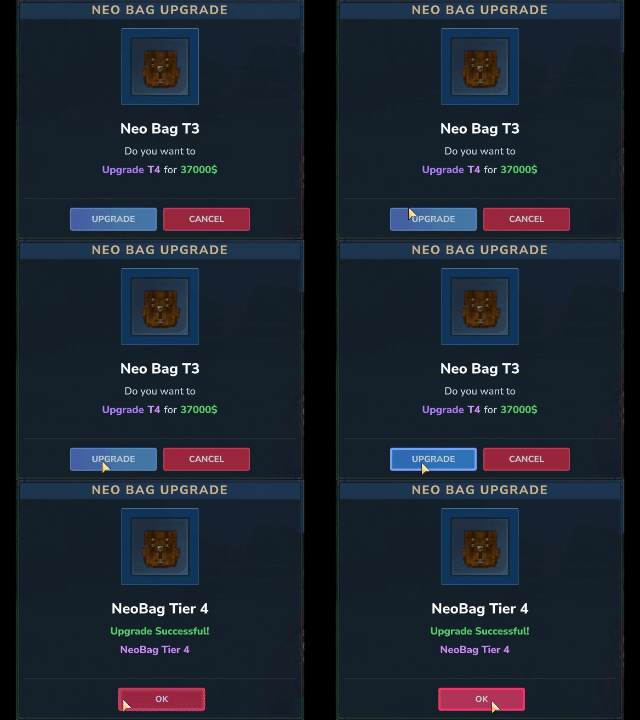
🔧 Detailed Information
Features
Virtual bag via command (/nb, /neo, /neobag)
Neobag Meu via command (/nbm, /neo menu, /neobag menu)
Permission-based row system (neobag.row.1 to neobag.row.6)
Optional upgrade system with economy costs (/neoupgrade)
To disable the upgrade system, (mods/NeoBag/Config)
Optional timed buy-acess system
NeoMenu with quick acess to Open
open the NeoBag config and change:
"economy": {
"neo_economy": true
to:
"economy": {
"neo_economy": false
Persistent player storage (mods/NeoBag/Playerdata)
Separate buy-acess storage (mods/NeoBag/Playerbuydata)
Localized messages (EN, DE, ITA, ES)
Commands
| Command | Description |
|---|---|
/nb /neo |
Open NeoBag |
/neobag |
Open NeoBag |
| /nb menu /nbm | Open NeoMenu |
/nb upgrade |
Start upgrade to next row |
/nb upgrade confirm |
Confirm pending upgrade |
/nb upgrade cancel |
Cancel pending upgrade |
/nb reload |
Reload config and message files |
/customcommand |
Optional custom command from config |
/neoupgrade |
Shortcut /nb upgrade |
Permissions
| Permission | Description |
|---|---|
neobag.use |
Base permission to use NeoBag |
| neobag.menu | /nb menu , /neo menu, /nbm |
| neobag.buy | /nb buy, /neo buy |
| neobag.admin | Allow Admin commands |
neobag.row.1 |
Allow up to 1 row |
neobag.row.2 |
Allow up to 2 rows |
neobag.row.3 |
Allow up to 3 rows |
neobag.row.4 |
Allow up to 4 rows |
neobag.row.5 |
Allow up to 5 rows |
neobag.row.6 |
Allow up to 6 rows |
❤️ Credits
Blaack92 – Developer
☕ Support the Development
If you enjoy my plugins and want to support future updates, you can buy me a coffee ❤️
👉 Ko-fi:
https://ko-fi.com/blaack
Project description from CurseForge.
Pick your setup
NeoBag releases for each Hytale build.
Choose the version and loader you play, then open the matching release.
Hytale version
0.5
1 loader buildCheck the dependencies, then try the file in a copied instance before changing a world you care about.
Recent files
NeoBag releases and Hytale builds
NeoBag-1.1.8.jar
29 Oct 2026
Client Not supported Server Required Dependencies No extras listed Listed on Project page
Check the 0.7 setup 0.7 release
NeoBag-1.1.7.jar
26 Oct 2026
Client Not supported Server Required Dependencies No extras listed Listed on Project page
Check the 0.7 setup 0.7 release
NeoBag-1.1.6.jar
16 Jun 2026
Client Not supported Server Required Dependencies No extras listed Listed on Project page
Check the 0.5 setup 0.5 release
NeoBag-1.1.5.jar
26 Mar 2026
Client Not supported Server Required Dependencies No extras listed Listed on Project page
Check the setup NeoBag-1.1.0.jar
21 Mar 2026
Client Not supported Server Required Dependencies No extras listed Listed on Project page
Check the setup NeoBag-1.0.5.jar
20 Mar 2026
Client Not supported Server Required Dependencies No extras listed Listed on Project page
Check the setup NeoBag-1.0.0.jar
19 Mar 2026
Client Not supported Server Required Dependencies No extras listed Listed on Project page
Check the setup Looking for an older file? The official CurseForge project page is in Resources.