Dynamic.Flashlight-0.1.0.jar
24 Mar 2026
Client Not supported Server Required Dependencies No extras listed Listed on Project page
Check the setup 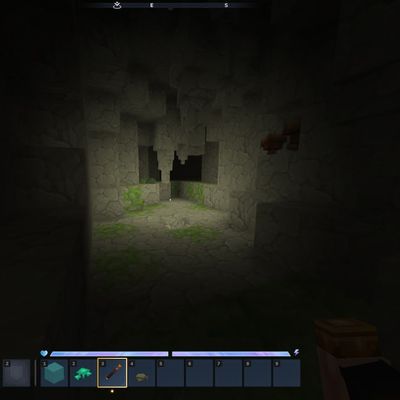
CurseForge · Hytale mod
A lightweight player flashlight system (command, not model yet) that simulates a forward beam using dynamic light entities.
Quick answer
Dynamic Flashlight Dynamic.Flashlight-0.1.0.jar targets Hytale. Do not install it as a separate client mod. Enable it on the world host—the local server in singleplayer or the dedicated server in multiplayer. No required dependencies listed for this file.
Where it goes
Do not install it as a separate client mod. Enable it on the world host—the local server in singleplayer or the dedicated server in multiplayer.
Put Hytale mods on the world host or dedicated server. Singleplayer runs a local server too; Hytale does not use separate client mods.
Dynamic.Flashlight-0.1.0.jar. Change the file and its required mods may change too.
This file does not list any required mods. Do not add a library just because a different file uses it.
This file does not list any required or optional project dependencies. Check the creator notes before changing an existing world.
Before you install it
Built for Dynamic Flashlight Dynamic.Flashlight-0.1.0.jar. Pick another file and the loader, install side or required mods may change.
Use Dynamic.Flashlight-0.1.0.jar. It targets Hytale; another release may target a different game build or dependency set.
This file does not list any required mods. Do not add a library just because a different file uses it.
Do not install it as a separate client mod. Enable it on the world host—the local server in singleplayer or the dedicated server in multiplayer.
Use the “Get this file” button beside Dynamic.Flashlight-0.1.0.jar. It opens that exact file at the source.
About this project
Small Hytale plugin experiment for a player flashlight effect for future projects.
Right now the flashlight is not rendered as a real projected beam. Instead, it is simulated by tracing the player view direction, finding impact points in the world, and spawning small dynamic light entities around those hit positions. This is why it is possible to see it as a forward beam projection.
I also need to create a model for the flashlight.
I do not currently know how to do it properly, so the current implementation uses a more practical workaround:
This gives a result that behaves more like a fake projected flashlight impact than a real render-level flashlight.
The plugin is split into a few simple parts:
Main registers the command and the tick systemFlashlightCommand enables, disables, or toggles the flashlightFlashlightTickSystem updates active flashlight players every few ticksFlashlightService contains the main logicFlashlightConeMath contains the math helpers used for beam samplingWhen a player runs the command:
The beam is approximated using:
The service traces those rays forward until they hit a non-air block in a loaded chunk.
From those results:
I went with spawned entities + DynamicLight because I do not currently have a proper way to render the flashlight exactly as I want.
The main problem is that what I really want is something closer to:
The plugin supports a config.json file for the main flashlight settings.
The config file is stored in the plugin data directory and is created automatically on first load if it does not exist yet.
It is used to adjust the main values without recompiling the plugin, such as:
If the file is missing, the plugin writes a default one automatically.
If the file already exists, the plugin loads the values from it.
Example:
{
  "debugDrawBeam": false,
  "debugShowHitPoint": false,
  "enableImpactLight": true,
  "playerLightRadius": 0,
  "playerLightRed": 0,
  "playerLightGreen": 0,
  "playerLightBlue": 0,
  "minEffectiveHitDistance": 2.0,
  "centerLightRadius": 5,
  "sideLightRadius": 2,
  "maxImpactLights": 10,
  "beamRange": 50.0,
  "beamHalfAngleDeg": 10.0,
  "rayStep": 0.08,
  "impactBackOffset": 0.15,
  "beamRingRays": 10,
  "debugDrawDurationSeconds": 0.12,
  "debugLineWidth": 0.02,
  "debugFade": false
}
/flashlight
/flashlight on
/flashlight off
Project description from CurseForge.
Recent files
24 Mar 2026
Looking for an older file? The official CurseForge project page is in Resources.
 mod
Build your own Stargate network to travel across the Universe with style !
 mod
magnetism range in a rocket, change the range you attract items as you like! May the force be with you
 mod
Paint any block, door, statue, or piece of furniture in any custom RGB color using a craftable Paint Brush and interactive color wheel!