SkillCheckAssetPack.zip
26 Mar 2026
Client Not supported Server Required Dependencies No extras listed Listed on Project page
Check the setup 
CurseForge · Hytale mod
The Asset Pack needed for the Skill Check Plugin
Quick answer
Skill Check Asset Pack SkillCheckAssetPack.zip targets Hytale. Do not install it as a separate client mod. Enable it on the world host—the local server in singleplayer or the dedicated server in multiplayer. No required dependencies listed for this file.
Where it goes
Do not install it as a separate client mod. Enable it on the world host—the local server in singleplayer or the dedicated server in multiplayer.
Put Hytale mods on the world host or dedicated server. Singleplayer runs a local server too; Hytale does not use separate client mods.
SkillCheckAssetPack.zip. Change the file and its required mods may change too.
This file does not list any required mods. Do not add a library just because a different file uses it.
This file does not list any required or optional project dependencies. Check the creator notes before changing an existing world.
Before you install it
Built for Skill Check Asset Pack SkillCheckAssetPack.zip. Pick another file and the loader, install side or required mods may change.
Use SkillCheckAssetPack.zip. It targets Hytale; another release may target a different game build or dependency set.
This file does not list any required mods. Do not add a library just because a different file uses it.
Do not install it as a separate client mod. Enable it on the world host—the local server in singleplayer or the dedicated server in multiplayer.
Use the “Get this file” button beside SkillCheckAssetPack.zip. It opens that exact file at the source.
About this project
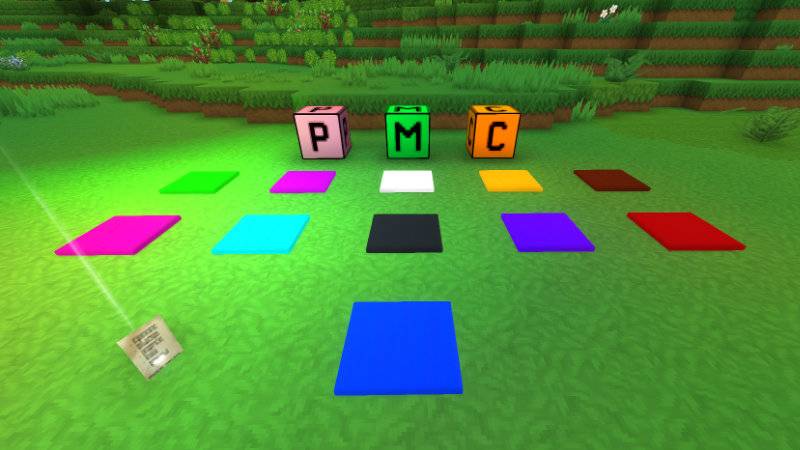
The Skill Check Asset Pack is an Asset Pack required by the Skill Check plugin. It provides all the custom items, blocks, models, and textures that the plugin depends on — none of which exist in base Hytale.
| Item | Description |
|---|---|
| Skill Check Admin Page | A holdable tool item. Right-clicking it opens the Skill Check Admin UI directly in-world. This is the primary way admins interact with arenas without typing commands. |
These are placeable blocks used during arena setup. Once placed in-world, the plugin scans for them and reads their positions to populate spawn point data.
| Item | Description |
|---|---|
| Skill Check Player Spawn | Marks a player spawn point. Place one per spawn position, then run Generate from Skill Check Blocks in the Admin Page to register all locations. |
| Skill Check Mob Spawn | Marks a mob spawn point for MOB game mode waves. |
| Skill Check Chest Spawn | Marks a chest spawn location for Chest Loot sessions. |
These are arena-building props with no functional plugin role — they exist purely as building material for constructing arenas with a consistent aesthetic.
A flat, glowing panel block. Available in 11 color variants:
White Black Blue Brown Cyan Green Pink Purple Red Violet Yellow
Project description from CurseForge.
Recent files
26 Mar 2026
Looking for an older file? The official CurseForge project page is in Resources.
 mod
modVandoria Jetpacks adds four unique craftable jetpacks to Hytale, each offering progressively better flight performance, improved player stats, custom models, animated thruster effects, immersive engine sounds, and balanced stamina-based flight.
 mod
modAdds a brand-new Labyrinth Dimension featuring a vast desert surface and an endless maze stretching deep below. Discover unique locations and face a variety of dangerous new enemies as you explore its depths!
 mod
modA comprehensive culinary expansion that enriches your gameplay with diverse new crops to harvest and sophisticated gourmet recipes to master.