CraftAlerts-1.0.2-release-0.5.0.jar
26 May 2026
Client Not supported Server Required Dependencies No extras listed Listed on Project page
Check the setup 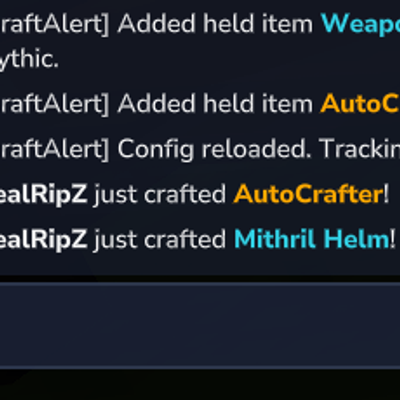
CurseForge · Hytale mod
Server-wide alerts when players craft rare or configured items. Fully customizable with a rarity color system.
Quick answer
CraftAlerts-1.0.2-release-0.5.0.jar targets Hytale. Do not install it as a separate client mod. Enable it on the world host—the local server in singleplayer or the dedicated server in multiplayer. No required dependencies listed for this file.
Where it goes
Do not install it as a separate client mod. Enable it on the world host—the local server in singleplayer or the dedicated server in multiplayer.
Put Hytale mods on the world host or dedicated server. Singleplayer runs a local server too; Hytale does not use separate client mods.
CraftAlerts-1.0.2-release-0.5.0.jar. Change the file and its required mods may change too.
This file does not list any required mods. Do not add a library just because a different file uses it.
This file does not list any required or optional project dependencies. Check the creator notes before changing an existing world.
Before you install it
Built for CraftAlerts-1.0.2-release-0.5.0.jar. Pick another file and the loader, install side or required mods may change.
Use CraftAlerts-1.0.2-release-0.5.0.jar. It targets Hytale; another release may target a different game build or dependency set.
This file does not list any required mods. Do not add a library just because a different file uses it.
Do not install it as a separate client mod. Enable it on the world host—the local server in singleplayer or the dedicated server in multiplayer.
Use the “Get this file” button beside CraftAlerts-1.0.2-release-0.5.0.jar. It opens that exact file at the source.
About this project

Server-wide alerts when players craft rare or configured items. Fully customizable with a rarity colour system.
When a player crafts an item that's on the alert list, every player on the server sees a message:
The item name is coloured by its rarity tier.
All commands are under /craftalerts:
/craftalerts add {item_id} {rarity} - Add an item to the alert list/craftalerts addheld {rarity} - Add the item you're currently holding/craftalerts remove {item_id} - Remove an item from the list/craftalerts removeheld - Remove the item you're currently holding/craftalerts list - Show all tracked items with their rarity colours/craftalerts reload - Reload the config from fileCraftAlerts.manage - Required for add, addheld, remove, and listCraftAlerts.reload - Required for reloadThe plugin generates a CraftAlerts/config.json on first run. You can edit it manually or use the in-game commands. Changes made via commands are saved automatically.
{
  "alertItems": [
    {
      "itemId": "Weapon_Shortbow_Onyxium",
      "rarity": "Mythic"
    }
  ]
}
this is the only default item as an example.
Add as many items as you like, including custom items from other mods. The rarity field accepts: Common, Uncommon, Rare, Very_Rare, Legendary, Mythic.
CraftAlerts works with any item that has a crafting recipe, including items added by other plugins and mods. Use /craftalerts addheld while holding a custom item to add it instantly, or use /craftalerts add {item_id} with the item's ID.
A server using
release/2026.03.26-89796e57b
Project description from CurseForge.
Recent files
26 May 2026
22 May 2026
1 May 2026
2 Apr 2026
Looking for an older file? The official CurseForge project page is in Resources.