HyAtlas-1.0.1.jar
4 Apr 2026
Client Not supported Server Required Dependencies No extras listed Listed on Project page
Check the setup 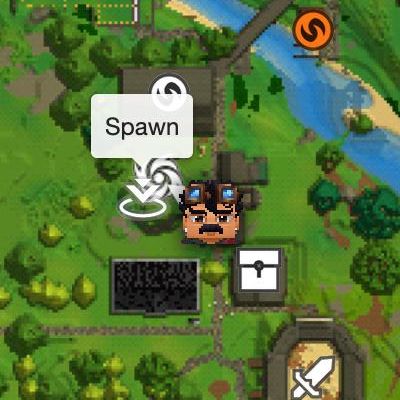
CurseForge · Hytale mod
Live Web Map viewer for Hytale
Quick answer
HyAtlas: Live Web Map HyAtlas-1.0.1.jar targets Hytale. Do not install it as a separate client mod. Enable it on the world host—the local server in singleplayer or the dedicated server in multiplayer. No required dependencies listed for this file.
Where it goes
Do not install it as a separate client mod. Enable it on the world host—the local server in singleplayer or the dedicated server in multiplayer.
Put Hytale mods on the world host or dedicated server. Singleplayer runs a local server too; Hytale does not use separate client mods.
HyAtlas-1.0.1.jar. Change the file and its required mods may change too.
This file does not list any required mods. Do not add a library just because a different file uses it.
This file does not list any required or optional project dependencies. Check the creator notes before changing an existing world.
Before you install it
Built for HyAtlas: Live Web Map HyAtlas-1.0.1.jar. Pick another file and the loader, install side or required mods may change.
Use HyAtlas-1.0.1.jar. It targets Hytale; another release may target a different game build or dependency set.
This file does not list any required mods. Do not add a library just because a different file uses it.
Do not install it as a separate client mod. Enable it on the world host—the local server in singleplayer or the dedicated server in multiplayer.
Use the “Get this file” button beside HyAtlas-1.0.1.jar. It opens that exact file at the source.
About this project
HyAtlas is an advanced, standalone, live interactive web map for your Hytale server. It runs completely behind the scenes without heavy dependencies, rendering your world directly into a beautiful, interactive web interface that players can access via their browsers.
It allows you to view real-time player locations, global world markers, and chunk generation in a Google Maps style interface. It has built-in caching, multithreading, and even automatic SSL (HTTPS) certificate generation for secure connections!
Update 1.0.1
* Fixed an issue where markers that no longer existed were automatically removed from the web map.
* Added smooth player movement on the web map.
* Added the ability to follow a player on the web map.
Features
* Live Real-Time Map: Watch players move across Orbis seamlessly.
* Smart Markers: Supports global points of interests and public markers with custom icons.
* Performance First: Extensive caching (Memory + Disk) and "Explored Only" modes to protect your server's TPS from dropping.
* Built-in SSL Deployment: Built-in Let's Encrypt ACME integration. Secure your map with https:// out of the box!
* Multi-Language Support: Swap between English (EN) and Ukrainian (UA) dynamically.
* In-Game Commands: Includes pre-generation, cache wiping, and instant config reloading.
HyAtlas-*.*.*.jar release. The config.json file controls everything about your HyAtlas map.
You need the hyatlas.admin permission role to use these options in-game.
* /hyatlas status — Check the health of your map server, active ports, and active web connections.
* /hyatlas reload — Refresh the config.json without rebooting the server.
* /hyatlas pregenerate <radius> — Stand anywhere in the world and use this command to instantly map the specified radius around you.
* /hyatlas clearcache — Wipe all memory and reset the map entirely.
* /hyatlas renewssl — Force a pull of a new Let's Encrypt browser certificate
Спробуйте HyAtlas на Обрій — українському сервері Hytale!
https://obriyhytale.pp.ua/map
Credits / Attribution
HyAtlas is an explicitly enhanced and maintained fork of the original EasyWebMap project. All credit for the foundational structure, concepts, and original mechanics goes to the original developer, cryptobench. This fork was created to continue the life of the project after original development stalled, introducing new features, modern fixes, performance optimizations, and complete multi-language localization.
Project description from CurseForge.
Recent files
4 Apr 2026
3 Apr 2026
Looking for an older file? The official CurseForge project page is in Resources.