Hytale version
Back to mods 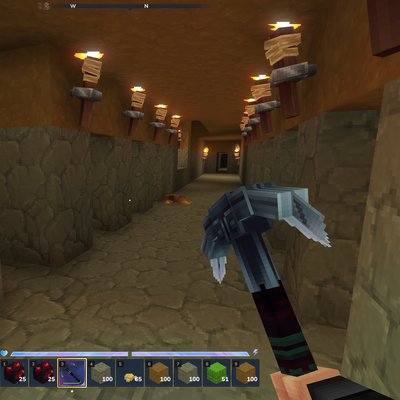
CurseForge · Hytale mod
Mining+
Vein Mining, Silk Touch, Bulk mining presets, match type or everything. Suitable on all block types with an in-built blacklist
Choose a version Pick your version below, then grab the matching file.
Quick answer
Which Mining+ release should I use?
Latest stable file MiningPlus-1.2.4-release-0.5.0.jar
Game version 0.5
Mod system Built-in Hytale mod system
Mining+ MiningPlus-1.2.4-release-0.5.0.jar targets 0.5. Do not install it as a separate client mod. Enable it on the world host—the local server in singleplayer or the dedicated server in multiplayer. No required dependencies listed for this file.
Where it goes
Where should Mining+ be installed in Hytale?
Do not install it as a separate client mod. Enable it on the world host—the local server in singleplayer or the dedicated server in multiplayer.
Separate client mod Not supported
World host / dedicated server Required
Mod system for this release Built-in Hytale mod system
Required install it here Optional supported, not mandatory Not supported do not install here Source doesn’t say do not assume
Put Hytale mods on the world host or dedicated server. Singleplayer runs a local server too; Hytale does not use separate client mods.
What else does Mining+ MiningPlus-1.2.4-release-0.5.0.jar need?
MiningPlus-1.2.4-release-0.5.0.jar. Change the file and its required mods may change too.
This file does not list any required mods. Do not add a library just because a different file uses it.
This file does not list any required or optional project dependencies. Check the creator notes before changing an existing world.
Before you install it
Add Mining+ without breaking your instance.
Built for Mining+ MiningPlus-1.2.4-release-0.5.0.jar. Pick another file and the loader, install side or required mods may change.
- 01
Stick to this file
Use MiningPlus-1.2.4-release-0.5.0.jar. It targets 0.5; another release may target a different game build or dependency set.
- 02
Bring the mods it needs
This file does not list any required mods. Do not add a library just because a different file uses it.
- 03
Enable it on the world host
Do not install it as a separate client mod. Enable it on the world host—the local server in singleplayer or the dedicated server in multiplayer.
- 04
Pick the file you checked
Use the “Get this file” button beside MiningPlus-1.2.4-release-0.5.0.jar. It opens that exact file at the source.
About this project
What does Mining+ add?
For issues or suggestions, please raise them in the HBL Nexus discord HERE
Recommended to use with Autocrafter! Autosmelt your ingots.

Why Mining+?
The existing vein mining mods on CurseForge are reported as broken. They don't drop items correctly and have chunk boundary bugs. Mining+ is built from scratch with proper drop handling, configurable patterns, and a polished UI (as much as I could sorry).
Mining+ is open source and under the MIT License. Check the source on GitHub.
Features
Vein Mining (Ores Only)
Mine one ore block and all connected ores of the same type break automatically. Iron connects to iron, silver to silver - never crosses types. Uses 26-directional adjacency so diagonal ores are included.
Excavation Patterns
Switch between mining modes to suit what you're doing:
- Ores Only - Classic vein mining. Flood-fills connected ores.
- Tunnel 1x1 - Single-block tunnel extending away from you.
- Tunnel 2x1 - Player-height tunnel (2 high, 1 wide).
- Tunnel 3x3 - Full 3x3 tunnel centered on the mined block.
- 3x3x3 Cube - 3x3 area, 3 blocks deep into the wall.
- 5x5x5 Cube - 5x5 area, 5 blocks deep into the wall.
All patterns use block face detection - the tunnel extends in the direction away from where you're standing.
In-Game Config UI
Open the config panel with /mining+. No items needed.
Configure:
- Activation Key - Always active, or require Crouch (Ctrl) / Walk (Alt) to be held
- Mining Mode - Choose your excavation pattern
- Max Blocks - Limit how many blocks break per action (16 / 32 / 64 / 128)
- Depth / Search Distance - How far veins and tunnels extend (8 / 16 / 32 / 64)
Proper Drops
All mined blocks drop their correct items using the game's drop tables. Drops spawn at the block you mined - no hunting for scattered items.
Safety
- Max blocks per action prevents runaway mining
- depth limit
- Chunk boundary aware, skips unloaded chunks
- Per-player enable/disable
Commands
| Command | Description |
|---|---|
/mining+/m+/miningplus |
Open the config UI |
Configuration
Server config is saved at mods/MiningPlus/config.json:
{
  "enabled": true,
  "maxBlocksPerAction": 64,
  "maxSearchDepth": 32
}
Per-player settings (activation key, pattern, toggle) are stored in memory and reset on server restart.
Support
Join our Discord for support, suggestions, and updates: https://discord.com/invite/aCE6HqfCHj
Project description from CurseForge.
Pick your setup
Mining+ releases for each Hytale build.
Choose the version and loader you play, then open the matching release.
Check the dependencies, then try the file in a copied instance before changing a world you care about.
Recent files
Mining+ releases and Hytale builds
MiningPlus-1.2.4-release-0.5.0.jar
26 May 2026
Client Not supported Server Required Dependencies No extras listed Listed on Project page
Check the 0.5 setup 0.5 release
MiningPlus-1.2.3-pre-release-0.5.0-pre.9.1.jar
22 May 2026
Client Not supported Server Required Dependencies No extras listed Listed on Project page
Check the setup MiningPlus-1.2.3-pre-release-2026.04.30-b4f6a911e.jar
1 May 2026
Client Not supported Server Required Dependencies No extras listed Listed on Project page
Check the setup MiningPlus-1.2.2-release-2026.03.26-89796e57b.jar
7 Apr 2026
Client Not supported Server Required Dependencies No extras listed Listed on Project page
Check the setup MiningPlus-1.2.1-release-2026.03.26-89796e57b.jar
5 Apr 2026
Client Not supported Server Required Dependencies No extras listed Listed on Project page
Check the setup MiningPlus-1.2.0-release-2026.03.26-89796e57b.jar
5 Apr 2026
Client Not supported Server Required Dependencies No extras listed Listed on Project page
Check the setup MiningPlus-1.1.0-release-2026.03.26-89796e57b.jar
5 Apr 2026
Client Not supported Server Required Dependencies No extras listed Listed on Project page
Check the setup MiningPlus-1.0.0-release-2026.03.26-89796e57b.jar
4 Apr 2026
Client Not supported Server Required Dependencies No extras listed Listed on Project page
Check the setup Looking for an older file? The official CurseForge project page is in Resources.
 mod
mod CurseForge · Hytale
BetterClaim
Territory claiming with interactive map GUI, party protection, allies, homes, admin tools, SQLite persistence, and granular permissions for server owners.
 mod
mod CurseForge · Hytale
Hexcode Evoke
Bring objects to life. Automate your plantation with the mannequins.
 mod
mod CurseForge · Hytale
GlymeraWorldGen
Switch your server's biome at runtime with a single command. Choose from Plains, Desert, Taiga, Volcanic, or the default mixed world. Only new chunks are affected – no restart needed.