Molten Steeps v1.0
10 Apr 2026
Client Not supported Server Required Dependencies No extras listed Listed on Project page
Check the setup 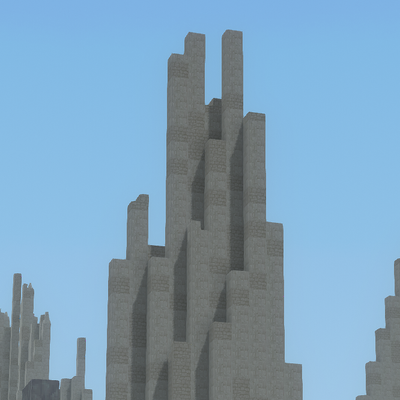
CurseForge · Hytale mod
A Hytale mod that contains the Molten Steeps biome -- a biome full of tall, jagged peaks that rise from lava
Quick answer
Molten Steeps v1.0 targets Hytale. Do not install it as a separate client mod. Enable it on the world host—the local server in singleplayer or the dedicated server in multiplayer. No required dependencies listed for this file.
Where it goes
Do not install it as a separate client mod. Enable it on the world host—the local server in singleplayer or the dedicated server in multiplayer.
Put Hytale mods on the world host or dedicated server. Singleplayer runs a local server too; Hytale does not use separate client mods.
Molten Steeps v1.0. Change the file and its required mods may change too.
This file does not list any required mods. Do not add a library just because a different file uses it.
This file does not list any required or optional project dependencies. Check the creator notes before changing an existing world.
Before you install it
Built for Molten Steeps v1.0. Pick another file and the loader, install side or required mods may change.
Use Molten Steeps v1.0. It targets Hytale; another release may target a different game build or dependency set.
This file does not list any required mods. Do not add a library just because a different file uses it.
Do not install it as a separate client mod. Enable it on the world host—the local server in singleplayer or the dedicated server in multiplayer.
Use the “Get this file” button beside Molten Steeps v1.0. It opens that exact file at the source.
About this project
Molten Steeps is a Worldgen V2 mod that adds the molten steeps biome.
The molten steeps biome consists of steep, jagged cliffs rising from lava at a low y-level to sharp peaks. The cliffs have a color gradient over different heights, and different heights contain different ores (i.e. gold, silver, and even adamantite near the lava).
The cliffs are decorated with stairs, slabs, and stalactites for texture, and have small pregenerated bridges.
To see the biome: extract the mod folder and place it in UserData/Mods. Then, open the menu to create a new creative Hytale world. In the settings, make sure the world type is generated. You should also see a mods tab -- click over to that, and make sure gapple.MoltenSteeps is selected.
Then, open the world. After running /op self, run /world settings worldgentype set HytaleGenerator. Then run /worldgen reload --clear. It should be working now, though you likely will have to exit out of the world and reenter to see it.
I hope you like the biome!
Project description from CurseForge.
Recent files
10 Apr 2026
Looking for an older file? The official CurseForge project page is in Resources.
 mod
modAdds a brand-new Labyrinth Dimension featuring a vast desert surface and an endless maze stretching deep below. Discover unique locations and face a variety of dangerous new enemies as you explore its depths!
 mod
modAn content/story mod, aiming to add new biomes, mobs, allies, bosses, weapons... and more, directly to your world.