Windmill-0.0.2.jar
26 Apr 2026
Client Not supported Server Required Dependencies No extras listed Listed on Project page
Check the setup 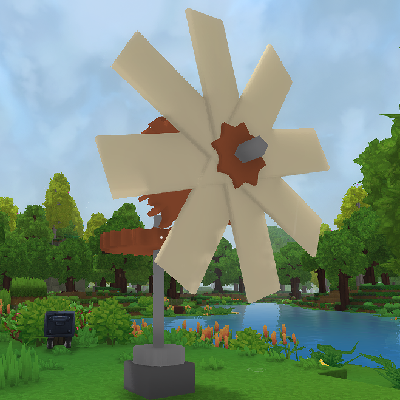
CurseForge · Hytale mod
Adds Windmill, MillStone and gears to connect everything
Quick answer
Windmill Automation Windmill-0.0.2.jar targets Hytale. Do not install it as a separate client mod. Enable it on the world host—the local server in singleplayer or the dedicated server in multiplayer. No required dependencies listed for this file.
Where it goes
Do not install it as a separate client mod. Enable it on the world host—the local server in singleplayer or the dedicated server in multiplayer.
Put Hytale mods on the world host or dedicated server. Singleplayer runs a local server too; Hytale does not use separate client mods.
Windmill-0.0.2.jar. Change the file and its required mods may change too.
This file does not list any required mods. Do not add a library just because a different file uses it.
This file does not list any required or optional project dependencies. Check the creator notes before changing an existing world.
Before you install it
Built for Windmill Automation Windmill-0.0.2.jar. Pick another file and the loader, install side or required mods may change.
Use Windmill-0.0.2.jar. It targets Hytale; another release may target a different game build or dependency set.
This file does not list any required mods. Do not add a library just because a different file uses it.
Do not install it as a separate client mod. Enable it on the world host—the local server in singleplayer or the dedicated server in multiplayer.
Use the “Get this file” button beside Windmill-0.0.2.jar. It opens that exact file at the source.
About this project
Added items :
How to make a functional windmill:
Place the windmill vertically and connect axis and a large gear. Then place a large gear horizontally to be able to place axis under. Place the Millstone at the bottom
How to use the Millstone:
Press F (Interaction Key) with wheat in hand and wait a few seconds for it to get flour back. One wheat = one flour.
interact with anything but wheat to gather flour, and double interact to also get back the wheat.
Sneak while interacting to place all the wheat you have in hand.
Known Bugs:
Windmill sometimes give the wrong rotation to their axis, this will be fixed in the next update.
I am definitely looking for an artist, so let me know if you would like to contribute!
Project description from CurseForge.
Recent files
26 Apr 2026
Looking for an older file? The official CurseForge project page is in Resources.
 mod
[Feedback welcomed] Turning Hytale into Fast-Paced ARPG, bringing New Combat style with Hytale Weapons, and Elemental powers
 mod
The Curse of the Void is a large Hardcore SMP for creators that increases its difficulty every week. Twilight is the first curse in the series
 mod
Yeet any non-full block in hytale.