Hytale version
Back to mods 
CurseForge · Hytale mod
Hy Voice Zoo
Record and add your own voice sounds into all Hytale's creature species!
Choose a version Pick your version below, then grab the matching file.
Quick answer
Which Hy Voice Zoo release should I use?
Latest stable file Hy Voice Zoo 1.0.3.jar
Game version 0.6
Mod system Built-in Hytale mod system
Hy Voice Zoo 1.0.3.jar targets 0.6. Do not install it as a separate client mod. Enable it on the world host—the local server in singleplayer or the dedicated server in multiplayer. No required dependencies listed for this file.
Where it goes
Where should Hy Voice Zoo be installed in Hytale?
Do not install it as a separate client mod. Enable it on the world host—the local server in singleplayer or the dedicated server in multiplayer.
Separate client mod Not supported
World host / dedicated server Required
Mod system for this release Built-in Hytale mod system
Required install it here Optional supported, not mandatory Not supported do not install here Source doesn’t say do not assume
Put Hytale mods on the world host or dedicated server. Singleplayer runs a local server too; Hytale does not use separate client mods.
What else does Hy Voice Zoo 1.0.3.jar need?
Hy Voice Zoo 1.0.3.jar. Change the file and its required mods may change too.
This file does not list any required mods. Do not add a library just because a different file uses it.
This file does not list any required or optional project dependencies. Check the creator notes before changing an existing world.
Before you install it
Add Hy Voice Zoo without breaking your instance.
Built for Hy Voice Zoo 1.0.3.jar. Pick another file and the loader, install side or required mods may change.
- 01
Stick to this file
Use Hy Voice Zoo 1.0.3.jar. It targets 0.6; another release may target a different game build or dependency set.
- 02
Bring the mods it needs
This file does not list any required mods. Do not add a library just because a different file uses it.
- 03
Enable it on the world host
Do not install it as a separate client mod. Enable it on the world host—the local server in singleplayer or the dedicated server in multiplayer.
- 04
Pick the file you checked
Use the “Get this file” button beside Hy Voice Zoo 1.0.3.jar. It opens that exact file at the source.
About this project
What does Hy Voice Zoo add?
 Hy Voice Zoo
(Inspired in My Voice Zoo game)
Back when Hytale introduced the Proximity Voice Chat, I had this idea...
Wouldn't it be so cool to be able to record your own voice as soundsfor all the Hytale's creatures ingame live?!!?!
Didn't even know it was going to be possible to make back then,
but time has passed I have improved a lot at creating mods,
and I managed to make it work!!
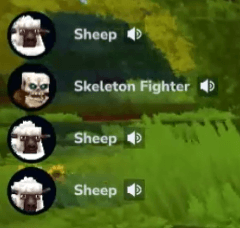
IT IS HILARIOUS!!! I PROMISE!! You will laugh non-stop with this!
NOTE: You need a mic to record, and Hytale's Voice Chat enabled for this work to work.

Record live ingame the sounds of every type of creature with your voice!(Voice Chat and Mic ON).
Crouch + Ability 3 while looking at the creature to open the recorder menu.
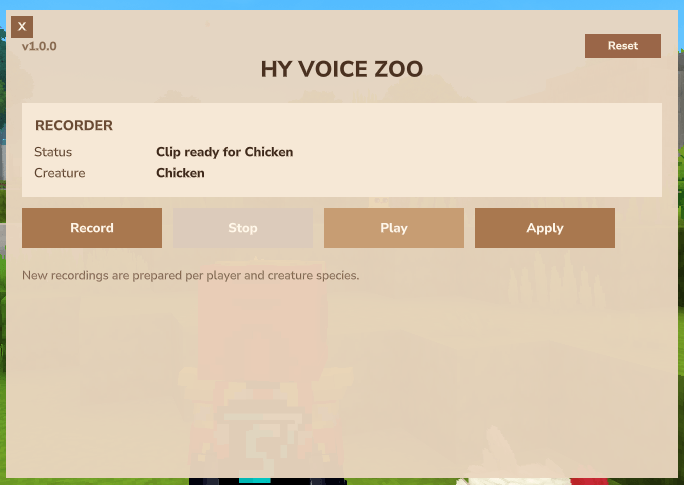
In the recorder menu UI, you can record a custom sound with
your own voice (auto-stops recording after 2.5s),
you can manually stop the recording,
you can play the recorded sound and then apply the sound.
Use the command "/hyvoicezoo" (or voicezoo, hvz, vz)
to open your HyVoiceZoo library of recorded sounds (that you recorded)!
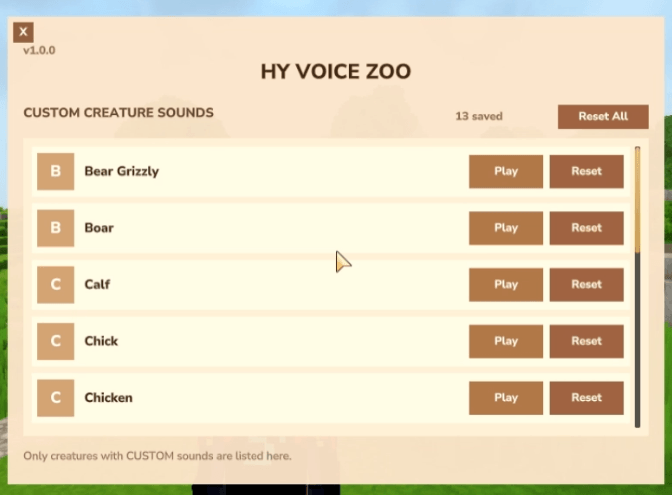
In this menu, you can play and reset the sound to default of each creature separately.
(You can also reset all creature sounds to default in one button)
This mod has 2 different modes to use it:
Default
-Each player can record and apply their own sounds for every type of creature,
and only this player will be able to hear them.
-(Individual experience)
-Like this, every player in big servers will get a chance to
record and hear their custom sounds.
-Works fine on multiplayer, custom sounds are
per player and per type of creature.
Shared Experience
(Can be enabled in config file)
-The recorded custom sound of each creature (by type) will
only be able to be recorded or re-recorded by
the first player to record and apply the sound of this creature.
-Like this, all players will hear the same custom sound applied to this creature,
and works the same way with the rest of creatures.
-The first player to record and apply a custom sound, keeps it!
So in big servers, not all players might get a chance.
-Of course, this mode still really fun!
-Other players will not be able to record an already
recorded creature (unless OP/owner).
-In this mode the sounds library menu will only show your recorded sounds,
not the rest of the player's sounds.
-The mode is up to the server/world owners.
INFO
This mod does not replace any vanilla assets,
it creates/generates new files and through java mutes the vanilla sounds and
plays the custom ones (if there is any).
The custom recorded sounds are saved as OGG in the world/server mods folder ;))
You can configurate a few options in this mod in
"hyvoicezooconfig.json" at the mods folder in your world/server.
I wanted to enter the contest with this awesome mod,
but I didn't manage to finish it in time :((
This mod is also a great mod for content creator's videos, check it out!
Also check out my other mods!
Discord
Our Discord Server (English and Spanish) for everyone interested at our
incoming new mods/mod updates for Hytale.
Disclaimer
Everyone is allowed to use this mod in videos, streams, etc. Please give credit to StarkyMods, provide a link to our page when possible.
Thank you for playing our mod!
Project description from CurseForge.
Pick your setup
Hy Voice Zoo releases for each Hytale build.
Choose the version and loader you play, then open the matching release.
Hytale version
0.5
1 loader buildCheck the dependencies, then try the file in a copied instance before changing a world you care about.
Recent files
Hy Voice Zoo releases and Hytale builds
Hy Voice Zoo 1.0.3.jar
26 Aug 2026
Client Not supported Server Required Dependencies No extras listed Listed on Project page
Check the 0.6 setup 0.6 release
Hy Voice Zoo 1.0.2.jar
26 May 2026
Client Not supported Server Required Dependencies No extras listed Listed on Project page
Check the 0.5 setup 0.5 release
Hy Voice Zoo 1.0.1.jar
4 May 2026
Client Not supported Server Required Dependencies No extras listed Listed on Project page
Check the setup Hy Voice Zoo 1.0.0.jar
3 May 2026
Client Not supported Server Required Dependencies No extras listed Listed on Project page
Check the setup Looking for an older file? The official CurseForge project page is in Resources.