
Hytale version
Back to mods 
CurseForge · Hytale mod
Social-Action-Menu
⚡ V11⚡New PM System⚡ALT⚡ support, pages, scoreboard, language config and Endless Leveling ranks.
Choose a version Pick your version below, then grab the matching file.
Quick answer
Which Social-Action-Menu release should I use?
Latest stable file SocialActionMenu-0.5.7.jar
Game version 0.5
Mod system Built-in Hytale mod system
Social-Action-Menu SocialActionMenu-0.5.7.jar targets 0.5. Do not install it as a separate client mod. Enable it on the world host—the local server in singleplayer or the dedicated server in multiplayer. No required dependencies listed for this file.
Where it goes
Where should Social-Action-Menu be installed in Hytale?
Do not install it as a separate client mod. Enable it on the world host—the local server in singleplayer or the dedicated server in multiplayer.
Separate client mod Not supported
World host / dedicated server Required
Mod system for this release Built-in Hytale mod system
Required install it here Optional supported, not mandatory Not supported do not install here Source doesn’t say do not assume
Put Hytale mods on the world host or dedicated server. Singleplayer runs a local server too; Hytale does not use separate client mods.
What else does Social-Action-Menu SocialActionMenu-0.5.7.jar need?
SocialActionMenu-0.5.7.jar. Change the file and its required mods may change too.
This file does not list any required mods. Do not add a library just because a different file uses it.
This file does not list any required or optional project dependencies. Check the creator notes before changing an existing world.
Before you install it
Add Social-Action-Menu without breaking your instance.
Built for Social-Action-Menu SocialActionMenu-0.5.7.jar. Pick another file and the loader, install side or required mods may change.
- 01
Stick to this file
Use SocialActionMenu-0.5.7.jar. It targets 0.5; another release may target a different game build or dependency set.
- 02
Bring the mods it needs
This file does not list any required mods. Do not add a library just because a different file uses it.
- 03
Enable it on the world host
Do not install it as a separate client mod. Enable it on the world host—the local server in singleplayer or the dedicated server in multiplayer.
- 04
Pick the file you checked
Use the “Get this file” button beside SocialActionMenu-0.5.7.jar. It opens that exact file at the source.
About this project
What does Social-Action-Menu add?

SocialActionMenu V11
Private Messages System
You can completely change the language in the config.
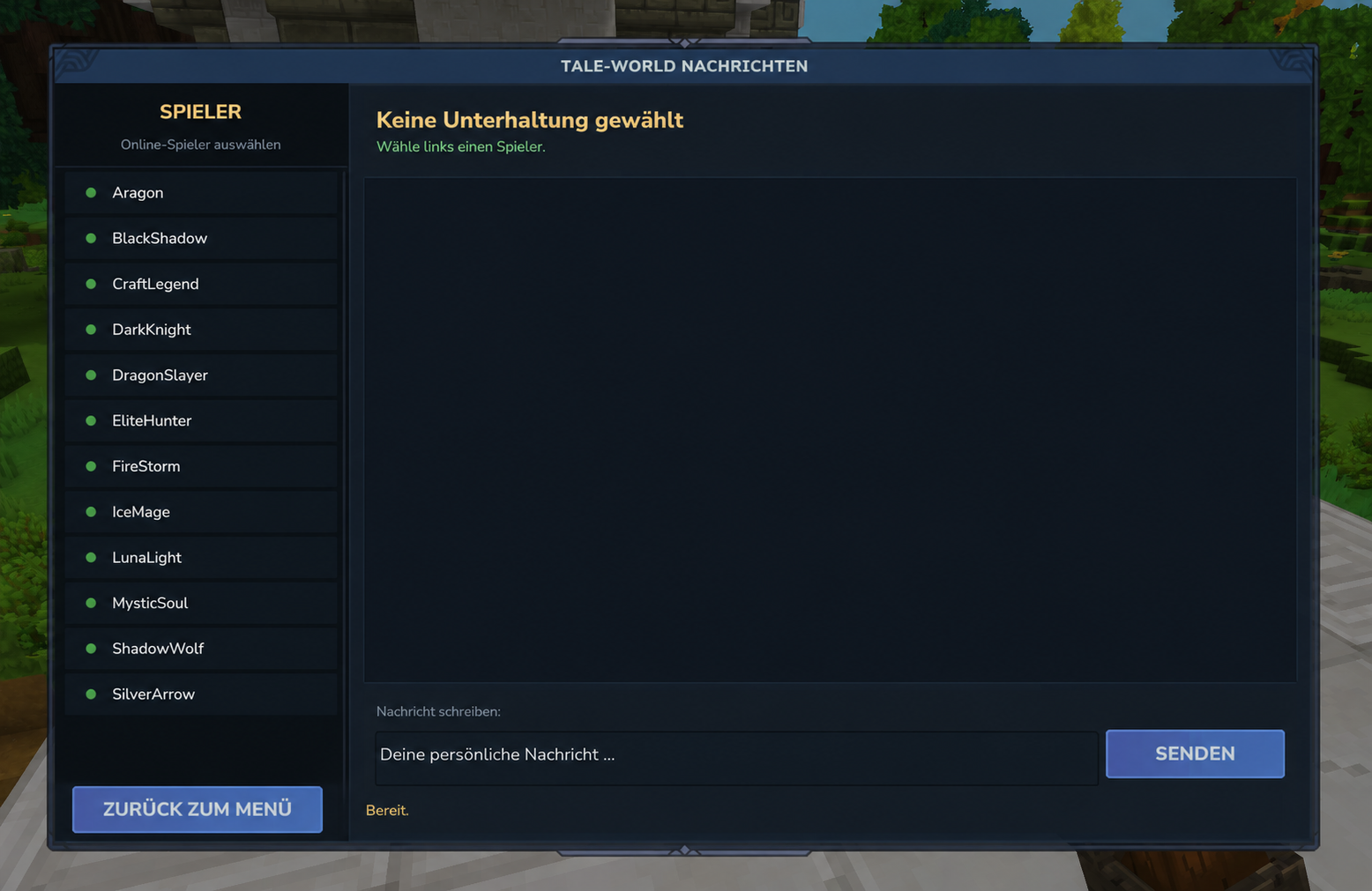
NEW UI Endless Styl :
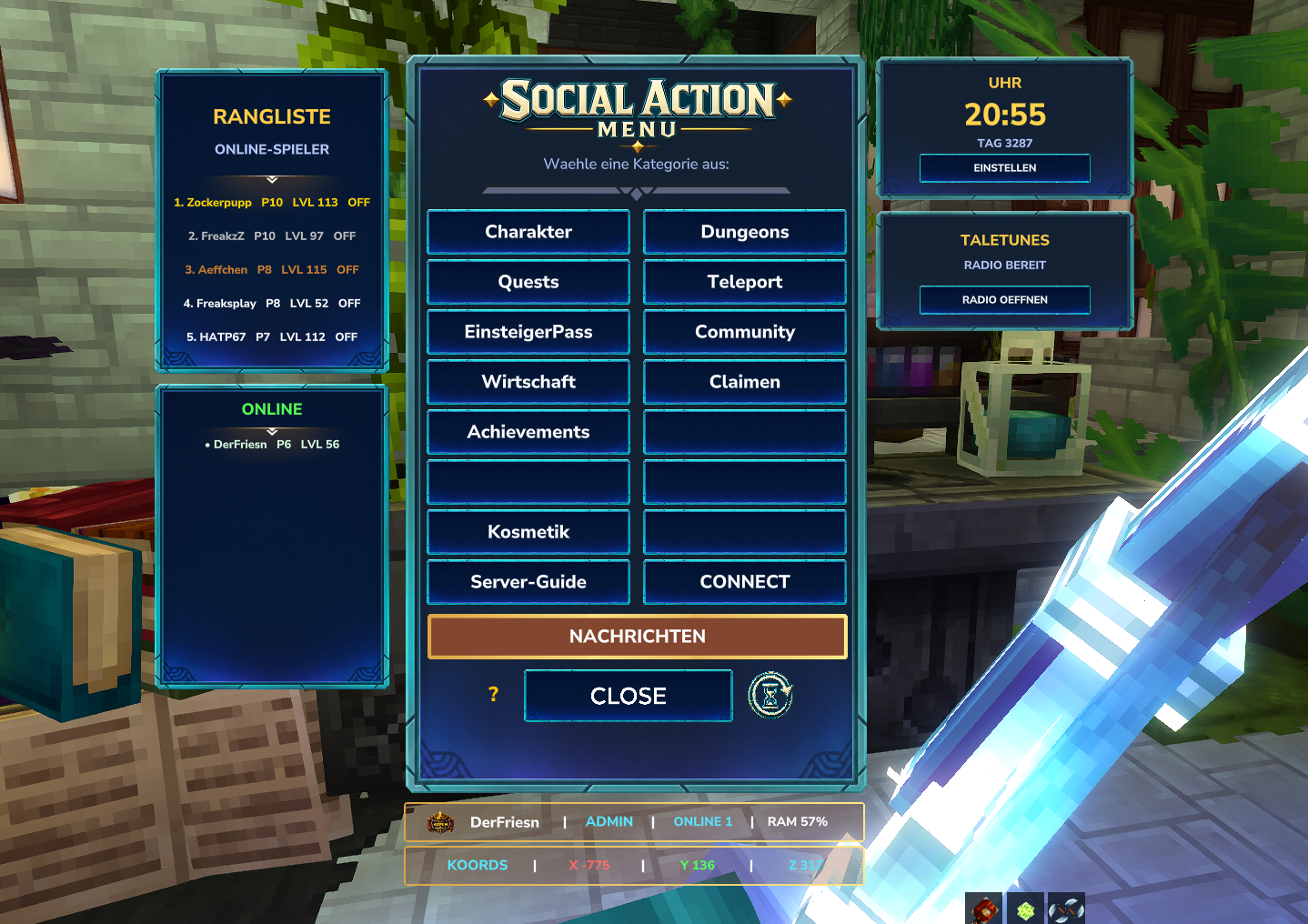
SocialActionMenu V10.9Update
A modern, animated and highly customizable action menu for Hytale servers. Perfect for RPG servers, MMO systems, custom commands, utility menus, server hubs and community integrations.
CurseForge Summary
Adds a customizable Hytale action menu with pages, command buttons, rankings, online player display, coordinates, optional clock, optional TaleTunes panel and German/English config support.
New in V10.9
This update focuses on the extended side UI and the new optional information panels.
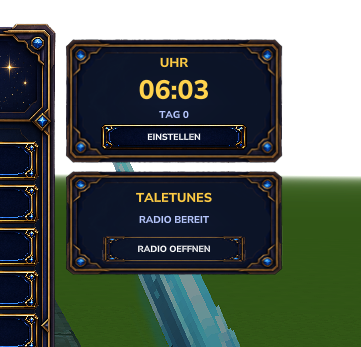
Clock Panel
SocialActionMenu now includes its own clock panel.
The clock can show:
- In-game time
- Real time
- Day display
- 24-hour or 12-hour format
- German or English text labels
- Its own settings page inside the menu
HyClock is no longer required for the SocialActionMenu clock.
TaleTunes Panel
A new optional TaleTunes panel was added below the clock area.
If TaleTunes is installed and enabled on the server, SocialActionMenu can show a small radio panel with a button to open the TaleTunes radio UI.
If TaleTunes is not installed, the TaleTunes panel will not be shown.
Coordinates Display

A new coordinate display was added to the bottom info area.
Players can now see their current position directly inside the SocialActionMenu UI:
X 123 Y 64 Z -456
No extra setup is required for the coordinate display.
New Config File for Clock and TaleTunes
Clock and TaleTunes texts are now separated into their own config file:
mods/SocialActionMenu/SocialActionClock.json
This makes it easier to translate or customize the clock and TaleTunes UI without touching the main menu config.
Important Update Notes
Please remove older SocialActionMenu .jar files before installing this version.
If you already have an older SocialActionClock.json, the mod will still use fallback defaults, but the new values may not appear inside the file automatically.
If the new config options are missing, you can either:
- Add the missing values manually
- Or delete
SocialActionClock.jsononce and let the mod generate a fresh version
After changing the config, use:
/socialmenureload
or restart the server.
Clock and TaleTunes Config
Config file:
mods/SocialActionMenu/SocialActionClock.json
Full Example Config
{
  "activeLanguage": "de",
  "defaults": {
    "enabled": true,
    "showClockPanel": true,
    "showTaleTunesPanel": true,
    "use24Hour": true,
    "showRealTime": false,
    "showDays": true
  },
  "texts": {
    "de": {
      "panelTitle": "UHR",
      "settingsButton": "EINSTELLEN",
      "disabledTime": "AUS",
      "disabledSubline": "ANZEIGE AUS",
      "realTimeLabel": "ECHTZEIT",
      "gameTimeLabel": "SPIELZEIT",
      "dayPrefix": "TAG",
      "settingsTitle": "UHR EINSTELLUNGEN",
      "settingsDescription": "Eigene SocialActionMenu-Uhr ohne HyClock.",
      "buttonToggleEnabled": "UHR AN/AUS",
      "buttonToggleFormat": "24H / 12H",
      "buttonToggleSource": "SPIELZEIT / ECHTZEIT",
      "buttonToggleDays": "TAG AN/AUS",
      "buttonRefresh": "AKTUALISIEREN",
      "buttonBack": "ZURUECK",
      "taleTunesTitle": "TALETUNES",
      "taleTunesSubline": "RADIO BEREIT",
      "taleTunesButton": "RADIO OEFFNEN"
    },
    "en": {
      "panelTitle": "CLOCK",
      "settingsButton": "SETTINGS",
      "disabledTime": "OFF",
      "disabledSubline": "DISPLAY OFF",
      "realTimeLabel": "REAL TIME",
      "gameTimeLabel": "GAME TIME",
      "dayPrefix": "DAY",
      "settingsTitle": "CLOCK SETTINGS",
      "settingsDescription": "Built-in SocialActionMenu clock without HyClock.",
      "buttonToggleEnabled": "CLOCK ON/OFF",
      "buttonToggleFormat": "24H / 12H",
      "buttonToggleSource": "GAME TIME / REAL TIME",
      "buttonToggleDays": "DAY ON/OFF",
      "buttonRefresh": "REFRESH",
      "buttonBack": "BACK",
      "taleTunesTitle": "TALETUNES",
      "taleTunesSubline": "RADIO READY",
      "taleTunesButton": "OPEN RADIO"
    }
  }
}
Enable or Disable Clock and TaleTunes
Hide the complete clock panel
Set this inside defaults:
"showClockPanel": false
Show the clock panel again
"showClockPanel": true
Hide the TaleTunes panel
"showTaleTunesPanel": false
Show the TaleTunes panel again
"showTaleTunesPanel": true
Important: The TaleTunes panel only appears if TaleTunes is installed and loaded on the server.
Disable only the clock display, but keep the panel/settings available
"enabled": false
Enable the clock display again
"enabled": true
Use 24-hour format
"use24Hour": true
Use 12-hour format
"use24Hour": false
Use real time
"showRealTime": true
Use in-game time
"showRealTime": false
Show day display
"showDays": true
Hide day display
"showDays": false
German and English Language Support
The clock and TaleTunes texts can be switched between German and English.
German
"activeLanguage": "de"
English
"activeLanguage": "en"
You can also edit all text entries manually under:
"texts": {
  "de": {
    ...
  },
  "en": {
    ...
  }
}
This allows server owners to fully customize labels, button texts and descriptions.
Coordinates
The coordinate display is shown automatically in the bottom info area of the SocialActionMenu.
It shows the current player position:
X / Y / Z
No extra config is required for coordinates in this version.
Main Features
- Custom command buttons
- Custom pages and categories
- Open the menu with ALT
- Optional ALT HUD
- Toggle ALT HUD ingame with
/socialhud - Page-based menu structure
- Supports subpages
- Supports player commands
- Supports console commands
- Supports player placeholders like
{name} - Clickable and styled chat messages
- Ranking display
- Online player display
- Player info card
- Coordinate display
- Optional clock panel
- Optional TaleTunes panel
- German and English text support for clock/TaleTunes
- Ingame config reload with
/socialmenureload - Good for RPG/MMO servers, hubs, utility menus and community servers
Commands
Open / use the menu
The menu opens with the ALT key.
Toggle ALT HUD
/socialhud
Use once to hide the ALT HUD. Use again to show it again.
Reload config
/socialmenureload
This reloads the SocialActionMenu config and the clock config.
Main Config File
The main menu config controls pages, buttons, ranking, online list, status, HUD and info panel.
mods/SocialActionMenu/SocialActionMenu.json
The clock and TaleTunes panel use their own config:
mods/SocialActionMenu/SocialActionClock.json
Button System
Every button can define what it should do.
Supported Action Types
| Action Type | Description |
|---|---|
PAGE |
Opens another menu page |
COMMAND |
Runs a command |
LINK |
Sends a clickable rich-text link message |
MESSAGE |
Sends a styled chat message |
BACK |
Goes back to the main menu |
CLOSE |
Closes the menu |
NONE |
Empty or disabled button |
Button Options
| Option | Description |
|---|---|
label |
Text displayed on the button |
actionType |
Defines what the button does |
targetPage |
Page ID used by PAGE |
command |
Command used by COMMAND |
runAs |
Defines whether the command runs as player or console |
message |
Styled message used by LINK or MESSAGE |
RunAs Options
| Option | Description |
|---|---|
PLAYER |
Runs the command as the player |
CONSOLE |
Runs the command as the server console |
You can use placeholders like:
{name}
Example:
"command": "spawn {name}",
"runAs": "CONSOLE"
Example Button Config
Main Menu Button Opening a Page
"button1": {
  "label": "Character",
  "actionType": "PAGE",
  "targetPage": "character",
  "command": "",
  "runAs": "PLAYER"
}
Subpage Button Running a Command
"button1": {
  "label": "Character Profile",
  "actionType": "COMMAND",
  "targetPage": "",
  "command": "lvl profile",
  "runAs": "PLAYER"
}
Back Button
"button15": {
  "label": "Back",
  "actionType": "BACK",
  "targetPage": "",
  "command": "",
  "runAs": "PLAYER"
}
Close Button
"button16": {
  "label": "Close",
  "actionType": "CLOSE",
  "targetPage": "",
  "command": "",
  "runAs": "PLAYER"
}
Clickable Link Button
{
"label": "Discord",
"actionType": "LINK",
"targetPage": "",
"command": "",
"runAs": "PLAYER",
"message": "<b><color:#B388FF>[DISCORD]</color></b> <color:#FFFFFF>Join our community:</color> <link:https://discord.gg/example><b><color:#FFD700>CLICK HERE</color></b></link>"
}
Example SocialActionMenu Config
This is a shortened example. You can add more pages and buttons the same way.
{
  "menu": {
    "description": "Choose a category:"
  },
  "language": {
    "rankingTitle": "RANKING",
    "onlineTitle": "ONLINE PLAYERS",
    "onlineStatusOn": "ON",
    "onlineStatusOff": "OFF",
    "levelPrefix": "LVL",
    "prestigePrefix": "P",
    "statusOnlinePrefix": "ONLINE",
    "statusRamPrefix": "RAM",
    "noRankingData": "No ranking data available",
    "noOnlinePlayers": "No players online",
    "restartAlertMissing": "RestartAlert is currently not available.",
    "pageNotFound": "SocialActionMenu page not found:"
  },
  "ranking": {
    "enabled": true,
    "maxEntries": 5,
    "showPrestige": true,
    "showLevel": true,
    "showStatus": true,
    "debug": false,
    "cache": {
      "maxEntries": 250,
      "maxAgeDays": 180
    }
  },
  "onlineList": {
    "enabled": true,
    "maxEntries": 5
  },
  "status": {
    "showOnline": true,
    "showRam": true
  },
  "hud": {
    "enabled": true,
    "title": "Social Menu",
    "keyText": "ALT",
    "toggleCommand": "socialhud",
    "iconText": "",
    "side": "left",
    "horizontalOffset": 12,
    "topOffset": 276,
    "width": 112,
    "height": 191
  },
  "buttons": {
    "button1": {
      "label": "Character",
      "actionType": "PAGE",
      "targetPage": "character",
      "command": "",
      "runAs": "PLAYER"
    },
    "button2": {
      "label": "Teleport",
      "actionType": "PAGE",
      "targetPage": "teleport",
      "command": "",
      "runAs": "PLAYER"
    },
    "button3": {
      "label": "Community",
      "actionType": "PAGE",
      "targetPage": "community",
      "command": "",
      "runAs": "PLAYER"
    },
    "button16": {
      "label": "Close",
      "actionType": "CLOSE",
      "targetPage": "",
      "command": "",
      "runAs": "PLAYER"
    }
  },
  "pages": {
    "character": {
      "title": "Character",
      "description": "Profile, classes, races, augments and skill points.",
      "buttons": {
        "button1": {
          "label": "Profile",
          "actionType": "COMMAND",
          "targetPage": "",
          "command": "lvl profile",
          "runAs": "PLAYER"
        },
        "button2": {
          "label": "Classes",
          "actionType": "COMMAND",
          "targetPage": "",
          "command": "lvl classes",
          "runAs": "PLAYER"
        },
        "button15": {
          "label": "Back",
          "actionType": "BACK",
          "targetPage": "",
          "command": "",
          "runAs": "PLAYER"
        },
        "button16": {
          "label": "Close",
          "actionType": "CLOSE",
          "targetPage": "",
          "command": "",
          "runAs": "PLAYER"
        }
      }
    },
    "teleport": {
      "title": "Teleport",
      "description": "Quick travel options.",
      "buttons": {
        "button1": {
          "label": "Spawn",
          "actionType": "COMMAND",
          "targetPage": "",
          "command": "spawn {name}",
          "runAs": "CONSOLE"
        },
        "button2": {
          "label": "Home",
          "actionType": "COMMAND",
          "targetPage": "",
          "command": "tp home",
          "runAs": "PLAYER"
        },
        "button15": {
          "label": "Back",
          "actionType": "BACK",
          "targetPage": "",
          "command": "",
          "runAs": "PLAYER"
        },
        "button16": {
          "label": "Close",
          "actionType": "CLOSE",
          "targetPage": "",
          "command": "",
          "runAs": "PLAYER"
        }
      }
    }
  }
}
Config Migration Notice
Older SocialActionMenu versions used a simpler one-page config format.
For newer versions, use the page-based config structure with:
buttonspagesactionTypetargetPagecommandrunAs
If you update from an older version, it is recommended to:
- Back up your old config
- Start the server once with the new version
- Let the mod generate the new example config
- Move your old buttons into the new page structure manually
Perfect For
- RPG servers
- MMO servers
- Community hubs
- Quest systems
- Leveling systems
- Dungeon systems
- Economy menus
- Teleport menus
- BattlePass menus
- Claim menus
- Server utility menus
Recommended: MultipleHUD
This mod is built to work together with:
MultipleHUD helps with:
- Better compatibility
- Shared UI systems
- Easier integration between mods
- Consistent user experience
For the best experience, make sure MultipleHUD is installed.
Inspiration
This mod was inspired by Okey Mod and HyMenu.
Support
If you enjoy this mod, consider leaving a star on CurseForge.
Other Projects
Check out my other Hytale projects here:
Project description from CurseForge.
Pick your setup
Social-Action-Menu releases for each Hytale build.
Choose the version and loader you play, then open the matching release.
Check the dependencies, then try the file in a copied instance before changing a world you care about.
Recent files
Social-Action-Menu releases and Hytale builds
SocialActionMenu-0.5.7.jar
22 Jul 2026
Client Not supported Server Required Dependencies No extras listed Listed on Project page
Check the 0.5 setup 0.5 release
SocialActionMenu-V11-Aligned.jar
22 Jul 2026
Client Not supported Server Required Dependencies No extras listed Listed on Project page
Check the 0.5 setup 0.5 release
SocialActionMenu-V11.jar
21 Jul 2026
Client Not supported Server Required Dependencies No extras listed Listed on Project page
Check the 0.5 setup 0.5 release
SocialActionMenu-V10.9-cordies-tunes-clock.jar
26 Jun 2026
Client Not supported Server Required Dependencies No extras listed Listed on Project page
Check the 0.5 setup 0.5 release
SocialActionMenu_V10.5-Guide.Button.jar
19 Jun 2026
Client Not supported Server Required Dependencies No extras listed Listed on Project page
Check the 0.5 setup 0.5 release
SocialActionMenu_V10_ALT_UI.jar
17 Jun 2026
Client Not supported Server Required Dependencies No extras listed Listed on Project page
Check the 0.5 setup 0.5 release
SocialActionMenu-V9.jar
15 Jun 2026
Client Not supported Server Required Dependencies No extras listed Listed on Project page
Check the 0.5 setup 0.5 release
SocialActionMenu-closes-first.jar
14 Jun 2026
Client Not supported Server Required Dependencies No extras listed Listed on Project page
Check the 0.5 setup 0.5 release
SocialActionMenu V8-Pages-new-Config.jar
10 Jun 2026
Client Not supported Server Required Dependencies No extras listed Listed on Project page
Check the 0.5 setup 0.5 release
SocialActionMenu-Language-socialmenureload.jar
8 Jun 2026
Client Not supported Server Required Dependencies No extras listed Listed on Project page
Check the 0.5 setup 0.5 release
SocialActionMenu V6.1-Top-5-Player-Only-Endless-Lvl.jar
3 Jun 2026
Client Not supported Server Required Dependencies No extras listed Listed on Project page
Check the setup SocialActionMenu V5.3- RestartAlert-Button-paused .jar
30 May 2026
Client Not supported Server Required Dependencies No extras listed Listed on Project page
Check the setup Looking for an older file? The official CurseForge project page is in Resources.
 mod
mod CurseForge · Hytale
Endless Demon Hunter V2
Become a fast and aggressive Demon Hunter with powerful class abilities, demonic wings, fire attacks, and heavy area damage.
 mod
mod CurseForge · Hytale
Twinfang Glaives V4
**Twinfang Glaives** adds a growing collection of dual-wielded glaives to Hytale.
 mod
mod CurseForge · Hytale
Endless Elite Mobs V3 (RPG Mobs)
Adds elite RPG mobs with 13 unique abilities all with custom interactions and cool visual effects, all very dangerous.