 Daily Streak Rewards - Rewards for daily login streak!
Hytale version
Back to mods 
CurseForge · Hytale mod
Zeto Gambling
Zeto Gambling adds fully functional fantasy casino machines to Hytale, including slot machines and claw machines with configurable rewards.
Choose a version Pick your version below, then grab the matching file.
Quick answer
Which Zeto Gambling release should I use?
Latest stable file ZetoGambling-2.2.6.jar
Game version 0.5
Mod system Built-in Hytale mod system
Zeto Gambling ZetoGambling-2.2.6.jar targets 0.5. Do not install it as a separate client mod. Enable it on the world host—the local server in singleplayer or the dedicated server in multiplayer. No required dependencies listed for this file.
Where it goes
Where should Zeto Gambling be installed in Hytale?
Do not install it as a separate client mod. Enable it on the world host—the local server in singleplayer or the dedicated server in multiplayer.
Separate client mod Not supported
World host / dedicated server Required
Mod system for this release Built-in Hytale mod system
Required install it here Optional supported, not mandatory Not supported do not install here Source doesn’t say do not assume
Put Hytale mods on the world host or dedicated server. Singleplayer runs a local server too; Hytale does not use separate client mods.
What else does Zeto Gambling ZetoGambling-2.2.6.jar need?
ZetoGambling-2.2.6.jar. Change the file and its required mods may change too.
This file does not list any required mods. Do not add a library just because a different file uses it.
This file does not list any required or optional project dependencies. Check the creator notes before changing an existing world.
Before you install it
Add Zeto Gambling without breaking your instance.
Built for Zeto Gambling ZetoGambling-2.2.6.jar. Pick another file and the loader, install side or required mods may change.
- 01
Stick to this file
Use ZetoGambling-2.2.6.jar. It targets 0.5; another release may target a different game build or dependency set.
- 02
Bring the mods it needs
This file does not list any required mods. Do not add a library just because a different file uses it.
- 03
Enable it on the world host
Do not install it as a separate client mod. Enable it on the world host—the local server in singleplayer or the dedicated server in multiplayer.
- 04
Pick the file you checked
Use the “Get this file” button beside ZetoGambling-2.2.6.jar. It opens that exact file at the source.
About this project
What does Zeto Gambling add?
ZetoGambling
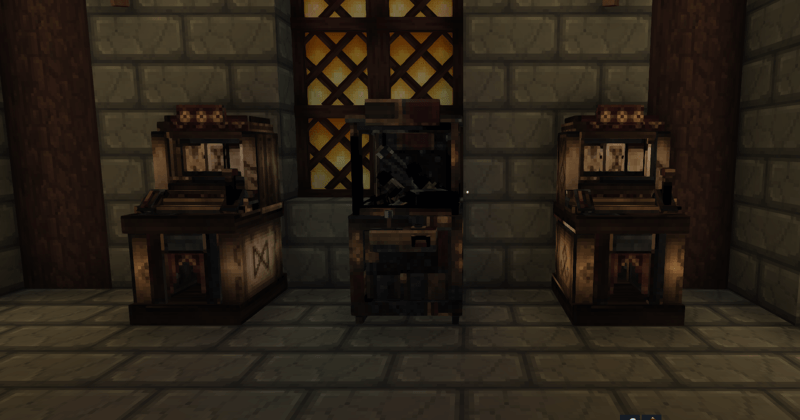
ZetoGambling adds fully functional casino machines to Hytale servers, including a slot machine and a claw machine with configurable rewards, server-side protection and medieval-style models.
Tested on Hytale Server 0.5.6.
Features
- Functional slot machine and claw machine
- Rewards managed directly in-game
- Support for item rewards and console commands
- Automatic
{player}placeholder replacement - Changes applied instantly without restarting the server
- Optional crafting recipes for each machine
- Compatible with SimpleClaims
- Medieval models made from wood, forged iron, brass and decorative runes
- Original lever, reel and claw animations preserved

Installation
- Stop the server.
- Remove any previous
GAMBLING!!!.zip,GAMBLING-Live-*.jarand olderZetoGambling-*.jarfiles from theModsfolder. - Place
ZetoGambling-2.1.1.jarinside theModsfolder. - Start the server.
Reward Editor
Use:
/gambling
Choose either Slot machine or Claw machine.
The editor allows you to add, modify and remove:
- Item rewards
- Console command rewards
For command rewards, enter only the command itself, without /.
Example:
lootbox givekey {player} blok 1
{player} is automatically replaced with the name of the player who won the reward.
All changes are saved and applied immediately.
Required permission:
chaszczu.gamblinglive.command.gambling
Server operators receive this permission by default.
Crafting Configuration
Open:
mods/Zeto_Gambling/crafting.properties
Available options:
AllowCraftSlotMachine=true
AllowCraftClawMachine=true
Change a value to false to disable the selected recipe.
The recipe will disappear from the workbench and crafting will also be blocked server-side. Configuration changes are detected automatically, usually within one second, so a server restart is not required.
Players who already have a workbench open should close and reopen it.
Claims Compatibility
Both machines can still be used inside protected SimpleClaims areas. Other block protection rules remain active.
Medieval Models
The machines use detailed medieval designs created specifically for the mod.
The slot machine combines dark wood, forged iron, brass decorations and runic reels. The claw machine resembles an alchemist’s prize cabinet with reinforced metal corners, illuminated details and a chain-operated claw.
Check my other mods:
 Zeto Admin Map Markers - Customizable Markers & Graphics on Map
 Metin Reforging - Upgrade items like in Metin2
 Zeto Fake Players - Fake Players with AI on Chat
Premium mods:
Project description from CurseForge.
Pick your setup
Zeto Gambling releases for each Hytale build.
Choose the version and loader you play, then open the matching release.
Check the dependencies, then try the file in a copied instance before changing a world you care about.
Recent files
Zeto Gambling releases and Hytale builds
ZetoGambling-2.2.6.jar
6 Aug 2026
Client Not supported Server Required Dependencies No extras listed Listed on Project page
Check the 0.5 setup 0.5 release
ZetoGambling-2.2.4.jar
4 Aug 2026
Client Not supported Server Required Dependencies No extras listed Listed on Project page
Check the 0.5 setup 0.5 release
ZetoGambling-2.2.2.jar
29 Jul 2026
Client Not supported Server Required Dependencies No extras listed Listed on Project page
Check the 0.5 setup 0.5 release
ZetoGambling-2.2.0.jar
24 Jul 2026
Client Not supported Server Required Dependencies No extras listed Listed on Project page
Check the 0.5 setup 0.5 release
ZetoGambling-2.1.4.jar
17 Jul 2026
Client Not supported Server Required Dependencies No extras listed Listed on Project page
Check the 0.5 setup 0.5 release
ZetoGambling-2.1.3.jar
10 Jul 2026
Client Not supported Server Required Dependencies No extras listed Listed on Project page
Check the 0.5 setup 0.5 release
ZetoGambling-2.1.2.jar
10 Jul 2026
Client Not supported Server Required Dependencies No extras listed Listed on Project page
Check the 0.5 setup 0.5 release
ZetoGambling-2.1.1.jar
10 Jul 2026
Client Not supported Server Required Dependencies No extras listed Listed on Project page
Check the 0.5 setup 0.5 release
Looking for an older file? The official CurseForge project page is in Resources.
 mod
mod CurseForge · Hytale
Machine Blocks
Make your Hytale Factory dream come true using technology through a tiered discovery system. Mostly Single block machines (this is not for the faint of heart, they are expensive). Tech, furnace, crusher, plant, fuel, alloy, miner, crop, farm, ore
 mod
mod CurseForge · Hytale
Endless Elite Mobs V3 (RPG Mobs)
Adds elite RPG mobs with 13 unique abilities all with custom interactions and cool visual effects, all very dangerous.
 mod
mod CurseForge · Hytale
Cultivation: Xianxia Leveling & Realm Progression
Walk the path of a Xianxia cultivator. Meditate for Spirit Qi, break through 7 realms, temper your body in battle, found a sect, walk an elemental Dao, brew pills, raise spirit beasts, survive heavenly tribulation -- then ascend past the peak itself.