 Daily Streak Rewards - Rewards for daily login streak!
Hytale version
Back to mods 
CurseForge · Hytale mod
More Arrows by Zeto
Expand archery in Hytale with new arrow types, unique effects and meaningful progression.
Choose a version Pick your version below, then grab the matching file.
Quick answer
Which More Arrows by Zeto release should I use?
Latest stable file More-Arrows-by-Zeto-2.3.4.jar
Game version 0.5
Mod system Built-in Hytale mod system
More Arrows by Zeto More-Arrows-by-Zeto-2.3.4.jar targets 0.5. Do not install it as a separate client mod. Enable it on the world host—the local server in singleplayer or the dedicated server in multiplayer. No required dependencies listed for this file.
Where it goes
Where should More Arrows by Zeto be installed in Hytale?
Do not install it as a separate client mod. Enable it on the world host—the local server in singleplayer or the dedicated server in multiplayer.
Separate client mod Not supported
World host / dedicated server Required
Mod system for this release Built-in Hytale mod system
Required install it here Optional supported, not mandatory Not supported do not install here Source doesn’t say do not assume
Put Hytale mods on the world host or dedicated server. Singleplayer runs a local server too; Hytale does not use separate client mods.
What else does More Arrows by Zeto More-Arrows-by-Zeto-2.3.4.jar need?
More-Arrows-by-Zeto-2.3.4.jar. Change the file and its required mods may change too.
This file does not list any required mods. Do not add a library just because a different file uses it.
This file does not list any required or optional project dependencies. Check the creator notes before changing an existing world.
Before you install it
Add More Arrows by Zeto without breaking your instance.
Built for More Arrows by Zeto More-Arrows-by-Zeto-2.3.4.jar. Pick another file and the loader, install side or required mods may change.
- 01
Stick to this file
Use More-Arrows-by-Zeto-2.3.4.jar. It targets 0.5; another release may target a different game build or dependency set.
- 02
Bring the mods it needs
This file does not list any required mods. Do not add a library just because a different file uses it.
- 03
Enable it on the world host
Do not install it as a separate client mod. Enable it on the world host—the local server in singleplayer or the dedicated server in multiplayer.
- 04
Pick the file you checked
Use the “Get this file” button beside More-Arrows-by-Zeto-2.3.4.jar. It opens that exact file at the source.
About this project
What does More Arrows by Zeto add?
More Arrows by Zeto
Expand archery in Hytale with new arrow types, unique effects and meaningful progression.
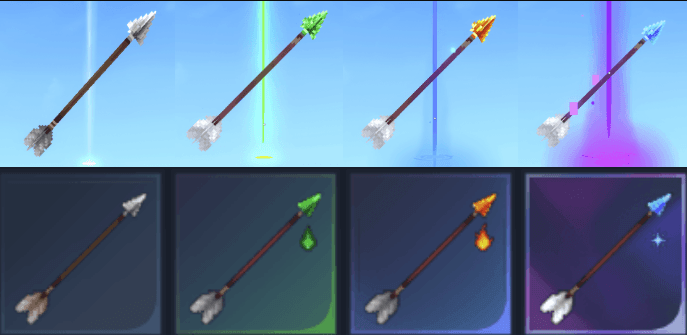
More Arrows introduces several specialized arrows designed to make ranged combat more varied, satisfying and tactical. Every arrow has its own recipe, statistics, visual trail, sound effects and combat utility.
The mod was created with three main priorities:
- Balanced gameplay and progression
- Satisfying visual and sound effects
- Natural integration with Hytale’s crafting and combat systems

These arrows are not intended to be an easy shortcut through the game or a way to instantly defeat powerful enemies. They are valuable utility items that require stronger materials and careful resource management.
Balance adjustments may be introduced in future updates based on testing and community feedback.
Features
- Multiple new arrow types
- Unique damage and status effects
- Custom trails, particles and sound effects
- Improved arrow flight speed and range
- Extended despawn time for missed arrows
- Ability to recover arrows that miss their target
- Compatibility with supported bow and crossbow mods
- Automatic prioritization of the strongest available arrow
- Recipes based on Hytale’s progression materials
When firing a bow or compatible crossbow, the game prioritizes the highest-tier arrow currently available in the player’s inventory.
Arrow Types
Iron Arrow
A reliable upgrade over the standard arrow, designed for stronger ranged damage and improved projectile performance.
Recipe:
- 4 Sticks
- 1 Iron Bar
Produces: 4 Iron Arrows
Features:
- +5 bonus impact damage
- Increased flight speed
- Increased effective range
- Grey and silver projectile trail
- Custom metallic visual effects
- Custom metallic sound effects
Poison Arrow
A tactical arrow that damages enemies over time while reducing their movement speed.
Recipe:
- 4 Sticks
- 1 Thorium Bar
- 2 Venom Sacs
Produces: 4 Poison Arrows
Features:
- Deals 1 damage every 0.375 seconds
- Effect lasts for 6 seconds
- Deals up to 16 additional poison damage
- Reduces the target’s movement speed by 30%
- Increased flight speed and range
- Green projectile trail
- Custom poison visual effects
- Custom poison sound effects
Fire Arrow
A powerful offensive arrow that sets enemies ablaze and pushes them backwards on impact.
Recipe:
- 4 Sticks
- 1 Adamantite Bar
- 2 Essence of Fire
Produces: 4 Fire Arrows
Features:
- Deals 4 damage every 0.75 seconds
- Burning effect lasts for 4 seconds
- Deals up to 20 additional fire damage
- Applies approximately 1 block of knockback
- Increased flight speed and range
- Orange, yellow and red projectile trail
- Custom fire visual effects
- Custom fire sound effects
Ice Arrow
A high-tier utility arrow capable of freezing enemies and dealing substantial additional damage.
Recipe:
- 4 Sticks
- 1 Mithril Bar
- 4 Essence of Ice
Produces: 4 Ice Arrows
Features:
- Deals 12 damage every 0.7 seconds
- Effect lasts for 2 seconds
- Deals up to 24 additional ice damage
- Freezes the target for 1 second
- Applies approximately 1 block of knockback
- Increased flight speed and range
- Blue and cyan projectile trail
- Custom ice visual effects
- Custom ice sound effects
Installation
JAR Installation
Download the latest
.jarversion of More Arrows.Move the file into:
C:\Users\[USER]\AppData\Roaming\Hytale\UserData\mods
Open Hytale.
Right-click your world.
Enable More Arrows in the world’s mod settings.
Load the world and enjoy.
Do not extract the .jar file.
ZIP Installation
Download the
.zipversion of the mod.Move the file into:
C:\Users\[USER]\AppData\Roaming\Hytale\UserData\mods
Open Hytale.
Right-click your world.
Enable More Arrows in the world’s mod settings.
Load the world and enjoy.
Do not extract the archive unless the installation instructions included with a specific release state otherwise.
Support Development
More Arrows is developed and maintained by Zeto.
Supporting me on Patreon helps fund continued development, compatibility updates, new arrow types, additional effects and future Hytale mods.
Patreon
https://www.patreon.com/c/Zeto_Glitch
Patreon members may receive access to additional benefits, development updates and server monetization options where explicitly stated for a particular mod or membership tier.
Feedback and Suggestions
Have an idea for another arrow type, a balance adjustment or compatibility with another mod?
Community feedback is welcome. Suggestions may influence future updates, but not every requested feature can be guaranteed.
When reporting a problem, please include:
- Hytale version
- More Arrows version
- Server or single-player environment
- Other installed combat, bow or crossbow mods
- Relevant logs or screenshots
- Steps required to reproduce the problem
More Mods by Zeto
More gameplay, server-management and quality-of-life mods are currently in development.
Follow my CurseForge profile and Patreon page to receive information about future releases and major updates.
Check my other mods:
 Zeto Admin Map Markers - Customizable Markers & Graphics on Map
 Metin Reforging - Upgrade items like in Metin2
 Zeto Fake Players - Fake Players with AI on Chat
Premium mods:
Project description from CurseForge.
Pick your setup
More Arrows by Zeto releases for each Hytale build.
Choose the version and loader you play, then open the matching release.
Check the dependencies, then try the file in a copied instance before changing a world you care about.
Recent files
More Arrows by Zeto releases and Hytale builds
More-Arrows-by-Zeto-2.3.4.jar
11 Sept 2026
Client Not supported Server Required Dependencies No extras listed Listed on Project page
Check the 0.5 setup 0.5 release
More-Arrows-by-Zeto-2.3.2.jar
27 Aug 2026
Client Not supported Server Required Dependencies No extras listed Listed on Project page
Check the 0.5 setup 0.5 release
More-Arrows-by-Zeto-2.3.1.jar
18 Aug 2026
Client Not supported Server Required Dependencies No extras listed Listed on Project page
Check the 0.5 setup 0.5 release
More-Arrows-by-Zeto-2.3.0.jar
30 Jul 2026
Client Not supported Server Required Dependencies No extras listed Listed on Project page
Check the 0.5 setup 0.5 release
Looking for an older file? The official CurseForge project page is in Resources.
 mod
mod CurseForge · Hytale
Zeto Polish – Pełne polskie tłumaczenie - spolszczenie
Comprehensive Polish translation featuring corrected item names and integration with the Polish Hytaris server.
 mod
mod CurseForge · Hytale
NoDurability
Tools, weapons and armor never lose durability, modded items included. /nodurability turns it back on for any of the three and repairs everything you carry. Server-side, applied once when items load, nothing runs per tick.
 mod
mod CurseForge · Hytale
God Mode Menu
Infinite health, stamina, oxygen, mana and signature energy, flight, walk speed and jump sliders, keep inventory on death and mobs that ignore you, all from an in-game menu (/godmode). Saved with your character. Server-side.