Hytale version
Back to mods 
CurseForge · Hytale mod
PPFVFXBlock
Add a block that play a VFX continuously
Choose a version Pick your version below, then grab the matching file.
Quick answer
Which PPFVFXBlock release should I use?
Latest stable file PPFVFXBlock-1.0.0.jar
Game version 0.6
Mod system Built-in Hytale mod system
PPFVFXBlock-1.0.0.jar targets 0.6. Do not install it as a separate client mod. Enable it on the world host—the local server in singleplayer or the dedicated server in multiplayer. No required dependencies listed for this file.
Where it goes
Where should PPFVFXBlock be installed in Hytale?
Do not install it as a separate client mod. Enable it on the world host—the local server in singleplayer or the dedicated server in multiplayer.
Separate client mod Not supported
World host / dedicated server Required
Mod system for this release Built-in Hytale mod system
Required install it here Optional supported, not mandatory Not supported do not install here Source doesn’t say do not assume
Put Hytale mods on the world host or dedicated server. Singleplayer runs a local server too; Hytale does not use separate client mods.
What else does PPFVFXBlock-1.0.0.jar need?
PPFVFXBlock-1.0.0.jar. Change the file and its required mods may change too.
This file does not list any required mods. Do not add a library just because a different file uses it.
This file does not list any required or optional project dependencies. Check the creator notes before changing an existing world.
Before you install it
Add PPFVFXBlock without breaking your instance.
Built for PPFVFXBlock-1.0.0.jar. Pick another file and the loader, install side or required mods may change.
- 01
Stick to this file
Use PPFVFXBlock-1.0.0.jar. It targets 0.6; another release may target a different game build or dependency set.
- 02
Bring the mods it needs
This file does not list any required mods. Do not add a library just because a different file uses it.
- 03
Enable it on the world host
Do not install it as a separate client mod. Enable it on the world host—the local server in singleplayer or the dedicated server in multiplayer.
- 04
Pick the file you checked
Use the “Get this file” button beside PPFVFXBlock-1.0.0.jar. It opens that exact file at the source.
About this project
What does PPFVFXBlock add?
PPFVFXBlock mod add a helpful block that play a VFX continuously !
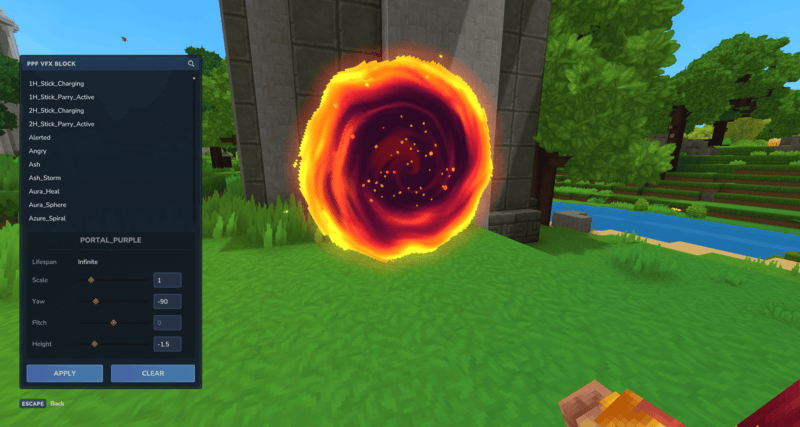
Features
VFX config :
- Scale
- Rotation
- Pitch
- Height
Feature under development
- Fix: Reload chunk VFX missing
- Add: Apply a block texture
Project description from CurseForge.
Pick your setup
PPFVFXBlock releases for each Hytale build.
Choose the version and loader you play, then open the matching release.
Check the dependencies, then try the file in a copied instance before changing a world you care about.
Recent files
PPFVFXBlock releases and Hytale builds
PPFVFXBlock-1.0.0.jar
7 Sept 2026
Client Not supported Server Required Dependencies No extras listed Listed on Project page
Check the 0.6 setup 0.6 release
Looking for an older file? The official CurseForge project page is in Resources.
 mod
mod CurseForge · Hytale
HyCurrency
Create, Sell and Buy with this coins and 2 new workbenches!
 mod
mod CurseForge · Hytale
Open Structure
OpenStructures is an open worldgen structure hub for Hytale spawn/paste engine, admin tools, and a public API so other mods can ship structure packs.
 mod
mod CurseForge · Hytale
Mr. Green's Mining Helmet
Ditch the torch clutter! The Miner’s Helmet projects a dynamic halo of light around your character as you explore. Uncover hidden ores, navigate pitch-black caverns, and keep your hands free for heavy mining.