Hytale version
Back to mods 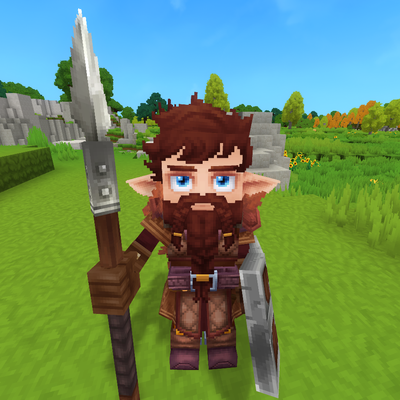
CurseForge · Hytale mod
Hoplite: Spear And Shield
Hold a shield and your spear goes one-handed. Drop the shield and it's two-handed again.
Choose a version Pick your version below, then grab the matching file.
Quick answer
Which Hoplite: Spear And Shield release should I use?
beta file Spear_And_Shield-2.2.0.jar
Game version 0.6
Mod system Built-in Hytale mod system
Hoplite: Spear And Shield Spear_And_Shield-2.2.0.jar targets 0.6. Do not install it as a separate client mod. Enable it on the world host—the local server in singleplayer or the dedicated server in multiplayer. No required dependencies listed for this file.
Where it goes
Where should Hoplite: Spear And Shield be installed in Hytale?
Do not install it as a separate client mod. Enable it on the world host—the local server in singleplayer or the dedicated server in multiplayer.
Separate client mod Not supported
World host / dedicated server Required
Mod system for this release Built-in Hytale mod system
Required install it here Optional supported, not mandatory Not supported do not install here Source doesn’t say do not assume
Put Hytale mods on the world host or dedicated server. Singleplayer runs a local server too; Hytale does not use separate client mods.
What else does Hoplite: Spear And Shield Spear_And_Shield-2.2.0.jar need?
Spear_And_Shield-2.2.0.jar. Change the file and its required mods may change too.
This file does not list any required mods. Do not add a library just because a different file uses it.
This file does not list any required or optional project dependencies. Check the creator notes before changing an existing world.
Before you install it
Add Hoplite: Spear And Shield without breaking your instance.
Built for Hoplite: Spear And Shield Spear_And_Shield-2.2.0.jar. Pick another file and the loader, install side or required mods may change.
- 01
Stick to this file
Use Spear_And_Shield-2.2.0.jar. It targets 0.6; another release may target a different game build or dependency set.
- 02
Bring the mods it needs
This file does not list any required mods. Do not add a library just because a different file uses it.
- 03
Enable it on the world host
Do not install it as a separate client mod. Enable it on the world host—the local server in singleplayer or the dedicated server in multiplayer.
- 04
Pick the file you checked
Use the “Get this file” button beside Spear_And_Shield-2.2.0.jar. It opens that exact file at the source.
About this project
What does Hoplite: Spear And Shield add?
Description
Spear and Shield lets you fight like a hoplite: a spear in one hand, a shield in the other.
How it works
- Spears stay two-handed by default.
- Put a shield in your off-hand and the spear in your main hand automatically switches to a one-handed version. Take the shield away and it switches back.
- Throwing still works in both modes (hold attack to charge).
- Durability is kept every time the spear switches.
- With a shield, the spear gets proper one-handed animations: it's held upright while you walk, run and jump, and you attack with a quick one-handed thrust.
Compatibility
- Works on its own with the base game spears.
- Works great together with Zapp's Better Spears, which makes spears craftable in survival. Spear and Shield picks up Zapp's stats and abilities automatically.
- All 17 spears from the base game are supported. Spears added by other mods are left untouched.
- Any shield works.
Project description from CurseForge.
Pick your setup
Hoplite: Spear And Shield releases for each Hytale build.
Choose the version and loader you play, then open the matching release.
Check the dependencies, then try the file in a copied instance before changing a world you care about.
Recent files
Hoplite: Spear And Shield releases and Hytale builds
Spear_And_Shield-2.2.0.jar
11 Oct 2026
Client Not supported Server Required Dependencies No extras listed Listed on Project page
Check the 0.6 setup Looking for an older file? The official CurseForge project page is in Resources.
 mod
mod CurseForge · Hytale
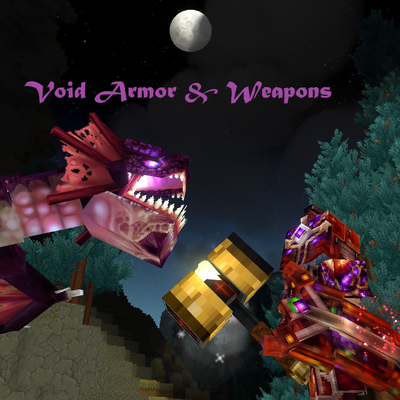
Void Armor & Weapons
Developed by the G.N.O.M.E. Institute, this armor fuses void crystals and blood magic into a devastatingly powerful defense.
 mod
mod CurseForge · Hytale
Lootr
A mod that makes it so nobody misses out on Loot! All loot chests are instanced per player and visually unique.
 mod
mod CurseForge · Hytale
New Life
A Hytale mod that lets players choose where they start in the world.