Hytale version
Back to mods 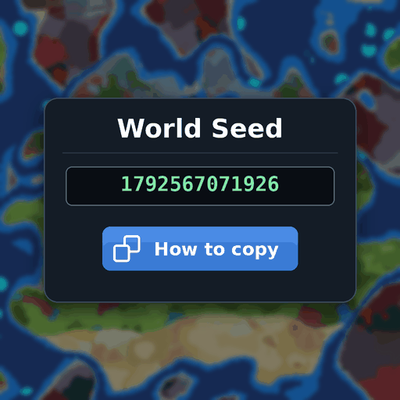
CurseForge · Hytale mod
OrbisSeedsUtils
OrbisSeedsUtils allows you to easily copy the world seed by doing /seed for use with a seedmap
Choose a version Pick your version below, then grab the matching file.
Quick answer
Which OrbisSeedsUtils release should I use?
Latest stable file 1.1.0
Game version 0.7
Mod system Built-in Hytale mod system
OrbisSeedsUtils 1.1.0 targets 0.7. Do not install it as a separate client mod. Enable it on the world host—the local server in singleplayer or the dedicated server in multiplayer. No required dependencies listed for this file.
Where it goes
Where should OrbisSeedsUtils be installed in Hytale?
Do not install it as a separate client mod. Enable it on the world host—the local server in singleplayer or the dedicated server in multiplayer.
Separate client mod Not supported
World host / dedicated server Required
Mod system for this release Built-in Hytale mod system
Required install it here Optional supported, not mandatory Not supported do not install here Source doesn’t say do not assume
Put Hytale mods on the world host or dedicated server. Singleplayer runs a local server too; Hytale does not use separate client mods.
What else does OrbisSeedsUtils 1.1.0 need?
1.1.0. Change the file and its required mods may change too.
This file does not list any required mods. Do not add a library just because a different file uses it.
This file does not list any required or optional project dependencies. Check the creator notes before changing an existing world.
Before you install it
Add OrbisSeedsUtils without breaking your instance.
Built for OrbisSeedsUtils 1.1.0. Pick another file and the loader, install side or required mods may change.
- 01
Stick to this file
Use 1.1.0. It targets 0.7; another release may target a different game build or dependency set.
- 02
Bring the mods it needs
This file does not list any required mods. Do not add a library just because a different file uses it.
- 03
Enable it on the world host
Do not install it as a separate client mod. Enable it on the world host—the local server in singleplayer or the dedicated server in multiplayer.
- 04
Pick the file you checked
Use the “Get this file” button beside 1.1.0. It opens that exact file at the source.
About this project
What does OrbisSeedsUtils add?
OrbisSeedsUtils
Summary: OrbisSeedsUtils allows you to easily copy the world seed by doing /seed for use with a seedmap
Description
OrbisSeedsUtils adds a /seed command that shows the seed of the world you're in, so you can use it with a seedmap.
Features
- Prints the world seed in chat
- Opens a small window with the seed in a text field. Click it and press Ctrl+A, then Ctrl+C to copy it
- A "How to copy" button reminds you of those steps
- Restricted to ops by default
Usage
Run /seed.
Permissions
orbisseedsutils.command.seed. Ops have it automatically. To give it to other players, grant them this permission.
Compatibility
Hytale server 0.4.4 and newer.
Why no one-click copy?
Hytale's server API can't write to a player's clipboard, so the window makes the seed easy to select instead.
Website to use the seed to look at the seedmap:
Project description from CurseForge.
Pick your setup
OrbisSeedsUtils releases for each Hytale build.
Choose the version and loader you play, then open the matching release.
Check the dependencies, then try the file in a copied instance before changing a world you care about.
Recent files
OrbisSeedsUtils releases and Hytale builds
1.1.0
22 Oct 2026
Client Not supported Server Required Dependencies No extras listed Listed on Project page
Check the 0.7 setup 0.7 release
1.0.0
21 Oct 2026
Client Not supported Server Required Dependencies No extras listed Listed on Project page
Check the 0.7 setup 0.7 release
Looking for an older file? The official CurseForge project page is in Resources.
 mod
mod CurseForge · Hytale
Ziggfreed's CommonLib
Common Library for Ziggfreed's Mods
 mod
mod CurseForge · Hytale
Garden Pruner
Craft a Garden Pruner to trim branches, leaves, vines, flowers, reeds, saplings, and other plants piece by piece.
 mod
mod CurseForge · Hytale
Zone View Control
Create admin-defined zones that limit chunk view radius in dense areas to improve gameplay stability