Hytale version
Back to mods 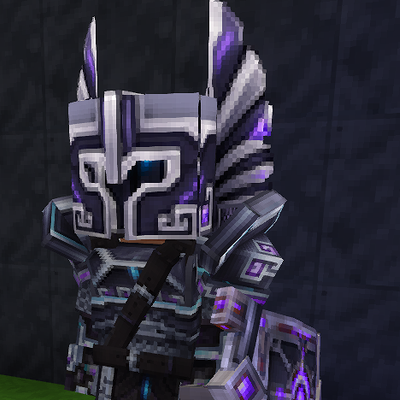
CurseForge · Hytale mod
Eclipse Forged Armor & Weapons
Six matching armor and weapon sets with silver detailing, and eclipse-inspired designs.
Choose a version Pick your version below, then grab the matching file.
Quick answer
Which Eclipse Forged Armor & Weapons release should I use?
Latest stable file Eclipseforged
Game version 0.7
Mod system Built-in Hytale mod system
Eclipse Forged Armor & Weapons Eclipseforged targets 0.7. Do not install it as a separate client mod. Enable it on the world host—the local server in singleplayer or the dedicated server in multiplayer. No required dependencies listed for this file.
Where it goes
Where should Eclipse Forged Armor & Weapons be installed in Hytale?
Do not install it as a separate client mod. Enable it on the world host—the local server in singleplayer or the dedicated server in multiplayer.
Separate client mod Not supported
World host / dedicated server Required
Mod system for this release Built-in Hytale mod system
Required install it here Optional supported, not mandatory Not supported do not install here Source doesn’t say do not assume
Put Hytale mods on the world host or dedicated server. Singleplayer runs a local server too; Hytale does not use separate client mods.
What else does Eclipse Forged Armor & Weapons Eclipseforged need?
Eclipseforged. Change the file and its required mods may change too.
This file does not list any required mods. Do not add a library just because a different file uses it.
This file does not list any required or optional project dependencies. Check the creator notes before changing an existing world.
Before you install it
Add Eclipse Forged Armor & Weapons without breaking your instance.
Built for Eclipse Forged Armor & Weapons Eclipseforged. Pick another file and the loader, install side or required mods may change.
- 01
Stick to this file
Use Eclipseforged. It targets 0.7; another release may target a different game build or dependency set.
- 02
Bring the mods it needs
This file does not list any required mods. Do not add a library just because a different file uses it.
- 03
Enable it on the world host
Do not install it as a separate client mod. Enable it on the world host—the local server in singleplayer or the dedicated server in multiplayer.
- 04
Pick the file you checked
Use the “Get this file” button beside Eclipseforged. It opens that exact file at the source.
About this project
What does Eclipse Forged Armor & Weapons add?
Eclipse Forged — Armor & Weapons
Forged in shadow. Finished in silver. Charged with color.
Give your arsenal a striking new look with Eclipseforged, a coordinated collection of armor and weapons featuring obsidian-dark metal, silver detailing, gemstone inlays, and an eclipse-inspired design.
Choose your finish:
💠 Original Eclipse — Violet inlays with icy cyan accents.
💚 Emerald Green — Vivid green accents against dark steel.
❤️ Ruby Red — Crimson details with a fierce finish.
🔥 Blazing Orange — Ember-colored highlights for a fiery look.
💛 Neon Yellow — Electric yellow accents that demand attention.
🖤 Black Silver — Deep black armor with polished silver highlights.
Each collection includes:
- Helmet, chestplate, gauntlets, and leggings
- Sword, battle axe, spear, shield, paired daggers, and bow
- Matching inventory icons and cosmetic weapon particles
That’s 60 separate equipment items, available in Creative by searching Eclipseforged. Built around Hytale’s Mithril equipment shapes and combat balance, these items stand alongside the default gear without replacing it.
Installation
Place the ZIP in your Hytale/UserData/Mods folder, enable Eclipseforged for your world, and restart Hytale. Leave the ZIP intact—no companion JAR is required.
Game version: Hytale 0.7.4
Project description from CurseForge.
Pick your setup
Eclipse Forged Armor & Weapons releases for each Hytale build.
Choose the version and loader you play, then open the matching release.
Check the dependencies, then try the file in a copied instance before changing a world you care about.
Recent files
Eclipse Forged Armor & Weapons releases and Hytale builds
Eclipseforged
23 Oct 2026
Client Not supported Server Required Dependencies No extras listed Listed on Project page
Check the 0.7 setup 0.7 release
Looking for an older file? The official CurseForge project page is in Resources.
 mod
CurseForge · Hytale
[MGG] Recipe Tweaks
Recipe Tweaks lets admins search, browse, edit, and reset Hytale crafting recipes in-game with category filtering, pagination, persistence, and instant client sync. Open the GUI with /recipe or /recipes.
 mod
CurseForge · Hytale
DapperMap
A lightweight, sophisticated and fully configurable Hytale minimap.
 mod
CurseForge · Hytale
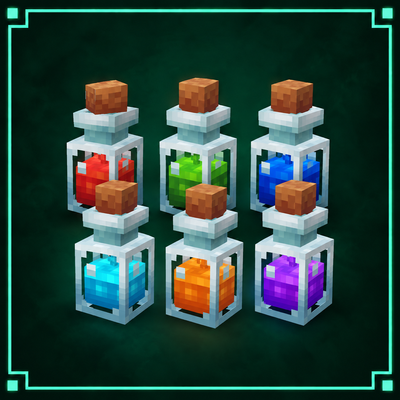
[MGG] Green's Potions
Green’s Potions adds six vanilla-friendly potions to Hytale: Water Breathing, Fire Resistance, Regeneration, Feather Falling, Strength, and Resistance, complete with custom recipes, status icons, and subtle footstep particles.