Hytale version
Back to mods 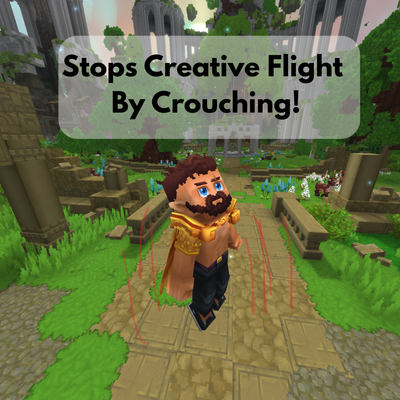
CurseForge · Hytale mod
Flight Stopper
Automatically stops flying when you touch the ground, just like Minecraft creative mode.
Choose a version Pick your version below, then grab the matching file.
Quick answer
Which Flight Stopper release should I use?
Latest stable file FlightStopper 1.0.1
Game version 0.7
Mod system Built-in Hytale mod system
Flight Stopper FlightStopper 1.0.1 targets 0.7. Do not install it as a separate client mod. Enable it on the world host—the local server in singleplayer or the dedicated server in multiplayer. No required dependencies listed for this file.
Where it goes
Where should Flight Stopper be installed in Hytale?
Do not install it as a separate client mod. Enable it on the world host—the local server in singleplayer or the dedicated server in multiplayer.
Separate client mod Not supported
World host / dedicated server Required
Mod system for this release Built-in Hytale mod system
Required install it here Optional supported, not mandatory Not supported do not install here Source doesn’t say do not assume
Put Hytale mods on the world host or dedicated server. Singleplayer runs a local server too; Hytale does not use separate client mods.
What else does Flight Stopper FlightStopper 1.0.1 need?
FlightStopper 1.0.1. Change the file and its required mods may change too.
This file does not list any required mods. Do not add a library just because a different file uses it.
This file does not list any required or optional project dependencies. Check the creator notes before changing an existing world.
Before you install it
Add Flight Stopper without breaking your instance.
Built for Flight Stopper FlightStopper 1.0.1. Pick another file and the loader, install side or required mods may change.
- 01
Stick to this file
Use FlightStopper 1.0.1. It targets 0.7; another release may target a different game build or dependency set.
- 02
Bring the mods it needs
This file does not list any required mods. Do not add a library just because a different file uses it.
- 03
Enable it on the world host
Do not install it as a separate client mod. Enable it on the world host—the local server in singleplayer or the dedicated server in multiplayer.
- 04
Pick the file you checked
Use the “Get this file” button beside FlightStopper 1.0.1. It opens that exact file at the source.
About this project
What does Flight Stopper add?
Creative flight ends the moment you touch the ground.
In vanilla Hytale, getting out of creative flight means double-tapping the spacebar. At high fly speeds, that first tap sends you shooting several blocks up before flight turns off. FlightStopper fixes this: just fly down to the ground and you land, the same way it works in another well-known block game.
Features
- Flight turns off automatically when you land
- Takeoff works as usual: double-tap jump and you lift off without being pulled back down
- Lightweight: a single check per player each tick, with no extra memory use while you fly
- Server-side only. Nothing to configure; drop it in your Mods folder and it works
Project description from CurseForge.
Pick your setup
Flight Stopper releases for each Hytale build.
Choose the version and loader you play, then open the matching release.
Check the dependencies, then try the file in a copied instance before changing a world you care about.
Recent files
Flight Stopper releases and Hytale builds
FlightStopper 1.0.1
24 Oct 2026
Client Not supported Server Required Dependencies No extras listed Listed on Project page
Check the 0.7 setup 0.7 release
Flightstopper.jar
24 Oct 2026
Client Not supported Server Required Dependencies No extras listed Listed on Project page
Check the 0.7 setup 0.7 release
Looking for an older file? The official CurseForge project page is in Resources.
 mod
mod CurseForge · Hytale
Mega Bench
One native crafting library with personal workbench unlocks, paid tier upgrades and original recipes.
 mod
mod CurseForge · Hytale
Kweebet
Craft Duck Race, Blackjack, Crash and Plinko machines, wager in-game items, and watch the action unfold in the world.
 mod
mod CurseForge · Hytale
Slipstream Transit
Build compact passenger tubes with automatic suction, first-person travel, named stops and colourful branching routes.