Hytale version
Back to mods 
CurseForge · Hytale mod
nyoCards | ♣️♦️ UNO, Coup, Truco and more
Various card games such as Truco, Poker, and UNO
Choose a version Pick your version below, then grab the matching file.
Quick answer
Which nyoCards | ♣️♦️ UNO, Coup, Truco and more release should I use?
Latest stable file nyoCards-0.4.0.jar
Game version 0.7
Mod system Built-in Hytale mod system
nyoCards | ♣️♦️ UNO, Coup, Truco and more nyoCards-0.4.0.jar targets 0.7. Do not install it as a separate client mod. Enable it on the world host—the local server in singleplayer or the dedicated server in multiplayer. No required dependencies listed for this file.
Where it goes
Where should nyoCards | ♣️♦️ UNO, Coup, Truco and more be installed in Hytale?
Do not install it as a separate client mod. Enable it on the world host—the local server in singleplayer or the dedicated server in multiplayer.
Separate client mod Not supported
World host / dedicated server Required
Mod system for this release Built-in Hytale mod system
Required install it here Optional supported, not mandatory Not supported do not install here Source doesn’t say do not assume
Put Hytale mods on the world host or dedicated server. Singleplayer runs a local server too; Hytale does not use separate client mods.
What else does nyoCards | ♣️♦️ UNO, Coup, Truco and more nyoCards-0.4.0.jar need?
nyoCards-0.4.0.jar. Change the file and its required mods may change too.
This file does not list any required mods. Do not add a library just because a different file uses it.
This file does not list any required or optional project dependencies. Check the creator notes before changing an existing world.
Before you install it
Add nyoCards | ♣️♦️ UNO, Coup, Truco and more without breaking your instance.
Built for nyoCards | ♣️♦️ UNO, Coup, Truco and more nyoCards-0.4.0.jar. Pick another file and the loader, install side or required mods may change.
- 01
Stick to this file
Use nyoCards-0.4.0.jar. It targets 0.7; another release may target a different game build or dependency set.
- 02
Bring the mods it needs
This file does not list any required mods. Do not add a library just because a different file uses it.
- 03
Enable it on the world host
Do not install it as a separate client mod. Enable it on the world host—the local server in singleplayer or the dedicated server in multiplayer.
- 04
Pick the file you checked
Use the “Get this file” button beside nyoCards-0.4.0.jar. It opens that exact file at the source.
About this project
What does nyoCards | ♣️♦️ UNO, Coup, Truco and more add?
Early Access. Back up your server before installing or updating.
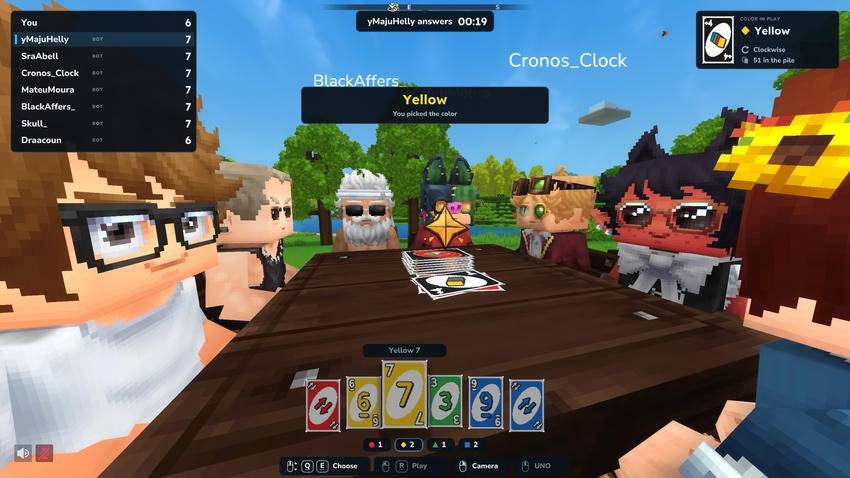
nyoCards is made for servers. Any block can become a table, and everything happens in the world: you sit down, your hand appears on screen, and the card you play flies onto the table for everyone to see.
Two games for now, truco and UNO, with more to come on the same tables, controls and screens.
Open a table with a deck, and anyone nearby joins by pressing F on it. The match starts on its own once the table is full. No item is needed to play: the keys come with the seat and go away when you stand up.
The games
| Game | Players | What it plays |
|---|---|---|
| Truco | 1v1 or 2v2 | Mineiro (fixed trump cards, a match of two games to 12) and Paulista (the turned-up card sets the trumps, one game to 12). Calls up to nine or twelve, the spokesman answers, face-down cards, the hand of ten |
| UNO | 2 to 8 | Skip, reverse, +2, wild and wild +4, choosing the colour, calling "UNO!" and catching whoever forgot, challenging a +4 |
UNO house rules can be set per server: challenging a +4, drawing until you can play, stacking +2 and +4, and playing a single round or to a points target.
A table holds up to 4 seats on one block. Up to 4 equal blocks side by side form one larger table, with up to 8 seats.
Playing
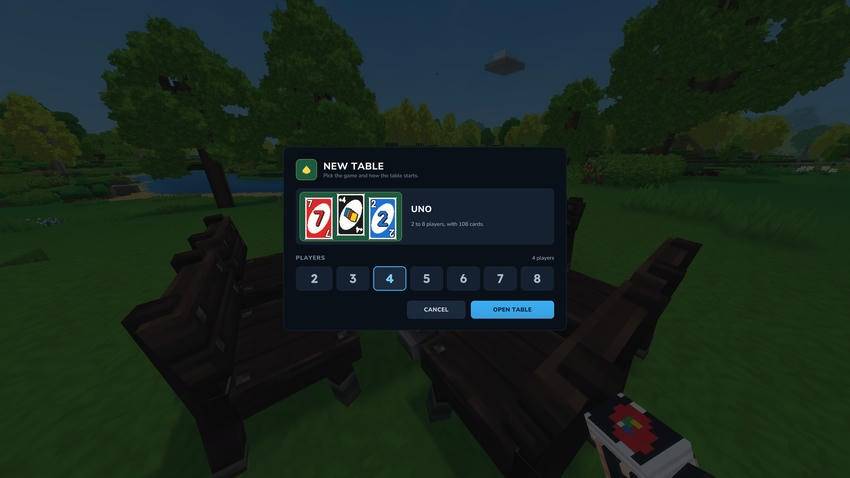
- Open a table: with the deck in hand, click a free block (or look at it and type
/cards table). The New table page asks for the game, the number of players and the mode. - Join: press F on the table, with anything in hand, or type
/cards joinnearby. Your seat is the side of the table you are standing on. - Play: the match starts five seconds after the last seat fills.
The deck belongs to the player. The mod never gives or takes it: it is crafted at the Workbench (Tinkering) from 8 Fibre and 1 Wood Trunk, or handed out by an admin.
Controls
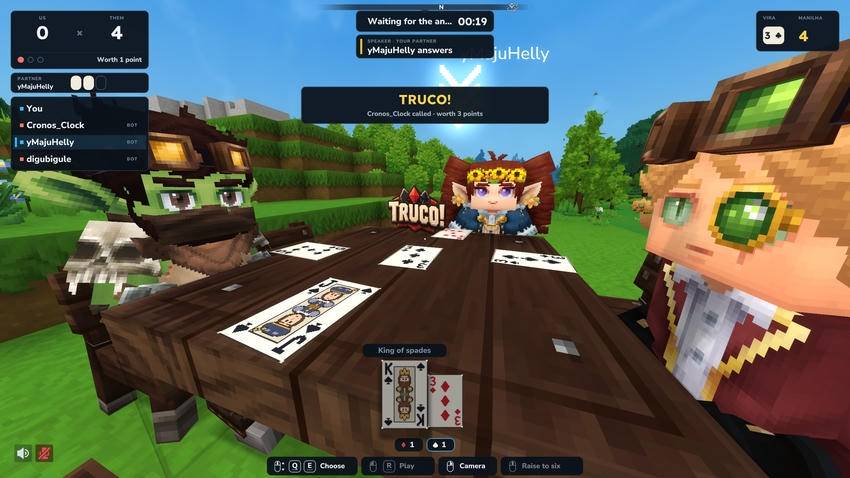
The same controls work in every game, and the bottom of the screen always shows what each key does right now.
| Control | Does |
|---|---|
Q · E or the mouse wheel |
Choose a card. On your turn, cards you cannot play are skipped |
Left click or R |
Play the selected card, or confirm the selected option |
| Right click | The game's own action: in truco, play the card face down on your turn and fold when a call is waiting for your team; in UNO, draw and pass. When it is not your turn and there is nothing to do, it toggles the table camera |
| Middle click | In truco, call truco; in UNO, UNO! |
| Crouch + middle click | Sort your hand |
When the game asks something, such as the colour of a wild card or an answer to a truco call, a row of options takes the place of the hand. Keys the rules would refuse are dimmed, and a refused action always says why. When drawing is the only possible move in UNO, the draw pile and the draw keys are highlighted.
Every key has a typed twin: /cards play, /cards pick, /cards draw, /cards pass, /cards call, /cards raise, /cards accept, /cards fold.
Sitting and the table camera
Players can sit on chairs and benches around the table and play normally. A bot whose seat has a chair or bench sits on it.
The table camera looks at the table from above and orbits around it with the mouse. Turn it on with /cards camera, or with right click when it is not your turn. While it is on, a figure with your appearance stays in your seat, and cards are played from and dealt to it. When you turn it off, you return exactly where you were.
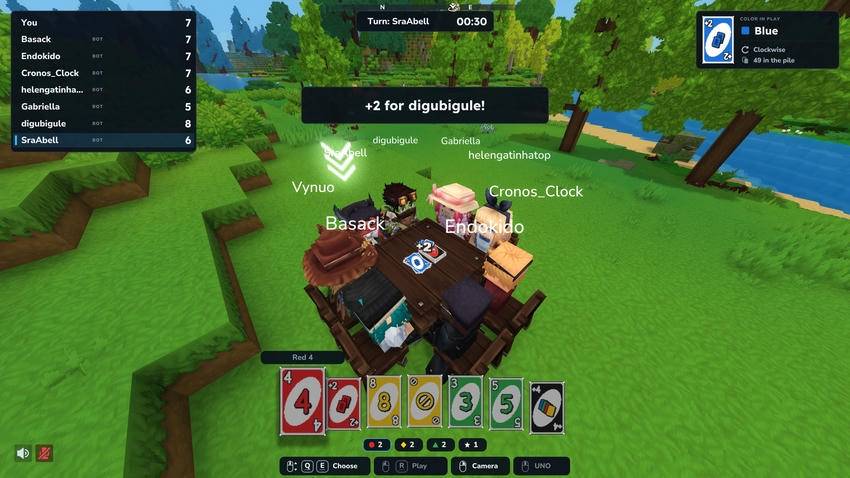
Bots
/cards bot fills the empty seats of a table with bots, and /cards bot remove takes them out. Bots play both games by the same rules, take a moment to think, and use a skin and a name like any player. The command is for admins by default.
Leaving and coming back
/cards leave stands you up at once. In truco, leaving a match hands the win to the other team. In UNO with three or more players, the match goes on without you.
Walking away, disconnecting or changing worlds keeps your seat for a while. Come back in time and you play on.
When a match ends, the table offers Rematch, Configure (for the player who opened it) and Stand up.
Statistics
For each game, every player has matches played, wins, losses, matches abandoned, the current and best win streak, time spent in matches, the dates of the first and last match, cards played, a count for each card, and counters of the game itself (calls in truco; draws, UNO calls, challenges and action cards in UNO).
/cards stats [player] shows the summary. /cards admin stats <player> [game] shows everything. Each player's file is kept on the server. Bots have no statistics.
Permissions
Everything a player does is open by default: playing, opening tables, the table camera and statistics. Everything administrative is closed by default, and so are bots. Operators need no setup at all.
| Node | Allows | Default |
|---|---|---|
nyocards.play |
Sitting and playing (.truco, .uno for one game) |
Everyone |
nyocards.table |
Opening and configuring a table (.truco, .uno for one game) |
Everyone |
nyocards.camera |
The table camera | Everyone |
nyocards.stats · nyocards.stats.others |
Your own statistics · someone else's | Everyone |
nyocards.bot |
Adding and removing bots | Admins |
nyocards.admin.* |
status, close, give, reload, stats, perms |
Admins |
/cards, /cards help and /cards leave need no permission, so nobody is ever stuck at a table. Permissions are checked when a player sits down or opens a table, never on each key press. /cards admin perms [player] lists every node and what applies to a given player.
Only VIPs open tables, a moderator group that closes them, and bots for a trusted player:
/perm group add hytale:Adventurer -nyocards.table
/perm group add VIP nyocards.table
/perm group add Moderators nyocards.admin.close,nyocards.admin.status
/perm user add <uuid> nyocards.bot
Configuration
Settings live in mods/Wynuo_nyoCards/config/. The mod writes each file once with every default and never rewrites it. Remove a key to get the default back.
server.json: language of the console and log, table reach and spacing, the table limit, timing, sounds, saved tables, the mouse wheel, bot names, statistics and usage reporting.games/truco.json: the default variant, time limits and two house rules (calling out of turn, and what three tied tricks do).games/uno.json: time limits and the house rules new tables start with.
/cards admin reload applies changes to the tables opened afterwards. A match in progress keeps the settings it started with. A value the mod cannot use is replaced by its default, and /cards admin status says which one.
Open tables are saved and come back after a restart.
nyoCards reports anonymous usage counts to bStats: games enabled, tables open, matches finished and their size, the variant played and the server language. No names, worlds or chat. One setting turns it off.
Performance
With no table open, nyoCards does nothing at all: no work per tick and no scheduled tasks. A table runs on events, never on ticks. Measured with bots, 16 tables in 2v2 (64 players) cost 0.077 ms per tick, and 32 tables (128 players) cost 0.134 ms per tick. Nothing is sent to a player's screen when nothing changes. A table uses at most one flying card and 13 resting ones, and none once it closes. The mod sends about 166 KB of assets to each client.
Commands
| Command | |
|---|---|
/cards |
Where you are and what you can do next |
/cards join |
Sit at the table you are looking at, or the nearest one |
/cards leave |
Stand up |
/cards table |
The New table page, or your table's settings |
/cards camera |
Turn the table camera on or off |
/cards stats [player] |
Statistics |
/cards help |
What you can use |
/cards bot [remove] |
Add or remove bots |
/cards admin status · close · give · reload · stats · perms |
Server administration |
/nyocards works everywhere /cards does.
Languages
English and Portuguese. Every player sees the mod in their own language, with nothing to set. The texts are in mods/Wynuo_nyoCards/translations/, one file per language: to add a language, copy en-US.lang, rename it to the language code and translate it. Saved edits apply without a restart, and your edits are kept when the mod updates.
What is coming
More card games on the same tables, controls and screens.
Made by Wynuo. News and behind the scenes on X: @theVynuo.
Project description from CurseForge.
Pick your setup
nyoCards | ♣️♦️ UNO, Coup, Truco and more releases for each Hytale build.
Choose the version and loader you play, then open the matching release.
Check the dependencies, then try the file in a copied instance before changing a world you care about.
Recent files
nyoCards | ♣️♦️ UNO, Coup, Truco and more releases and Hytale builds
nyoCards-0.4.0.jar
31 Oct 2026
Client Not supported Server Required Dependencies No extras listed Listed on Project page
Check the 0.7 setup 0.7 release
nyoCards-0.3.0.jar
31 Oct 2026
Client Not supported Server Required Dependencies No extras listed Listed on Project page
Check the 0.7 setup 0.7 release
nyoCards-0.2.0.jar
29 Oct 2026
Client Not supported Server Required Dependencies No extras listed Listed on Project page
Check the 0.7 setup 0.7 release
nyoCards-0.1.0.jar
29 Oct 2026
Client Not supported Server Required Dependencies No extras listed Listed on Project page
Check the 0.7 setup 0.7 release
Looking for an older file? The official CurseForge project page is in Resources.
 mod
mod CurseForge · Hytale
ChatGuard
Stops chat spam: message cooldown, repeated messages, caps and links. Players with a bypass permission are never filtered.
 mod
mod CurseForge · Hytale
AFK Status
Marks idle players as AFK and announces it in chat. /afk toggles it by hand; moving brings you back.
 mod
mod CurseForge · Hytale
LagCleaner
Removes dropped items on a timer with chat warnings. /clearitems runs it now. Inventories and chests are never touched.