Minecraft version
Back to mods 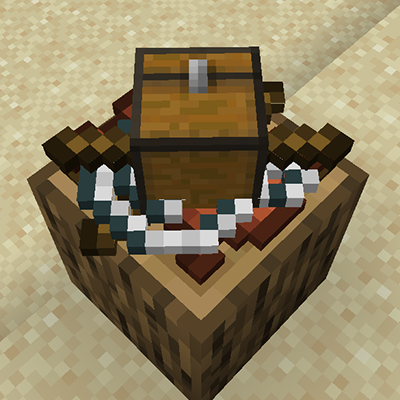
CurseForge · Minecraft mod
Craft on Surface
Sequential in-world crafting by clicking on every solid surface
Choose a version Pick your version below, then grab the matching file.
Quick answer
Which Craft on Surface release should I use?
beta file craft_on_surface-1.20.1-1.0.6.jar
Game version 1.20.1
Loader Forge
Craft on Surface craft_on_surface-1.20.1-1.0.6.jar targets 1.20.1 with Forge. The project page does not say whether this file belongs on the client, dedicated server, or both. No extra mods listed for this file.
Where it goes
Is Craft on Surface required on the client, server, or both?
The project page does not say whether this file belongs on the client, dedicated server, or both.
Client Source doesn’t say
Dedicated server Source doesn’t say
Loader for this release Forge
Required install it here Optional supported, not mandatory Not supported do not install here Source doesn’t say do not assume
The source does not explicitly classify this release as client-only or server-only.
What else does Craft on Surface craft_on_surface-1.20.1-1.0.6.jar need?
craft_on_surface-1.20.1-1.0.6.jar. Change the file and its required mods may change too.
This file does not list any required mods. Do not add a library just because a different file uses it.
This file does not list any required or optional mods.
Before you install it
Add Craft on Surface without breaking your instance.
Built for Craft on Surface craft_on_surface-1.20.1-1.0.6.jar. Pick another file and the loader, install side or required mods may change.
- 01
Stick to this file
Use craft_on_surface-1.20.1-1.0.6.jar. It targets 1.20.1 with Forge; another release may have different loader, side or dependency requirements.
- 02
Bring the mods it needs
This file does not list any required mods. Do not add a library just because a different file uses it.
- 03
Put it on the correct side
The project page does not say whether this file belongs on the client, dedicated server, or both.
- 04
Pick the file you checked
Use the “Get this file” button beside craft_on_surface-1.20.1-1.0.6.jar. It opens that exact file at the source.
About this project
What does Craft on Surface add?
Another attempt to create versatile mod for in-world crafting. This mod was created for modpack makers to expand possible crafting while in early game stages.
First variant: Surface Crafting
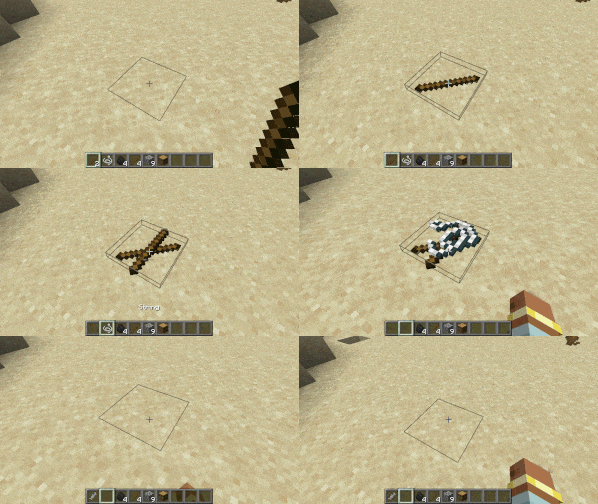
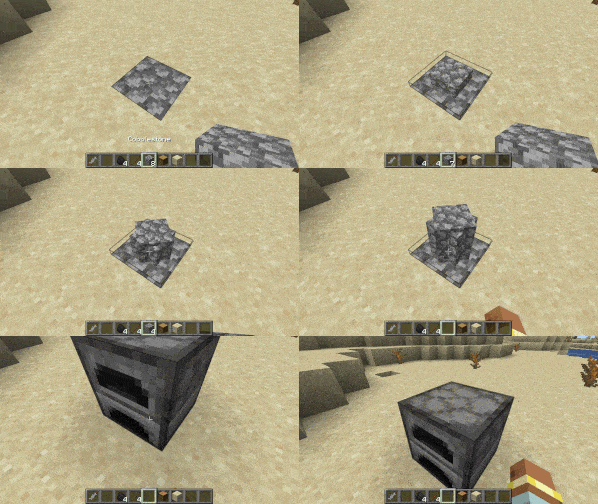
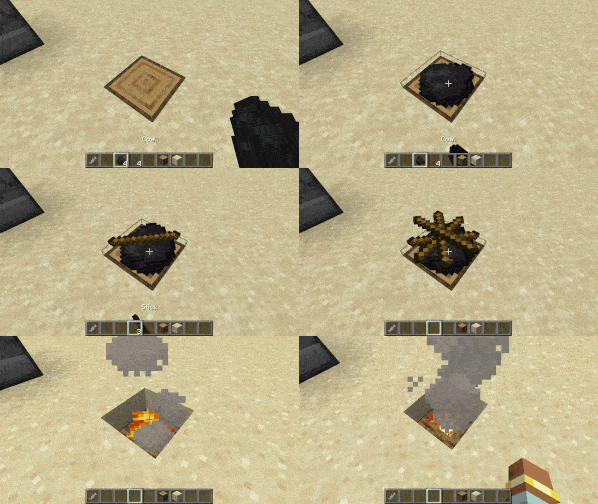
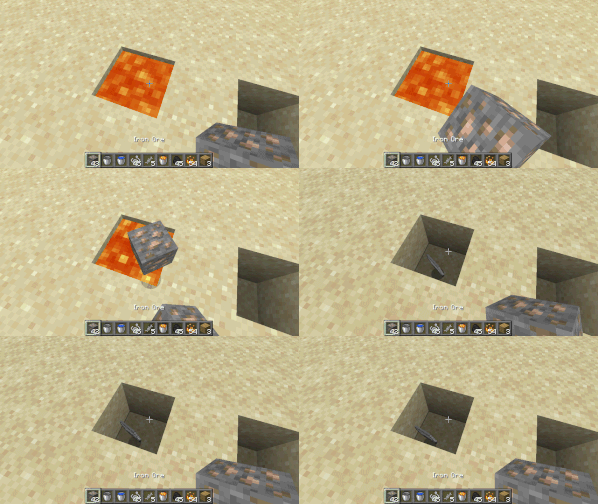
Place the first ingredient on any solid block to start crafting. Place another one above the first and so on. Shift-Right-Click with empty hand to attempt crafting. Right-Click with empty hand (or just left-click) to grab the topmost ingradient back to hotbar.
Maximum number of ingredients in sequence is 16. Also it is possible to specify which block exactly is needed for craft (block tags supported as well as special conditions "$solid" and "$nonsolid" for specifying any solid or non-solid block respectively).
Output can be Item, which drops in world. Like this:
Or block can be crafted and placed:
Or result block can replace crafting block:
Second variant: Item to Fluid
Toss items in fluid in any order to get the result. Items are invulnerable when they are used in a recipe (can't be exploded or burned, only despawned).
Maximum number of ingredients is 6. Desired fluid should be specified.
Out can either be an Item:
Or a new Fluid:
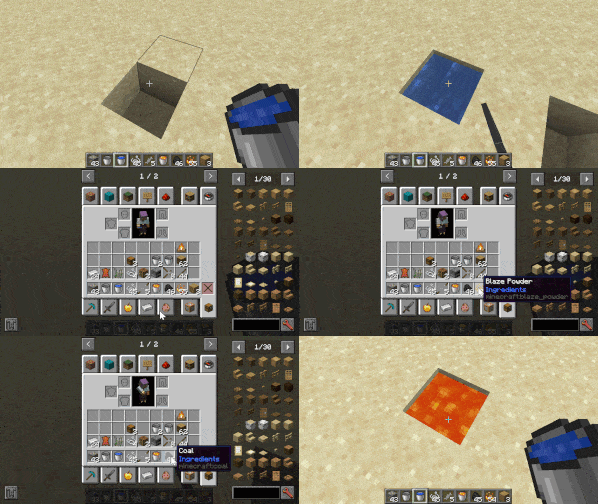
Features:
- Full data-driven recipes
- JEI Integration
For a detailed manual on how to use these recipe types, please see included mod datapack.
Future plans:
- Craft items by combining two liquids (like cobblestone generation)
- Craft items by hitting ingredients with an Anvil
- Craft items by throwing ingredients in fire
Your comments and suggestions are heartly welcome!
Project description from CurseForge.
Pick your setup
Craft on Surface by Minecraft version and loader
Choose the version and loader you play, then open the matching release.
Check the dependencies, then try the file in a copied instance before changing a world you care about.
Recent files
Craft on Surface versions and loaders
craft_on_surface-1.20.1-1.0.6.jar
24 May 2024
Client Source doesn’t say Server Source doesn’t say Dependencies No extras listed Listed on Release listing
Check the 1.20.1 · Forge setup 1.20.1Forge beta
craft_on_surface-1.20.1-1.0.5.jar
18 May 2024
Client Source doesn’t say Server Source doesn’t say Dependencies No extras listed Listed on Release listing
Check the 1.20.1 · Forge setup 1.20.1Forge beta
craft_on_surface-1.20.1-1.0.4.jar
9 May 2024
Client Source doesn’t say Server Source doesn’t say Dependencies No extras listed Listed on Release listing
Check the 1.20.1 · Forge setup 1.20.1Forge beta
craft_on_surface-1.20.1-1.0.3.jar
8 May 2024
Client Source doesn’t say Server Source doesn’t say Dependencies No extras listed Listed on Release listing
Check the 1.20.1 · Forge setup 1.20.1Forge beta
craft_on_surface-1.20.1-1.0.2.jar
8 May 2024
Client Source doesn’t say Server Source doesn’t say Dependencies No extras listed Listed on Release listing
Check the 1.20.1 · Forge setup 1.20.1Forge beta
craft_on_surface-1.0.1.jar
7 May 2024
Client Source doesn’t say Server Source doesn’t say Dependencies No extras listed Listed on Release listing
Check the 1.20.1 · Forge setup 1.20.1Forge beta
craft_on_surface-1.0.0.jar
6 May 2024
Client Source doesn’t say Server Source doesn’t say Dependencies No extras listed Listed on Release listing
Check the 1.20.1 · Forge setup 1.20.1Forge beta
Looking for an older file? The official CurseForge project page is in Resources.
 mod
mod Modrinth · Minecraft
Mineqtt
A Mod that allows Minecraft to talk to iot devices using the mqtt protocol. Ever wanted to turn on your smart lights by flicking a lever in Minecraft?
 mod
mod CurseForge · Minecraft
Singulo
Tech progression from thermocouples to rotating black holes: physics-inspired machines, multiblocks, wormholes and gravity tools.
 mod
mod CurseForge · Minecraft
KopperLib
A library for Kopper mods - Compatibilities