Minecraft version
Back to mods 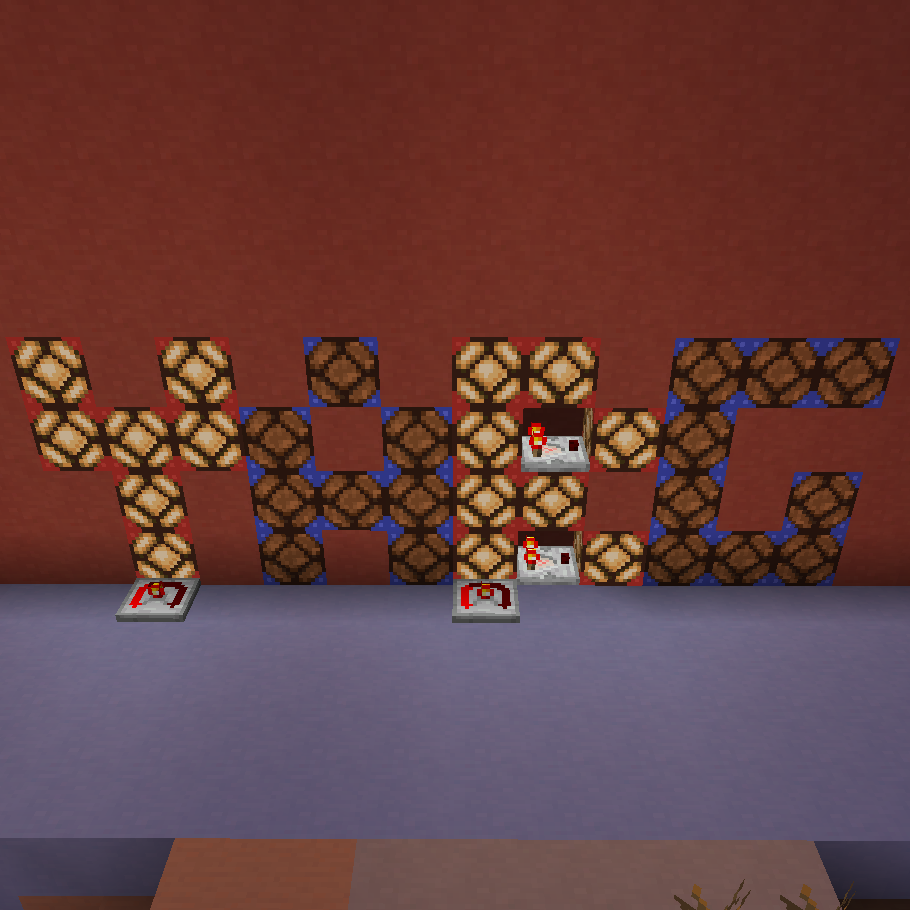
CurseForge · Minecraft mod
Yet Another Redstone Gadgets
Adds a few useful redstone gadgets
Choose a version Pick your version below, then grab the matching file.
Quick answer
Which Yet Another Redstone Gadgets release should I use?
Latest stable file yetanotherredstonegadgets-1.5.0.jar
Game version 1.21.1
Loader NeoForge
Yet Another Redstone Gadgets yetanotherredstonegadgets-1.5.0.jar targets 1.21.1 with NeoForge. The project page does not say whether this file belongs on the client, dedicated server, or both. No extra mods listed for this file.
Where it goes
Is Yet Another Redstone Gadgets required on the client, server, or both?
The project page does not say whether this file belongs on the client, dedicated server, or both.
Client Source doesn’t say
Dedicated server Source doesn’t say
Loader for this release NeoForge
Required install it here Optional supported, not mandatory Not supported do not install here Source doesn’t say do not assume
The source does not explicitly classify this release as client-only or server-only.
What else does Yet Another Redstone Gadgets yetanotherredstonegadgets-1.5.0.jar need?
yetanotherredstonegadgets-1.5.0.jar. Change the file and its required mods may change too.
This file does not list any required mods. Do not add a library just because a different file uses it.
This file does not list any required or optional mods.
Before you install it
Add Yet Another Redstone Gadgets without breaking your instance.
Built for Yet Another Redstone Gadgets yetanotherredstonegadgets-1.5.0.jar. Pick another file and the loader, install side or required mods may change.
- 01
Stick to this file
Use yetanotherredstonegadgets-1.5.0.jar. It targets 1.21.1 with NeoForge; another release may have different loader, side or dependency requirements.
- 02
Bring the mods it needs
This file does not list any required mods. Do not add a library just because a different file uses it.
- 03
Put it on the correct side
The project page does not say whether this file belongs on the client, dedicated server, or both.
- 04
Pick the file you checked
Use the “Get this file” button beside yetanotherredstonegadgets-1.5.0.jar. It opens that exact file at the source.
About this project
What does Yet Another Redstone Gadgets add?
Adds a few useful redstone tools.
Currently adds:
- Propagating redstone lamps!
- These relay their input signal to lamps next to them, if the colour matches
- Can be used for more compact displays
- Redstone divider
- Divides the input signal by a set amount
- The divider can be cycled through 2/3/5/7 by rightclicking
- The rounding mode (round up or down) can be set by shift rightclicking
- Redstone dial
- Outputs a signal with a fixed strength
- Can be set to output any signal between 0 and 15
- Redstone dial lamp
- Lights up based on redstone signal strength
- Seven segment lamp
- Displays redstone signal strength as a single hex digit
- Long range observer
- Can be set to focus on any single block 1-8 blocks in front
- Outputs a redstone signal when the focused block's blockstate changes
- Can see through solid blocks
- Calibrated observer
- Focuses on a specific property of the block in front of it
- Only pulses when that specific property changes
- Amethyst resonator
- When powered from the side, sends a signal to other resonators within 8 blocks in each direction
- When receiving a signal, outputs power at the bottom
- Useful for wirelessly transferring pulses
- Region analog reader
- Checks the region in front of it, either 3x3, 5x5, 7x7, 3x3x3 or 5x5x5
- Saves the average comparator output level of all blocks in that area that can output to a comparator
- Outputs that level to a comparator
Project description from CurseForge.
Pick your setup
Yet Another Redstone Gadgets by Minecraft version and loader
Choose the version and loader you play, then open the matching release.
Minecraft version
1.20.4
1 loader buildCheck the dependencies, then try the file in a copied instance before changing a world you care about.
Recent files
Yet Another Redstone Gadgets versions and loaders
yetanotherredstonegadgets-1.5.0.jar
6 May 2025
Client Source doesn’t say Server Source doesn’t say Dependencies No extras listed Listed on Release listing
Check the 1.21.1 · NeoForge setup NeoForge1.21.1 release
yetanotherredstonegadgets-1.4.0.jar
15 Aug 2024
Client Source doesn’t say Server Source doesn’t say Dependencies No extras listed Listed on Release listing
Check the 1.20.4 · NeoForge setup NeoForge1.20.4 release
yetanotherredstonegadgets-1.3.0.jar
4 Aug 2024
Client Source doesn’t say Server Source doesn’t say Dependencies No extras listed Listed on Release listing
Check the 1.20.4 · NeoForge setup NeoForge1.20.4 release
yetanotherredstonegadgets-1.2.2.jar
31 Jul 2024
Client Source doesn’t say Server Source doesn’t say Dependencies No extras listed Listed on Release listing
Check the 1.20.4 · NeoForge setup NeoForge1.20.4 release
yetanotherredstonegadgets-1.2.1.jar
30 Jul 2024
Client Source doesn’t say Server Source doesn’t say Dependencies No extras listed Listed on Release listing
Check the 1.20.4 · NeoForge setup NeoForge1.20.4 release
Looking for an older file? The official CurseForge project page is in Resources.
 mod
CurseForge · Minecraft
Createch 2 Core
Core mod used in the Createch 2 Modpack
 mod
CurseForge + Modrinth · Minecraft
Curios API
A flexible and expandable accessory/equipment API for users and developers.
 mod
CurseForge · Minecraft
Item Milestone Log
Records the cumulative playtime at which you first obtain each of your own goal items — perfect for ATM Star hunts in ATM10.