Minecraft version
Back to mods 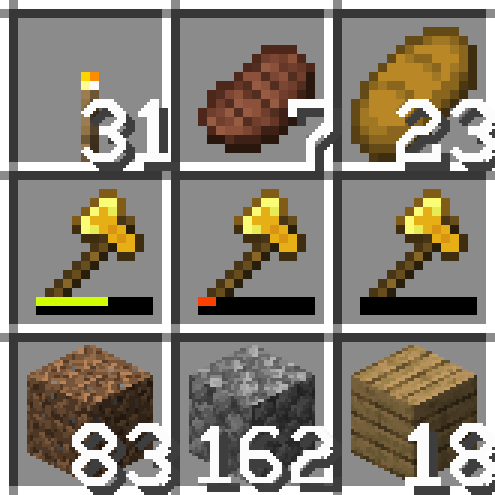
CurseForge · Minecraft mod
Inventory Sorter (Configurable)
Simple inventory sorting, now in configurable order. Forked from the original by cpw.
Choose a version Pick your version below, then grab the matching file.
Quick answer
Which Inventory Sorter (Configurable) release should I use?
Latest stable file inventorysorter-1.20.1-23.1.9.jar
Game version 1.20.1
Loader Forge
Inventory Sorter (Configurable) inventorysorter-1.20.1-23.1.9.jar targets 1.20.1 with Forge. The project page does not say whether it belongs on the client. The project page does not say whether it belongs on the dedicated server. No extra mods listed for this file.
Where it goes
Is Inventory Sorter (Configurable) required on the client, server, or both?
The project page does not say whether it belongs on the client. The project page does not say whether it belongs on the dedicated server.
Client Source doesn’t say
Dedicated server Source doesn’t say
Loader for this release Forge
Required install it here Optional supported, not mandatory Not supported do not install here Source doesn’t say do not assume
The source does not explicitly classify this release as client-only or server-only.
What else does Inventory Sorter (Configurable) inventorysorter-1.20.1-23.1.9.jar need?
inventorysorter-1.20.1-23.1.9.jar. Change the file and its required mods may change too.
This file does not list any required mods. Do not add a library just because a different file uses it.
This file does not list any required or optional mods.
Before you install it
Add Inventory Sorter (Configurable) without breaking your instance.
Built for Inventory Sorter (Configurable) inventorysorter-1.20.1-23.1.9.jar. Pick another file and the loader, install side or required mods may change.
- 01
Stick to this file
Use inventorysorter-1.20.1-23.1.9.jar. It targets 1.20.1 with Forge; another release may have different loader, side or dependency requirements.
- 02
Bring the mods it needs
This file does not list any required mods. Do not add a library just because a different file uses it.
- 03
Put it on the correct side
The project page does not say whether it belongs on the client. The project page does not say whether it belongs on the dedicated server.
- 04
Pick the file you checked
Use the “Get this file” button beside inventorysorter-1.20.1-23.1.9.jar. It opens that exact file at the source.
About this project
What does Inventory Sorter (Configurable) add?
Inventory Sorter (Configurable)
A Minecraft mod for simple inventory sorting, now in configurable order. Forked from Inventory Sorter by cpw.
The default sort order is ported from Quark's Inventory Sorting feature.
Some bugfixes and improvements were also added. More information below.
Supports Forge 1.18.2, 1.19.2 and 1.20.1 for now.
Cautions
This fork is meant to be a drop-in replacement for the original mod. Delete the original mod first to prevent accidental conflicts!
Also, I don't test this mod on multiplayer servers so there might be some issues that don't present in the original. Please report any issues if you find any.
Links
- GitHub
- Modrinth
- CurseForge
Features
- Inventory Sorting, with the middle click or custom hotkey
Scroll wheel(removed, sorry)
Changes and Bug Fixes
- Implemented a failsafe to prevent items from being deleted in certain scenarios
- Notably, Curios slots
- Introduced an option to prevent hotbar from being sorted (enabled by default)
- Fixed compatibility with mods that increase slot stack sizes in the 1.18.2 version
- Notably, Sophisticated Backpacks/Storages and Dank Storage
- 1.19.2 and 1.20.1 versions were already compatible
- Added an option to abort sorting based on the first slot type
- Default:
[SlotIronFurnaceInput](from Iron Furnace)
- Default:
- Cleaned up the mod by removing some features that were causing issues or redundant
- Notably, the Scroll Wheel function
TODO: Make PRs for the original repo, after enough testing
Configure the Sort Order
You can finally customize the sort order, while maintaining the compatibility of the original Inventory Sorter!
The default sort order is (mostly) the same as Quark's Inventory Sorting feature - because I love Quark. The code is directly ported and adopted from the original code.
The current available options for the sort order are:
- Quark
- Identical to the original, except that torch comes before foods: Check the differences on GitHub Repo.
- Creative Tab
- Could be not 100% accurate
- Raw Item ID (Registered Order)
- Same as the default order in JEI etc. (on ~1.19.2)
- Item (Original) Name
- Item Display Name
You can also set it to order items by count first, just like the original mod, and then by one of the above options (when the count is the same).
Just choose an option in the config file. (might require relaunch, depends on the config)
Details
- The core functionality is not changed from the original, which means:
The mod requires installation on both client and server to function. It makes no attempt to sort in the client, rather delegating all work to the server. This means it is very reliable and very fast. It should work with all containers (and maybe too many), and tries to respect canExtract/isItemValid (it will avoid slots that are marked that way).
Thanks to
- cpw, the author of the original Inventory Sorter
- Vazkii, the author of Quark
License
This project is licensed under GPL v3, except for the code in QuarkSortingHandler.java, which is licensed under the CC BY-NC-SA 3.0. Please refer to LICENSE.md for more details.
Project description from CurseForge.
Pick your setup
Inventory Sorter (Configurable) by Minecraft version and loader
Choose the version and loader you play, then open the matching release.
Minecraft version
1.19.2
1 loader buildMinecraft version
1.18.2
1 loader buildCheck the dependencies, then try the file in a copied instance before changing a world you care about.
Recent files
Inventory Sorter (Configurable) versions and loaders
inventorysorter-1.20.1-23.1.9.jar
15 Mar 2025
Client Source doesn’t say Server Source doesn’t say Dependencies No extras listed Listed on Release listing
Check the 1.20.1 · Forge setup 1.20.1Forge release
inventorysorter-1.19.2-21.1.12.jar
15 Mar 2025
Client Source doesn’t say Server Source doesn’t say Dependencies No extras listed Listed on Release listing
Check the 1.19.2 · Forge setup 1.19.2Forge release
inventorysorter-1.18.2-19.1.11.jar
15 Mar 2025
Client Source doesn’t say Server Source doesn’t say Dependencies No extras listed Listed on Release listing
Check the 1.18.2 · Forge setup 1.18.2Forge release
inventorysorter-1.20.1-23.1.6.jar
18 Jan 2025
Client Source doesn’t say Server Source doesn’t say Dependencies No extras listed Listed on Release listing
Check the 1.20.1 · Forge setup 1.20.1Forge release
inventorysorter-1.19.2-21.1.9.jar
18 Jan 2025
Client Source doesn’t say Server Source doesn’t say Dependencies No extras listed Listed on Release listing
Check the 1.19.2 · Forge setup 1.19.2Forge release
inventorysorter-1.18.2-19.1.8.jar
18 Jan 2025
Client Source doesn’t say Server Source doesn’t say Dependencies No extras listed Listed on Release listing
Check the 1.18.2 · Forge setup 1.18.2Forge release
inventorysorter-1.20.1-23.1.3.jar
22 Sept 2024
Client Source doesn’t say Server Source doesn’t say Dependencies No extras listed Listed on Release listing
Check the 1.20.1 · Forge setup 1.20.1Forge release
inventorysorter-1.19.2-21.1.7.jar
22 Sept 2024
Client Source doesn’t say Server Source doesn’t say Dependencies No extras listed Listed on Release listing
Check the 1.19.2 · Forge setup 1.19.2Forge release
inventorysorter-1.18.2-19.1.6.jar
22 Sept 2024
Client Source doesn’t say Server Source doesn’t say Dependencies No extras listed Listed on Release listing
Check the 1.18.2 · Forge setup 1.18.2Forge release
inventorysorter-1.19.2-21.1.5.jar
26 Aug 2024
Client Source doesn’t say Server Source doesn’t say Dependencies No extras listed Listed on Release listing
Check the 1.19.2 · Forge setup 1.19.2Forge release
inventorysorter-1.18.2-19.1.4.jar
26 Aug 2024
Client Source doesn’t say Server Source doesn’t say Dependencies No extras listed Listed on Release listing
Check the 1.18.2 · Forge setup 1.18.2Forge release
inventorysorter-1.19.2-21.1.0.jar
25 Aug 2024
Client Source doesn’t say Server Source doesn’t say Dependencies No extras listed Listed on Release listing
Check the 1.19.2 · Forge setup 1.19.2Forge release
Looking for an older file? The official CurseForge project page is in Resources.
 mod
mod Modrinth · Minecraft
Wunderreich
Trade smarter, store anywhere, and build better with wondrous Vanilla+ mechanics.
 mod
mod CurseForge · Minecraft
Berry Immunity
Just a small mod that adds a command to make a player immune to berry bushes, just like foxes.
 mod
mod CurseForge · Minecraft
Iron Signs
Create signs in all colors of Minecraft