Minecraft version
Back to mods 
CurseForge · Minecraft mod
AMS Easy Coordinates
Simple client-side coordinates on your HUD.
Choose a version Pick your version below, then grab the matching file.
Quick answer
Which AMS Easy Coordinates release should I use?
Latest stable file ams-easy-coordinates-neoforge-2.0.0.jar
Game version 1.21.1
Loader NeoForge
AMS Easy Coordinates ams-easy-coordinates-neoforge-2.0.0.jar targets 1.21.1 with NeoForge. The project page does not say whether this file belongs on the client, dedicated server, or both. No extra mods listed for this file.
Where it goes
Is AMS Easy Coordinates required on the client, server, or both?
The project page does not say whether this file belongs on the client, dedicated server, or both.
Client Source doesn’t say
Dedicated server Source doesn’t say
Loader for this release NeoForge
Required install it here Optional supported, not mandatory Not supported do not install here Source doesn’t say do not assume
The source does not explicitly classify this release as client-only or server-only.
What else does AMS Easy Coordinates ams-easy-coordinates-neoforge-2.0.0.jar need?
ams-easy-coordinates-neoforge-2.0.0.jar. Change the file and its required mods may change too.
This file does not list any required mods. Do not add a library just because a different file uses it.
This file does not list any required or optional mods.
Before you install it
Add AMS Easy Coordinates without breaking your instance.
Built for AMS Easy Coordinates ams-easy-coordinates-neoforge-2.0.0.jar. Pick another file and the loader, install side or required mods may change.
- 01
Stick to this file
Use ams-easy-coordinates-neoforge-2.0.0.jar. It targets 1.21.1 with NeoForge; another release may have different loader, side or dependency requirements.
- 02
Bring the mods it needs
This file does not list any required mods. Do not add a library just because a different file uses it.
- 03
Put it on the correct side
The project page does not say whether this file belongs on the client, dedicated server, or both.
- 04
Pick the file you checked
Use the “Get this file” button beside ams-easy-coordinates-neoforge-2.0.0.jar. It opens that exact file at the source.
About this project
What does AMS Easy Coordinates add?

AMS Easy Coordinates gives you quick access to your in-game XYZ coordinates right on the screen. It also allows you to quickly share your coordinates with other players via chat.
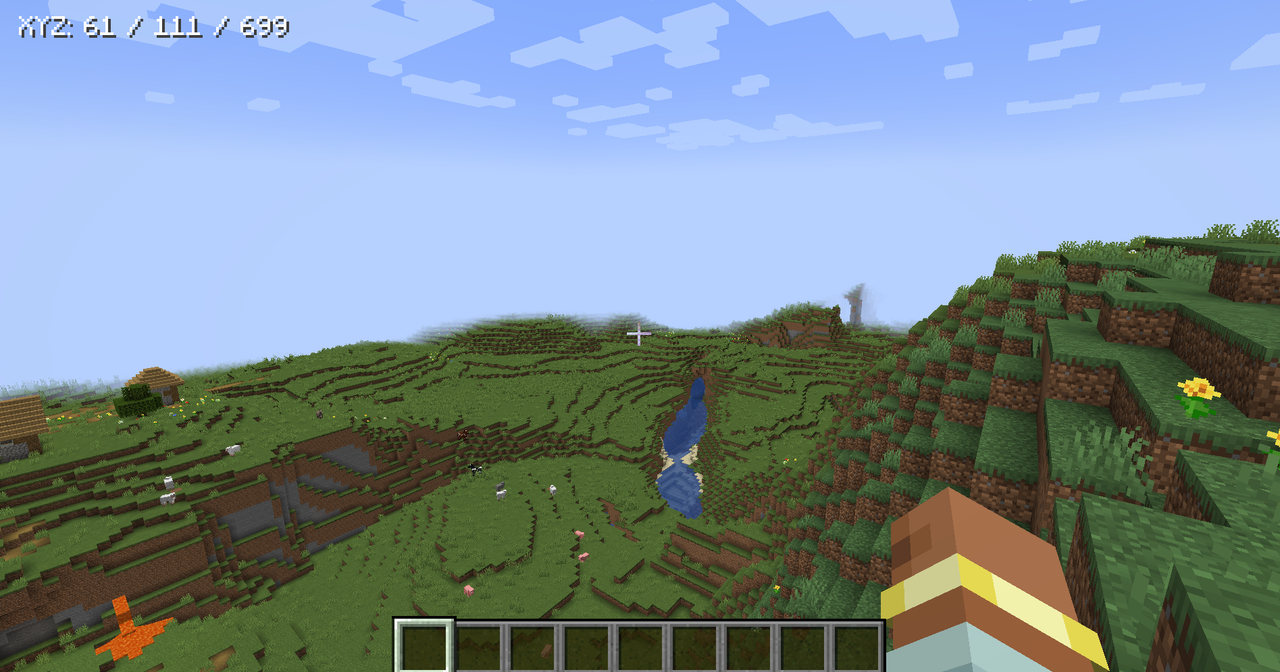
It is intentionally simple: no minimap, no waypoints, no server requirement, and no multiplayer chat spam. Toggle the display on or off, choose where it appears at the top of the screen, and adjust the text size through the generated client config.
Features:
- Client-side coordinates HUD.
- Toggleable display.
- Top-left, top-center, and top-right placement.
- Configurable text size.
- Hidden while the debug/F3 screen is open.
- No server install required.
Note:
Verions below 2.0.0 of AMS Easy Coordinates allowed players to share coordinates through chat. That feature has been removed on 2.0.0+ so this mod can stay focused on a clean client-side HUD. If you want multiplayer location pings, install AMS Pings, which is built for richer player, block, and item pinging.
If you enjoy this mod, consider supporting my work.
Project description from CurseForge.
Pick your setup
AMS Easy Coordinates by Minecraft version and loader
Choose the version and loader you play, then open the matching release.
Minecraft version
1.20.6
1 loader buildMinecraft version
1.20.5
1 loader buildMinecraft version
1.20.4
2 loader buildsMinecraft version
1.20.3
2 loader buildsMinecraft version
1.20.2
2 loader buildsMinecraft version
1.20.1
2 loader buildsCheck the dependencies, then try the file in a copied instance before changing a world you care about.
Recent files
AMS Easy Coordinates versions and loaders
ams-easy-coordinates-neoforge-2.0.0.jar
ams-easy-coordinates-2.0.0.jar
25 Jun 2026
Client Source doesn’t say Server Source doesn’t say Dependencies No extras listed Listed on Release listing
Check the 1.21.1 · NeoForge setup 1.21.1NeoForge release
ams-easy-coordinates-fabric-2.0.0.jar
ams-easy-coordinates-2.0.0.jar
25 Jun 2026
Client Source doesn’t say Server Source doesn’t say Dependencies No extras listed Listed on Release listing
Check the 1.21.1 · Fabric setup Fabric1.21.1 release
ams-easy-coordinates-fabric-2.0.0.jar
ams-easy-coordinates-2.0.0.jar
25 Jun 2026
Client Source doesn’t say Server Source doesn’t say Dependencies No extras listed Listed on Release listing
Check the 1.20.6 · Fabric setup 1.20.2Fabric1.20.51.20.1 release
ams-easy-coordinates-forge-2.0.0.jar
ams-easy-coordinates-2.0.0.jar
25 Jun 2026
Client Source doesn’t say Server Source doesn’t say Dependencies No extras listed Listed on Release listing
Check the 1.20.4 · Forge setup 1.20.21.20.1Forge1.20.4 release
Looking for an older file? The official CurseForge project page is in Resources.
 mod
CurseForge + Modrinth · Minecraft
Enchantment Core
A data-driven enchantment component and utility library.
 mod
CurseForge · Minecraft
NULLzone
Introduces a multiblock structure that keeps monsters from spawning in inside the defined area.
 mod
CurseForge · Minecraft
Boss Tweaks
Fully heal Bosses when all nearby players are defeated, add Bossbars to entities that lack one... And more!