YetAnotherConfigLib (YACL) Needed by ExplosionVisualizer 2.3.0-fabri-0.15.11-1.21+
requiredMatching file found Matched file: 3.8.2+1.21.1-fabric

CurseForge · Minecraft mod
Use real-time 3D rendering to display various information about the explosion
Quick answer
ExplosionVisualizer 2.3.0-fabri-0.15.11-1.21+ targets 1.21, 1.21.1, 1.21.2 with Fabric. It must be installed on the client. Do not install it on the dedicated server. All 4 required mods have matching files.
Where it goes
It must be installed on the client. Do not install it on the dedicated server.
This file is marked client-only.
2.3.0-fabri-0.15.11-1.21+ on 1.21.1 Fabric. Every mod below is checked against that same setup.
Install YetAnotherConfigLib (YACL), Mod Menu, Fabric API, Text Placeholder API first. We found matching files for this game-version and loader setup. 2 come through another mod in the chain.
2 extra mods were pulled in by other dependencies. Indented rows show who needs each one. We only count dependency files that match this setup. A file for another loader does not fill the gap.
Before you install it
Built for ExplosionVisualizer 2.3.0-fabri-0.15.11-1.21+ on 1.21.1 Fabric. Pick another file and the loader, install side or required mods may change.
Use 2.3.0-fabri-0.15.11-1.21+. It targets 1.21, 1.21.1, 1.21.2 with Fabric; another release may have different loader, side or dependency requirements.
Install YetAnotherConfigLib (YACL), Mod Menu, Fabric API, Text Placeholder API first. We found matching files for this game-version and loader setup. 2 come through another mod in the chain.
It must be installed on the client. Do not install it on the dedicated server.
Use the “Get this file” button beside 2.3.0-fabri-0.15.11-1.21+. It opens that exact file at the source.
About this project
This mod is a powerful tool. It can simulate and display various details of explosions in real-time, including explosion rays, blocks that will be destroyed, the explosion center, estimated damage to nearby entities, and sample points of entities about to be affected. #IMPORTANT Please check the Changelog for the latest updates!
BASIC COMMANDS /explosionVisualizer mainRender <toggle> <- #Enable Rendering
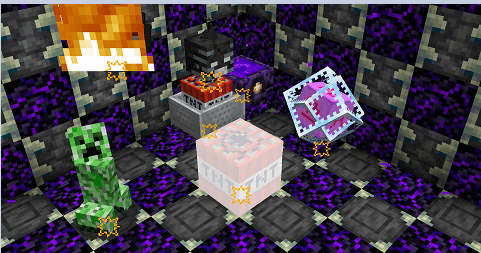
/explosionVisualizer renderBlockDestruction <toggle> <- #Enable block destruction projection rendering Block destruction projection
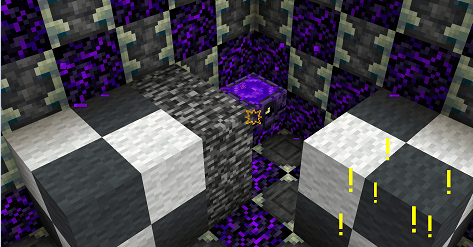
/explosionVisualizer rendererEntityDamage <toggle> <- #Enable entity damage projection rendering Replace this with a description
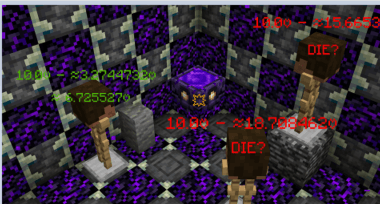
/explosionVisualizer rendererEntityRaycast <toggle> <- #Enable entity sample-points & raycast rendering Replace this with a description
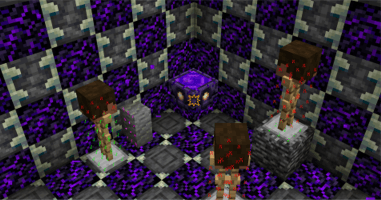
/explosionVisualizer renderExplosionBlockDetectionRay <toggle> <- #Enable explosion sample-points & raycast rendering Replace this with a description
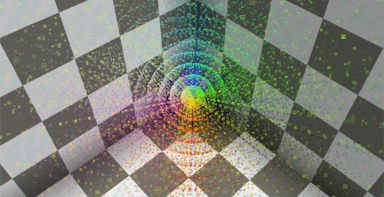
ADDITIONAL COMMANDS /explosionVisualizer fakeExplosion add <name> <x> <y> <z> <power> <IgnorBlockInSide(Boolean)> <-#create fake explosions Replace this with a description
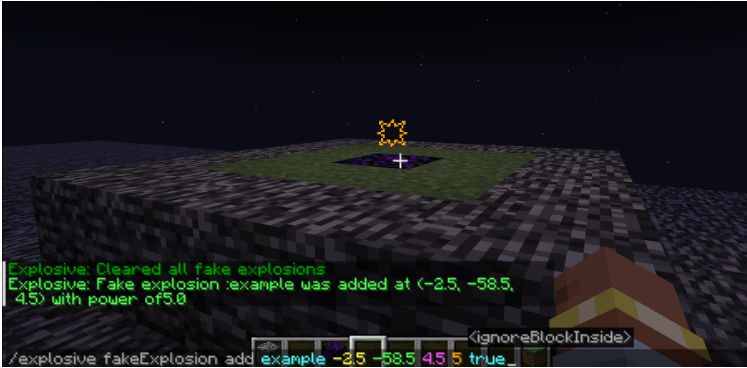
/explosionVisualizer fakeExplosion add <name> <x> <y> <z> <power> <IgnorBlockInside(Boolean)>
<name> : <String>(a name) <x> <y> <z> : <Float> <Float> <Float> (Explosion center's position) <power> : <Float> (Explosion power) <ignoreBlockInside> : <Boolean> (Sometimes the explosion center is inside a block, which affects the evaluation of the explosion. Enabling this option will ignore the block at the explosion center) /explosionVisualizer fakeExplosions remove <name> <-#remove the fake explosion by name
/explosionVisualizer fakeExplosions removeall <-#remove all the fake explosions Replace this with a description
/explosionVisualizer blockDamageRayRendererSettings range <Xmax> <Xmin> <Ymax> <Ymin> <Zmax> <Zmin>
/explosionVisualizer blockDamageRayRendererSettings range <Xmax> <Xmin> <Ymax> <Ymin> <Zmax> <Zmin>
<Xmax> : <Int(0<sub>16)> <Xmin> : <Int(0</sub>16)> <Ymax> : <Int(0<sub>16)> <Ymin> : <Int(0</sub>16)> <Zmax> : <Int(0<sub>16)> <Zmin> : <Int(0</sub>16)> In Minecraft, 1532 rays are emitted from the center of the explosion towards the outermost layer of a 16x16x16 voxel grid surrounding the explosion center. (See" https://minecraft.fandom.com/wiki/Explosion" for details.)
Displaying them all together can look very cluttered. This command allows you to slice these rays for easier viewing.
<Xmax> : <Int(0<sub>16)> <Xmin> : <Int(0</sub>16)> <Ymax> : <Int(0<sub>16)> <Ymin> : <Int(0</sub>16)> <Zmax> : <Int(0<sub>16)> <Zmin> : <Int(0</sub>16)> are filters to limit the range. Here are some examples..
(0 16 0 16 88)
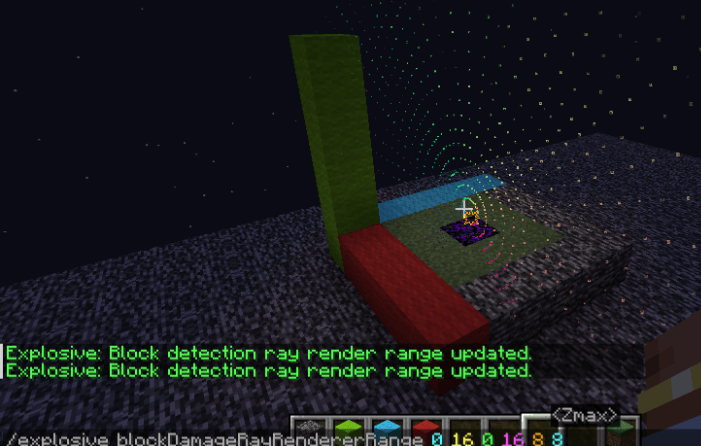
(0 7 5 16 6 16)
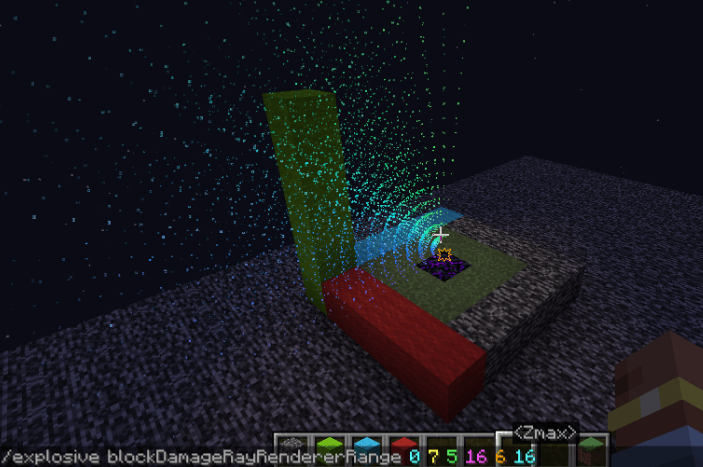
(0 16 8 16 0 16)
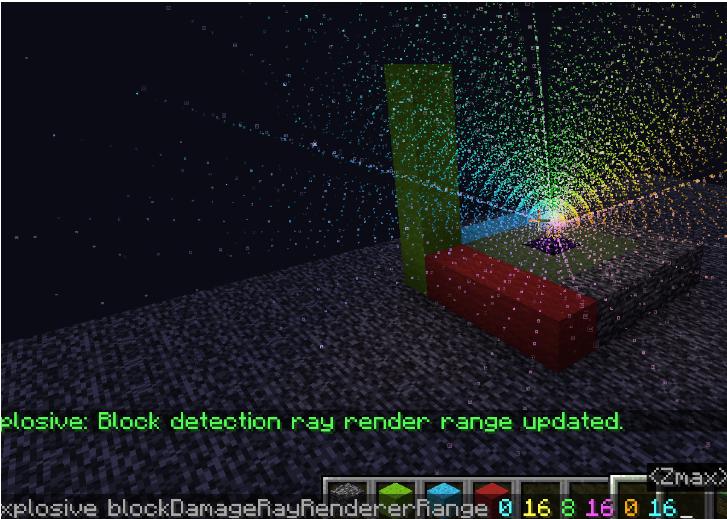
Project description from CurseForge.
Pick your setup
Choose the version and loader you play, then open the matching release.
Check the dependencies, then try the file in a copied instance before changing a world you care about.
Recent files
ExplosionVisualizer-2.3.0-fabri-0.15.11-1.21+.jar
1 Dec 2024
29 Sept 2024
ExplosionVisualizer-2.1.0-fabri-0.15.11-1.21+.jar
22 Sept 2024
ExplosionVisualizer-2.1.0-fabri-0.15.11-1.21+.jar
19 Sept 2024
ExplosionVisualizer-1.1.0.jar
8 Sept 2024
Looking for an older file? The official CurseForge project page is in Resources.
 mod
All-in-One Minecraft Client Visual Assistance Mod
 mod
A Minecraft mod that lets you cycle through paintings using the brush!
 mod
Polymorph recipe selection for Farmer's Delight cooking blocks