TxniLib Needed by Pack Analytics PackAnalytics Neoforge 1.0.5 for 1.21.1
requiredMatching file found Matched file: TxniLib Neoforge 1.0.24 for 1.21.1

CurseForge · Minecraft mod
Collects player count metrics for modpack authors.
Quick answer
Pack Analytics PackAnalytics Neoforge 1.0.5 for 1.21.1 targets 1.21.1 with NeoForge. The project page does not say whether this file belongs on the client, dedicated server, or both. All 1 required mods have matching files.
Where it goes
The project page does not say whether this file belongs on the client, dedicated server, or both.
The source does not explicitly classify this release as client-only or server-only.
PackAnalytics Neoforge 1.0.5 for 1.21.1. Change the file and its required mods may change too.
Install TxniLib first. We found matching files for this game-version and loader setup.
We only count dependency files that match this setup. A file for another loader does not fill the gap.
Before you install it
Built for Pack Analytics PackAnalytics Neoforge 1.0.5 for 1.21.1. Pick another file and the loader, install side or required mods may change.
Use PackAnalytics Neoforge 1.0.5 for 1.21.1. It targets 1.21.1 with NeoForge; another release may have different loader, side or dependency requirements.
Install TxniLib first. We found matching files for this game-version and loader setup.
The project page does not say whether this file belongs on the client, dedicated server, or both.
Use the “Get this file” button beside PackAnalytics Neoforge 1.0.5 for 1.21.1. It opens that exact file at the source.
About this project

Simple mod that collects anonymous player count metrics for modpack authors, sends it to a centralized web server, and stores it in InfluxDB for easy Grafana viewing of historical data.







This mod integrates with Better Compatibility Checker and will use the version number from your BCC config if possible.
Metrics endpoint URL is configurable, as well as pack ID and the rate at which keepalive requests should be sent.
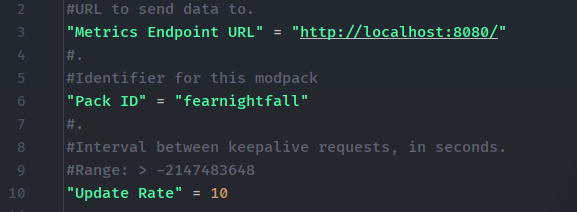
You can find an example server here on GitHub, which just collects current usage stats for each modpack ID and optionally sends it over to Grafana.
Note: this mod does not send player information, usernames, or IDs. It just makes a simple "I'm playing" request with the modpack version you are on, every so often, to track online players.
Project description from CurseForge.
Pick your setup
Choose the version and loader you play, then open the matching release.
Check the dependencies, then try the file in a copied instance before changing a world you care about.
Recent files
packanalytics-neoforge-1.0.5-1.21.1.jar
9 Jun 2025
packanalytics-fabric-1.0.4-1.21.1.jar
8 Jun 2025
packanalytics-fabric-1.0.4-1.20.1.jar
8 Jun 2025
packanalytics-forge-1.0.4-1.20.1.jar
8 Jun 2025
packanalytics-neoforge-1.0.4-1.21.1.jar
8 Jun 2025
packanalytics-neoforge-1.0.3-1.21.1.jar
30 Oct 2024
packanalytics-fabric-1.0.3-1.21.1.jar
30 Oct 2024
packanalytics-fabric-1.0.3-1.20.1.jar
30 Oct 2024
packanalytics-forge-1.0.3-1.20.1.jar
30 Oct 2024
packanalytics-forge-1.0.2-1.20.1.jar
30 Oct 2024
packanalytics-fabric-1.0.2-1.21.1.jar
30 Oct 2024
packanalytics-fabric-1.0.2-1.20.1.jar
30 Oct 2024
Looking for an older file? The official CurseForge project page is in Resources.
 mod
mod💾 Store your XP in any Item you want!
 mod
modAllows the use of Hytale blockymodel files in mods or resource packs as well as blockyanim files in mods only
 mod
modServer utilities to help servers run rule screens, kick afk players, report admin actions to prevent abuse and more