Minecraft version
Back to mods 
CurseForge · Minecraft mod
limited time
Set a time for the item
Choose a version Pick your version below, then grab the matching file.
Quick answer
Which limited time release should I use?
Latest stable file Limited_timeV0.1.1.jar
Game version 1.19.2
Loader Forge
limited time Limited_timeV0.1.1.jar targets 1.19.2 with Forge. The project page does not say whether this file belongs on the client, dedicated server, or both. No extra mods listed for this file.
Where it goes
Is limited time required on the client, server, or both?
The project page does not say whether this file belongs on the client, dedicated server, or both.
Client Source doesn’t say
Dedicated server Source doesn’t say
Loader for this release Forge
Required install it here Optional supported, not mandatory Not supported do not install here Source doesn’t say do not assume
The source does not explicitly classify this release as client-only or server-only.
What else does limited time Limited_timeV0.1.1.jar need?
Limited_timeV0.1.1.jar. Change the file and its required mods may change too.
This file does not list any required mods. Do not add a library just because a different file uses it.
This file does not list any required or optional mods.
Before you install it
Add limited time without breaking your instance.
Built for limited time Limited_timeV0.1.1.jar. Pick another file and the loader, install side or required mods may change.
- 01
Stick to this file
Use Limited_timeV0.1.1.jar. It targets 1.19.2 with Forge; another release may have different loader, side or dependency requirements.
- 02
Bring the mods it needs
This file does not list any required mods. Do not add a library just because a different file uses it.
- 03
Put it on the correct side
The project page does not say whether this file belongs on the client, dedicated server, or both.
- 04
Pick the file you checked
Use the “Get this file” button beside Limited_timeV0.1.1.jar. It opens that exact file at the source.
About this project
What does limited time add?
This mod is useful for modpack creators or server admins. When a player holds an item and enters a command, the item will disappear from the player’s inventory once the specified time expires, and placing it in a chest won’t stop the countdown. Currently, it supports the Curios API mod, allowing specified accessories to disappear after the time expires, with plans to support more mods in the future.
此模组对整合包作者或服务器管理员有用。玩家持有物品并输入指令后,一旦指定时间到期,物品将从玩家的物品栏中消失,放进箱子里也没用。目前支持 Curios API 模组,指定的饰品也可以在时间到期后消失,并计划在未来支持更多模组。
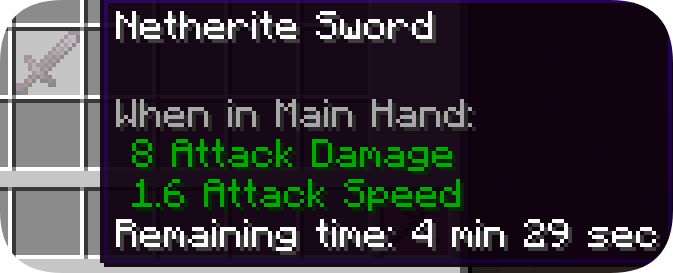
Usage: Enter the command
/limitedtime [number] + s or h使用方法:
/limitedtime [number] + s or h
For example, set an item to exist for 10 seconds (while holding the item in hand). If "s" is not entered, the default unit will be minutes.
例如,将某个物品设置为存在 10 秒(同时手持该物品)。如果不输入“s”,则默认单位为分钟。

Known Bugs:
- Do not duplicate items with a "countdown," as only the first item will disappear. Therefore, each item should have its time set manually.
不要使用“倒计时”复制过的物品,因为只有第一个物品会消失。因此,每个项目都应该手动设置其时间。
Project description from CurseForge.
Pick your setup
limited time by Minecraft version and loader
Choose the version and loader you play, then open the matching release.
Check the dependencies, then try the file in a copied instance before changing a world you care about.
Recent files
limited time versions and loaders
Limited_timeV0.1.1.jar
13 Nov 2024
Client Source doesn’t say Server Source doesn’t say Dependencies No extras listed Listed on Release listing
Check the 1.19.2 · Forge setup 1.19.2Forge release
limited_timeV0.1.0.jar
13 Nov 2024
Client Source doesn’t say Server Source doesn’t say Dependencies No extras listed Listed on Release listing
Check the 1.19.2 · Forge setup 1.19.2Forge release
Looking for an older file? The official CurseForge project page is in Resources.
 mod
Modrinth · Minecraft
Environmental Lunar Tech
Environmental Lunar Tech adds a set of Lunar themed Multiblocks to the game. Currently there are Lunar Panels but more content is planned and will be added in future updates.
 mod
Modrinth · Minecraft
Environmental Tech Legacy
The classic Environmental Tech: multiblock void miners, solar arrays, lightning rods and nanobot beacons, as its own mod beside Environmental Tech.
 mod
Modrinth · Minecraft
Environmental Energy
Environmental Energy contains a vast selection of energy-generating Multiblock machines such as Solar Panels and Lightning Rods and more.