Minecraft version
Back to mods 
CurseForge · Minecraft mod
Lite Map
A flexible and user-friendly mini-map mod designed for smooth performance and customization.
Choose a version Pick your version below, then grab the matching file.
Quick answer
Which Lite Map release should I use?
Latest stable file xcodex_lite_map-1.0.0.jar
Game version 1.21, 1.21.1
Loader NeoForge
Lite Map xcodex_lite_map-1.0.0.jar targets 1.21, 1.21.1 with NeoForge. The project page does not say whether this file belongs on the client, dedicated server, or both. No extra mods listed for this file.
Where it goes
Is Lite Map required on the client, server, or both?
The project page does not say whether this file belongs on the client, dedicated server, or both.
Client Source doesn’t say
Dedicated server Source doesn’t say
Loader for this release NeoForge
Required install it here Optional supported, not mandatory Not supported do not install here Source doesn’t say do not assume
The source does not explicitly classify this release as client-only or server-only.
What else does Lite Map xcodex_lite_map-1.0.0.jar need?
xcodex_lite_map-1.0.0.jar. Change the file and its required mods may change too.
This file does not list any required mods. Do not add a library just because a different file uses it.
This file does not list any required or optional mods.
Before you install it
Add Lite Map without breaking your instance.
Built for Lite Map xcodex_lite_map-1.0.0.jar. Pick another file and the loader, install side or required mods may change.
- 01
Stick to this file
Use xcodex_lite_map-1.0.0.jar. It targets 1.21, 1.21.1 with NeoForge; another release may have different loader, side or dependency requirements.
- 02
Bring the mods it needs
This file does not list any required mods. Do not add a library just because a different file uses it.
- 03
Put it on the correct side
The project page does not say whether this file belongs on the client, dedicated server, or both.
- 04
Pick the file you checked
Use the “Get this file” button beside xcodex_lite_map-1.0.0.jar. It opens that exact file at the source.
About this project
What does Lite Map add?
Take Your Minecraft Exploration to the Next Level!
This mini-map mod offers a smooth and immersive experience. It’s designed to enhance your gameplay without sacrificing hardware efficiency.
Key features include:
- Dynamic Zoom Levels: Zoom in up to 5x for precise navigation or zoom out up to 8x to see the bigger picture.
- Customizable Radius: Adjust the mini-map radius for seamless performance, even on low-end PCs.
- Flexible GUI Options: Resize the mini-map directly on the screen, and switch effortlessly between minimized and expanded modes.
- Biome-Aware Rendering: Enjoy mini-map visuals that match the colors of Minecraft's biomes for a more immersive and visually appealing experience.
- Full Control: Reposition the mini-map, configure zoom keys, and toggle modes—all through an intuitive settings menu.
Ready to navigate with ease? Try it out now and transform the way you explore Minecraft!
Zoom Levels
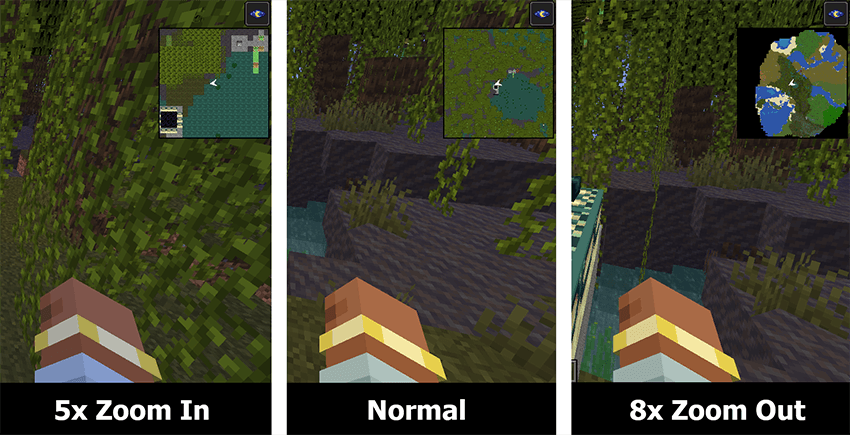
The zoom-in levels include 5x and 2x, while the zoom-out levels include 2x, 4x, and 8x. You can switch between these levels using the PageUp and PageDown keys. These key bindings can be customized in the mod settings menu in the mod list.
GUI Scale Modes
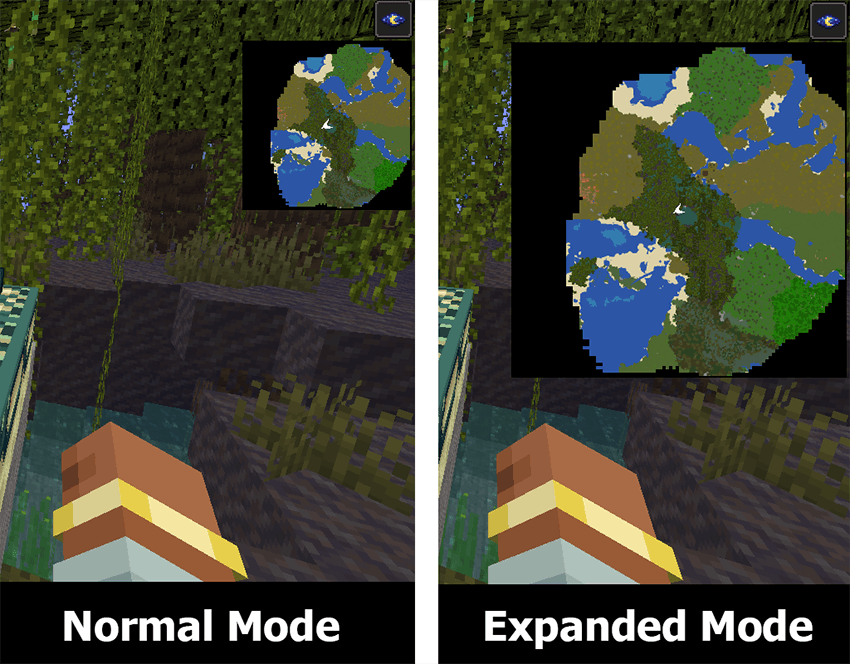
GUI Scale Modes consist of minimized/normal mode and expanded mode. You can switch between modes using the CapsLock key. This key binding can be customized in the mod settings menu in the mod list.
Reposition the mini-map
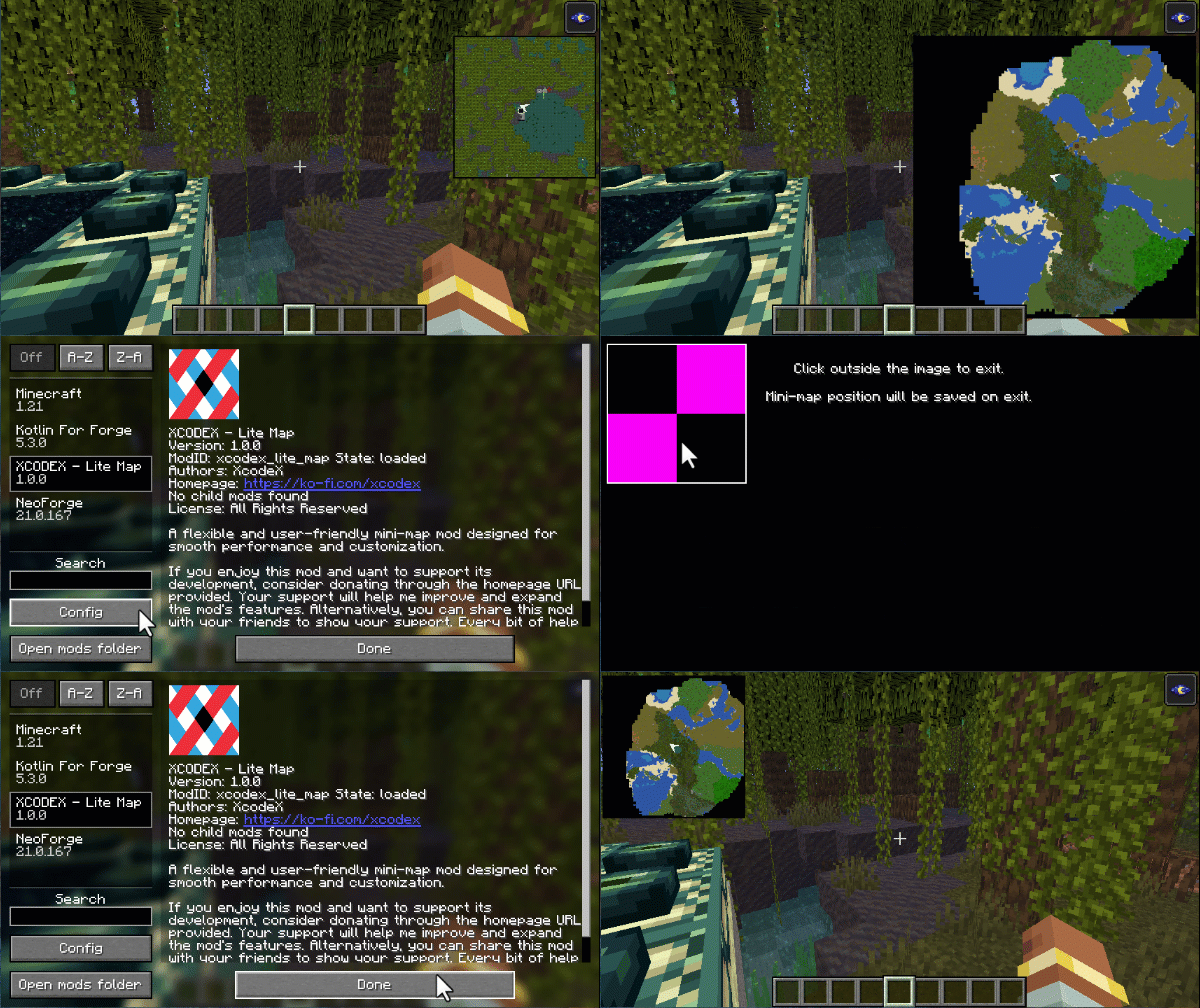
Effortlessly reposition the mini-map by simply clicking and dragging it to your desired spot, then click outside to save its position — making customization as seamless as ever!
Required Dependency: Kotlin for Forge. Please ensure you have the Kotlin for Forge library installed for this mod to work properly.
Project description from CurseForge.
Pick your setup
Lite Map by Minecraft version and loader
Choose the version and loader you play, then open the matching release.
Minecraft version
1.21
1 loader buildCheck the dependencies, then try the file in a copied instance before changing a world you care about.
Recent files
Lite Map versions and loaders
xcodex_lite_map-1.0.0.jar
25 Dec 2024
Client Source doesn’t say Server Source doesn’t say Dependencies No extras listed Listed on Release listing
Check the 1.21.1 · NeoForge setup 1.21NeoForge1.21.1 release
Looking for an older file? The official CurseForge project page is in Resources.
 mod
CurseForge + Modrinth · Minecraft
Blocksmith - Voxel Weapons
Create your custom weapons voxel by voxel with dynamic stats!
 mod
CurseForge · Minecraft
Barienne
Raise and ride dragons, found kingdoms with thrones, nobles and armies, marry villagers, master 9 classes and trades, hold royal tournaments and survive a Curse that makes death permanent.
 mod
CurseForge + Modrinth · Minecraft
Nuclear Radiation
Radioactive hazards into Minecraft