Cloth Config API (Fabric/Forge/NeoForge) Needed by RenderScale 1.3.1 for NeoForge 1.21.5
requiredMatching file found Matched file: [NeoForge 1.21.5] v18.0.145
CurseForge · Minecraft mod
RenderScale allows you to change Minecraft's render resolution separately from the HUD elements.
Quick answer
RenderScale 1.3.1 for NeoForge 1.21.5 targets 1.21.5 with NeoForge. The project page does not say whether this file belongs on the client, dedicated server, or both. All 1 required mods have matching files.
Where it goes
The project page does not say whether this file belongs on the client, dedicated server, or both.
The source does not explicitly classify this release as client-only or server-only.
RenderScale 1.3.1 for NeoForge 1.21.5. Change the file and its required mods may change too.
Install Cloth Config API (Fabric/Forge/NeoForge) first. We found matching files for this game-version and loader setup.
We only count dependency files that match this setup. A file for another loader does not fill the gap.
Before you install it
Built for RenderScale 1.3.1 for NeoForge 1.21.5. Pick another file and the loader, install side or required mods may change.
Use RenderScale 1.3.1 for NeoForge 1.21.5. It targets 1.21.5 with NeoForge; another release may have different loader, side or dependency requirements.
Install Cloth Config API (Fabric/Forge/NeoForge) first. We found matching files for this game-version and loader setup.
The project page does not say whether this file belongs on the client, dedicated server, or both.
Use the “Get this file” button beside RenderScale 1.3.1 for NeoForge 1.21.5. It opens that exact file at the source.
About this project
RenderScale allows you to change Minecraft's render resolution separately from the HUD elements.
This is a fork of ResolutionControl++, with added support for NeoForge.
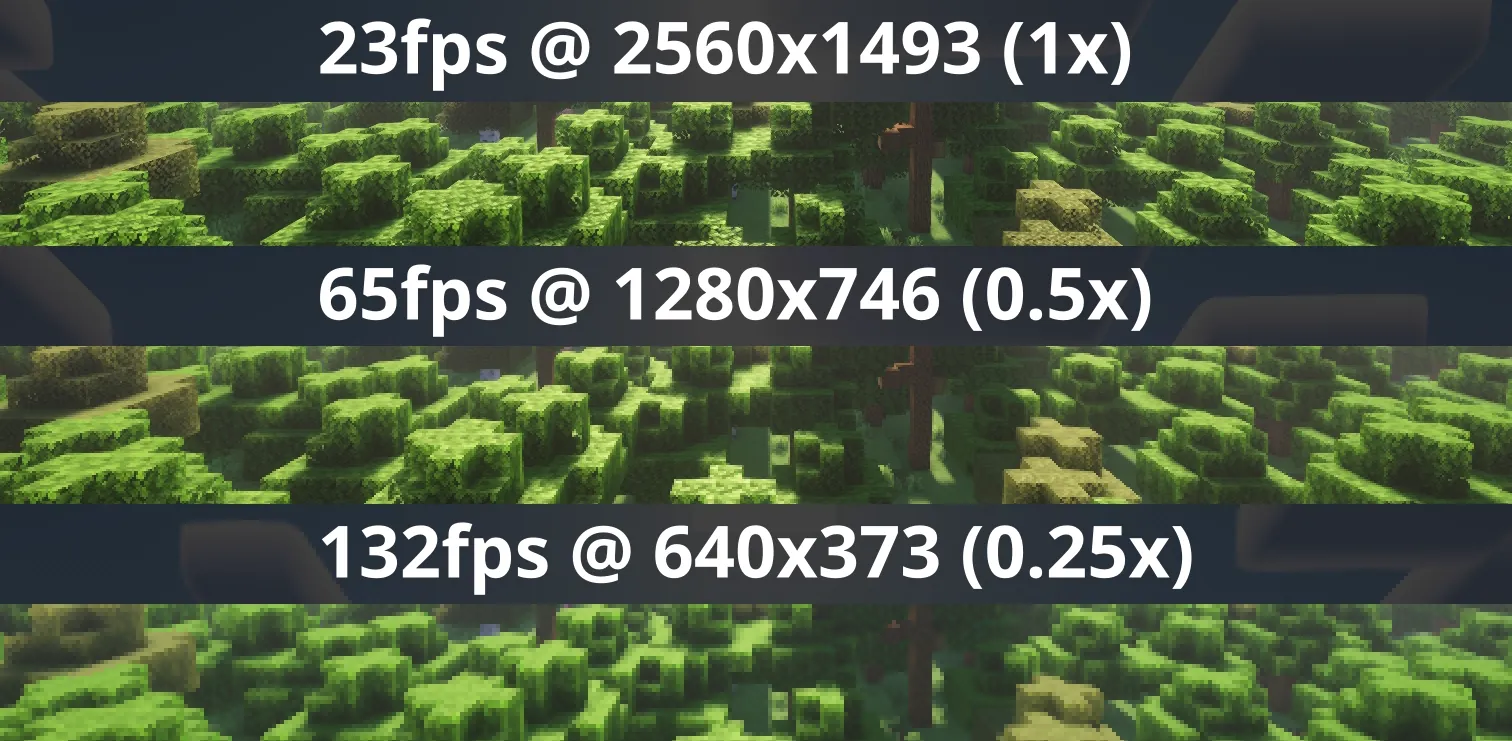
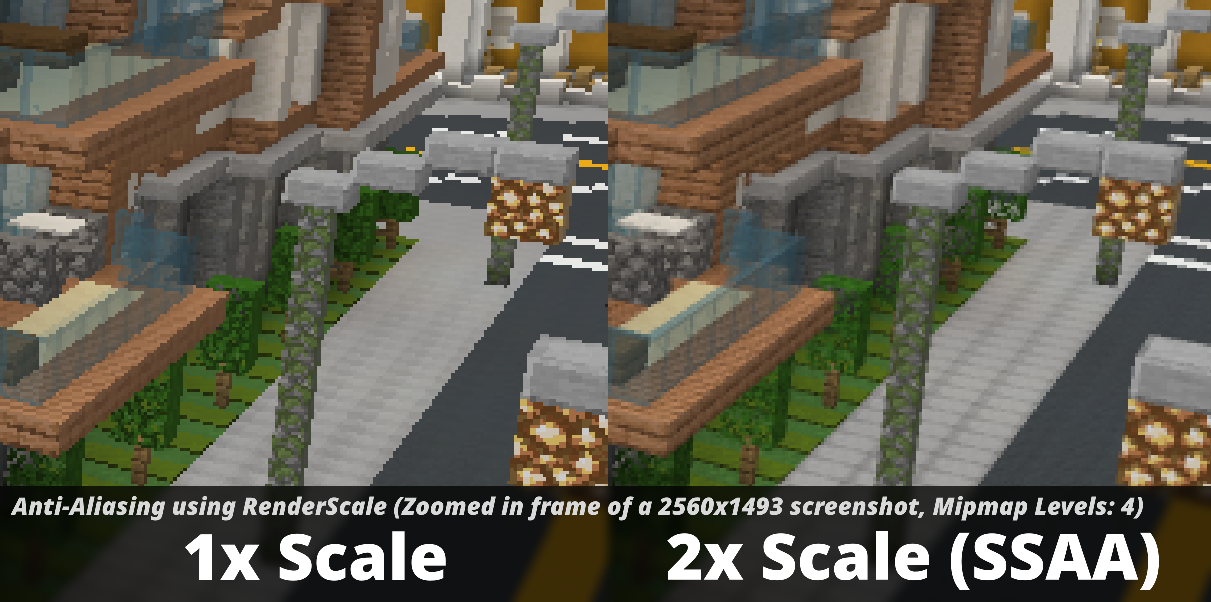
Check out Fabrishot if you also want the large screenshot feature that was in ResolutionControl.
Press O or, use the mod menu config to control the render scale multiplier. You can increase for better antialiasing, or decrease for improved performance. This is heavily recommended for laptops with retina displays!
You can also force "linear" scale algorithm (similar to FXAA) in lower render scales if you want. It's best to leave it as OFF if you're using shaders since they usually have their own antialiasing.
There is experimental support for FSR 1.0 upscaling on 1.21.11 and above! No plans to support DLSS or FSR 2.0+.
There are plans for Dynamic Resolution!
Aims to be compatible with any mod, including Sodium, Iris, etc. However, there are mods that can break RenderScale. You can report any issues here, or on my discord. Make sure to include your latest MC logs!
1.21.5+ Nvidia Note: Very rarely, certain systems with NVIDIA GPUs can get UI artifacts while in inventory, etc. If you're affected by this, check out 1.21.5+ NVIDIA UI Artifacts for updates and potential fixes.
| Minecraft | Fabric | NeoForge | Forge |
|---|---|---|---|
| 1.21.2 and above | ✅ | ✅ | 🚫 |
| 1.21.0 - 1.21.1 | ✅ [1] | ✅ [1] | 🚫 |
| 1.20.2 - 1.20.6 | 🚫 [2] | 🚫 | 🚫 |
| 1.20.1 | ✅ [2] | 🚫 | ✅ |
[1] Does not support Fabulous graphics
Check out the previous forks, ResolutionControl++, ResolutionControl+, ResolutionControl for older versions
Project description from CurseForge.
Pick your setup
Choose the version and loader you play, then open the matching release.
Showing the newest 12 of 15 game versions. Older files are in the list below.
Check the dependencies, then try the file in a copied instance before changing a world you care about.
Recent files
renderscale-1.4.0-alpha.5-neoforge+1.21.1.jar
6 Aug 2026
renderscale-1.4.0-alpha.5-fabric+1.21.1.jar
6 Aug 2026
renderscale-1.4.0-alpha.4-neoforge+26.2.jar
22 Jun 2026
renderscale-1.4.0-alpha.4-fabric+26.2.jar
22 Jun 2026
renderscale-1.4.0-alpha.4-neoforge+26.1.jar
22 Jun 2026
renderscale-1.4.0-alpha.4-fabric+1.21.11.jar
22 Jun 2026
renderscale-1.4.0-alpha.4-neoforge+1.21.11.jar
22 Jun 2026
renderscale-1.4.0-alpha.4-fabric+26.1.jar
22 Jun 2026
renderscale-1.4.0-alpha.3-neoforge+26.2.jar
20 Jun 2026
renderscale-1.4.0-alpha.3-fabric+26.2.jar
20 Jun 2026
renderscale-1.4.0-alpha.3-fabric+26.1.jar
20 Jun 2026
renderscale-1.4.0-alpha.3-fabric+1.21.11.jar
20 Jun 2026
Looking for an older file? The official CurseForge project page is in Resources.
 mod
modFunctional broadcast cameras, PTZ control, tally lights and video switching for Minecraft.
 mod
modAll-in-one unofficial Japanese translation mod
 mod
modLimit per-hit armor durability damage with a legacy percentage cap or custom expressions based on armor durability and Unbreaking level.