LDLib Needed by justpump-1.1.0.jar
requiredMatching file found Matched file: LDLib2-1.21.1-2.2.39.a-neoforge

CurseForge · Minecraft mod
A simple pump module that enables the extraction and filling of fluids.
Quick answer
justpump-1.1.0.jar targets 1.21.1 with NeoForge. The project page does not say whether this file belongs on the client, dedicated server, or both. All 1 required mods have matching files.
Where it goes
The project page does not say whether this file belongs on the client, dedicated server, or both.
The source does not explicitly classify this release as client-only or server-only.
justpump-1.1.0.jar. Change the file and its required mods may change too.
Install LDLib first. We found matching files for this game-version and loader setup. 2 come through another mod in the chain.
2 extra mods were pulled in by other dependencies. Indented rows show who needs each one. We only count dependency files that match this setup. A file for another loader does not fill the gap.
Before you install it
Built for justpump-1.1.0.jar. Pick another file and the loader, install side or required mods may change.
Use justpump-1.1.0.jar. It targets 1.21.1 with NeoForge; another release may have different loader, side or dependency requirements.
Install LDLib first. We found matching files for this game-version and loader setup. 2 come through another mod in the chain.
The project page does not say whether this file belongs on the client, dedicated server, or both.
Use the “Get this file” button beside justpump-1.1.0.jar. It opens that exact file at the source.
About this project
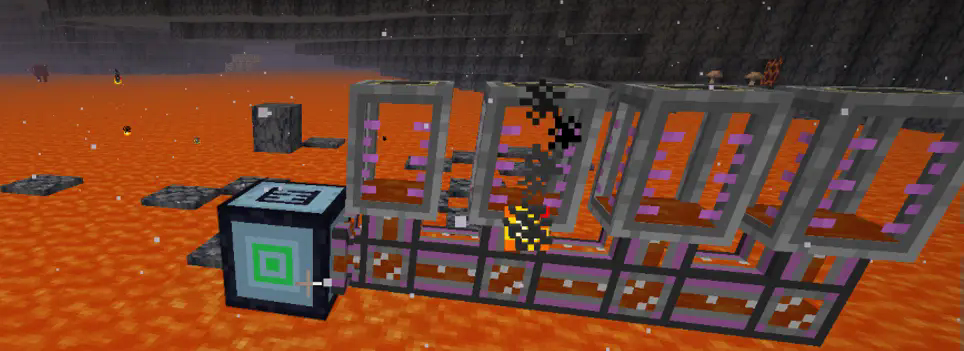
A simple MOD is designed to function similarly to a hose pulley. In automatic mode, it can draw the liquid below. When the liquid below exceeds 10,000 units, it is considered infinite. There is also a range - extraction mode, which can extract all the liquid within a specified range. Additionally, there is a fluid - filling mode, which fills the fluid within a designated range.
Put the jar-file into the mods folder in your .minecraft directory.
You can configure the amount of fluid extracted per tick, the default capacity of the pump, and the threshold considered as infinite.
#Number of blocks processed per tick
# Default: 4096
# Range: > 1
blocksPerTick = 4096
#Pump fluid storage capacity in mB (1 bucket = 1000mB)
# Default: 16
# Range: 1 ~ 64
pumpCapacity = 16
#Fluid amount above this threshold will be considered infinite
# Default: 10000
# Range: > 0
infiniteThreshold = 10000
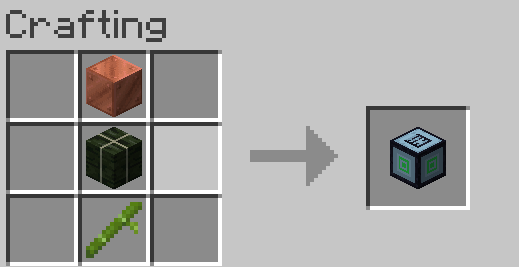
You can use copper blocks, kelp blocks, and bamboo for synthesis.
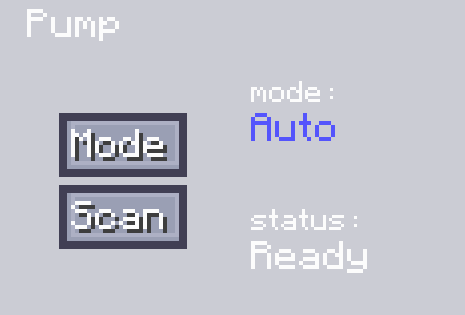
When in the auto mode, you need to place the machine above the fluid. Then click "Scan" to obtain the position of the extractable fluid. After that, use a pipeline for active output and connect it to the corresponding fluid - storage container, and thus the fluid output can be completed.
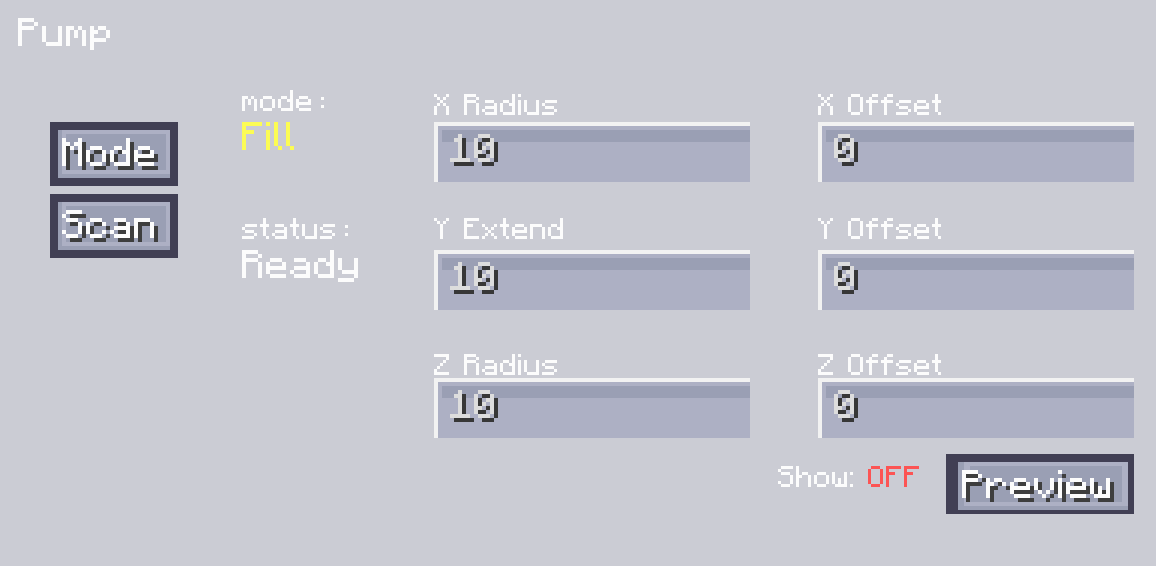
Another mode for liquid range extraction allows you to set the range. You can do this by setting the radii on the X, Y, and Z axes, and adjust the offset values of XYZ to set its specific position. You can view the range by clicking the "Display Range" button. After adjusting it to the appropriate position, you can click "Scan" to complete the scanning of all extractable fluids. After the scanning is finished, just like in the automatic mode, you can output the fluid through a pipeline for active output.
The filling mode is similar to the extraction mode. The difference is that you need to input fluid into our pump. First, set the range and adjust the position. After that, you can click "Scan". It will scan for positions where the fluid can be placed and obtain the position information. Then, input the fluid into the pump, and it will place the fluid at the corresponding positions.
Project description from CurseForge.
Pick your setup
Choose the version and loader you play, then open the matching release.
Check the dependencies, then try the file in a copied instance before changing a world you care about.
Recent files
2 Mar 2026
11 Feb 2025
Looking for an older file? The official CurseForge project page is in Resources.
 mod
modFunctional broadcast cameras, PTZ control, tally lights and video switching for Minecraft.
 mod
modAdds the Magic Mirror and Ice Mirror from Terraria to Minecraft, allowing you to teleport to your respawn point with configurable cooldown and dimension settings.
 mod
modThis mod includes XRay or block finder, entity highlighting, kill aura, etc