Minecraft version
Back to mods 
CurseForge · Minecraft mod
Arcshaper Tools
A combat mod adding Arc Shaper tools to Minecraft, combining functions of shovel, hoe, pickaxe, and axe for versatile use.
Choose a version Pick your version below, then grab the matching file.
Quick answer
Which Arcshaper Tools release should I use?
Latest stable file ArcShaper Tools 1.0.1+1.21.4
Game version 1.21.4
Loader Fabric
ArcShaper Tools 1.0.1+1.21.4 targets 1.21.4 with Fabric. The project page does not say whether this file belongs on the client, dedicated server, or both. No extra mods listed for this file.
Where it goes
Is Arcshaper Tools required on the client, server, or both?
The project page does not say whether this file belongs on the client, dedicated server, or both.
Client Source doesn’t say
Dedicated server Source doesn’t say
Loader for this release Fabric
Required install it here Optional supported, not mandatory Not supported do not install here Source doesn’t say do not assume
The source does not explicitly classify this release as client-only or server-only.
What else does ArcShaper Tools 1.0.1+1.21.4 need?
ArcShaper Tools 1.0.1+1.21.4. Change the file and its required mods may change too.
This file does not list any required mods. Do not add a library just because a different file uses it.
This file does not list any required or optional mods.
Before you install it
Add Arcshaper Tools without breaking your instance.
Built for ArcShaper Tools 1.0.1+1.21.4. Pick another file and the loader, install side or required mods may change.
- 01
Stick to this file
Use ArcShaper Tools 1.0.1+1.21.4. It targets 1.21.4 with Fabric; another release may have different loader, side or dependency requirements.
- 02
Bring the mods it needs
This file does not list any required mods. Do not add a library just because a different file uses it.
- 03
Put it on the correct side
The project page does not say whether this file belongs on the client, dedicated server, or both.
- 04
Pick the file you checked
Use the “Get this file” button beside ArcShaper Tools 1.0.1+1.21.4. It opens that exact file at the source.
About this project
What does Arcshaper Tools add?
Arc Shapers - Versatile Combat Tools Mod
Arc Shapers is a combat-focused Minecraft mod introducing the Arc Shaper, a unique tool that combines the functionality of a shovel, hoe, pickaxe, axe, and sword into one powerful item. Perfect for players who prioritize efficiency, the Arc Shaper adapts to various tasks: create paths on grass like a shovel, till soil while holding shift to act as a hoe, or strip logs and wood when holding control, behaving like an axe. This versatile tool brings streamlined utility to your Minecraft experience, reducing the need for multiple tools in your inventory.
With Arc Shapers, you can streamline your inventory, carrying a single item that covers all essential tool functions. Whether you're building, farming, or exploring, the Arc Shaper is your all-in-one solution. Perfect for survival gameplay and optimized for convenience, Arc Shapers will change the way you play Minecraft.
How to use?
The Arc Shaper functions like a regular tool for mining and attacking, but it offers special abilities when used with specific key presses:
Tilling Grass or Dirt: Hold Shift while right-clicking on grass or dirt blocks to till them, transforming them into farmland ready for planting crops!
Stripping Logs or Woods: Hold Control while right-clicking on any log or wood block to strip off the bark, revealing the smooth wood beneath!
How to craft?
The Arc Shaper is crafted by placing a Sword in the center of the crafting grid, with a Pickaxe in the top-left, Hoe in the top-right, Axe in the bottom-left, and Shovel in the bottom-right. To craft different types of Arc Shapers, match the tool materials: use Wooden tools for a Wooden Arc Shaper, Iron tools for an Iron Arc Shaper, and so on.
Check out Talents on Modrinth
🧠 Talent Expansion – Master Combat, Defense, and Survival with Unique Talents!
Talent Expansion adds a customizable talent tree system to Minecraft, giving players the power to unlock and level up abilities using Talent Crystals — special items crafted by surrounding a Nether Star with Emeralds.
🔹 How It Works:
Unlock talents by spending Talent Crystals, which can be crafted using 8 Emeralds surrounding 1 Nether Star
Open the Talent GUI with the V key (customizable in Controls → Key Binds) to view and manage your talent tree.
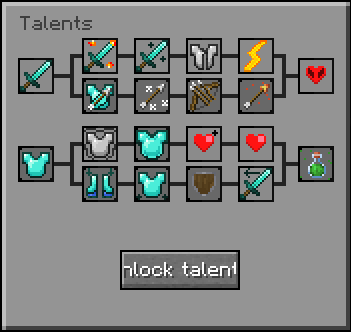
Talents can be leveled up to increase their effectiveness, with some requiring one prerequisite talent.
Hover over each talent to display its name & when clicked makes the Unlock Talent Button visible which is used to unlock the selectec talent.
🗡️ Combat Talents
Attack (Root for Fire Sword & Blow) – Boosts sword damage.
Fire Sword – Melee hits set enemies on fire.
Quick Sword Hit – Faster sword attack speed.
Armor Penetration – Sword attacks ignore some armor.
Thunder – Summons lightning on hit.
Blow – Arrows pierce armor.
Critical Arrow – Increased arrow crit chance or damage.
Multishot – Shoot multiple arrows simultaneously.
Flame – Sets targets on fire with arrows.
✨ Special Talents
🩸 Life Steal – Gain health when dealing damage. 🧬 Requires either any of these: Thunder and Flame.
☠ Resilience – Reduces duration and strength of negative status effects. 🧬 Requires either any of these: Heal and Thorns.
🛡️ Defense Talents
Armor (Root for Knockback Resistance and Featherfall) – Increases armor defense.
Knockback Resistance – Reduces knockback taken.
Tough Armor – Additional defense boost.
Health Boost – Increases max health.
Heal – Heals more when hunger is full.
Featherfall – Greatly reduces fall damage.
Protection – General damage reduction from all sources.
Shield – Chance to auto-block damage with a shield.
Thorns – Chance to damage attackers.
⚠ This mod will be shortly available on CurseForge as well.
Leave any suggestions to improve the mod or found a bug report here
🧡 Support
If you’d like to support my work, check out GameTeam Minecraft Server hosting using my affiliate link
(Affiliate link – I may earn a small commission from this.)
Project description from CurseForge.
Pick your setup
Arcshaper Tools by Minecraft version and loader
Choose the version and loader you play, then open the matching release.
Minecraft version
1.21.3
1 loader buildMinecraft version
1.21.2
1 loader buildMinecraft version
1.21.1
1 loader buildMinecraft version
1.21
1 loader buildCheck the dependencies, then try the file in a copied instance before changing a world you care about.
Recent files
Arcshaper Tools versions and loaders
ArcShaper Tools 1.0.1+1.21.4
arcshapers-1.0.1+1.21.4.jar
25 Feb 2025
Client Source doesn’t say Server Source doesn’t say Dependencies No extras listed Listed on Release listing
Check the 1.21.4 · Fabric setup Fabric1.21.4 release
Arcshaper Tools 1.0.0
arcshapers-1.0.0+1.21.x.jar
16 Feb 2025
Client Source doesn’t say Server Source doesn’t say Dependencies No extras listed Listed on Release listing
Check the 1.21.3 · Fabric setup 1.21Fabric1.21.31.21.1 release
Looking for an older file? The official CurseForge project page is in Resources.
 mod
CurseForge · Minecraft
[FCA]Flame Chase Artifacts New
This mod adds accessories inspired by Honkai: Star Rail, primarily based on the 13 Goldborn of Wenfaros.
 mod
CurseForge + Modrinth · Minecraft
Cobblemon Catch Rate Display
Real-time catch rate calculator for Cobblemon. Shows live percentages, ball comparisons, and status effects. 100% client-side. It works on any server.
 mod
CurseForge + Modrinth · Minecraft
BankSystem
BankSystem is a Minecraft mod that brings money in to the game. Players can have a bankacount that can not only hold money but items too.