Create Needed by Create: Filters Anywhere createfiltersanywhere-1.21.1-2.6.0.jar
requiredMatching file found Matched file: Create 6.0.10 for mc1.21.1

CurseForge · Minecraft mod
An addon for Create that expands usage of Attribute Filters and List Filters to support other mods. Also adds some QOL features to filters.
Quick answer
Create: Filters Anywhere createfiltersanywhere-1.21.1-2.6.0.jar targets 1.21.1 with NeoForge. The project page does not say whether this file belongs on the client, dedicated server, or both. All 1 required mods have matching files.
Where it goes
The project page does not say whether this file belongs on the client, dedicated server, or both.
The source does not explicitly classify this release as client-only or server-only.
createfiltersanywhere-1.21.1-2.6.0.jar. Change the file and its required mods may change too.
Install Create first. We found matching files for this game-version and loader setup.
We only count dependency files that match this setup. A file for another loader does not fill the gap.
Before you install it
Built for Create: Filters Anywhere createfiltersanywhere-1.21.1-2.6.0.jar. Pick another file and the loader, install side or required mods may change.
Use createfiltersanywhere-1.21.1-2.6.0.jar. It targets 1.21.1 with NeoForge; another release may have different loader, side or dependency requirements.
Install Create first. We found matching files for this game-version and loader setup.
The project page does not say whether this file belongs on the client, dedicated server, or both.
Use the “Get this file” button beside createfiltersanywhere-1.21.1-2.6.0.jar. It opens that exact file at the source.
About this project
This mod adds a few extra feature's to the Create mod's excellent Attribute and List Filters!
The main feature (and the namesake of the mod) is added compatability to use Create's filters in other mod's filter slots! Additional mods will be added over time, but here are the supported mods so far:
Tom's Simple Storage Mod (v1.1+)
Refined Storage (v1.3+, 1.20.1 only)
In addition to the above support, this adds interoperability between supported mod's filter items. For example, you can use Modular Routers filters inside Create's Smart Chutes to filter, or even use the FTB Filter System filters with your AE2 Storage Bus, and more!
New Attributes:
In addition to compatibility with existing mods, as of v1.2+, I have now started adding new attributes as well. You can see the current list below.
Built-In/Vanilla
Compatibility will only be applied when the mods are present, you should be able to use the mod whether all of the above mods are present or not.
In addition to this compatibility, this mod also adds some nifty QOL features to Create's filters, such as the ability to view details on the filters inside of List Filters by using the CTRL key while hovering the filter. You can also delete individual attributes from a filter while editing it, instead of only being able to clear out all attributes and add back the ones you want.
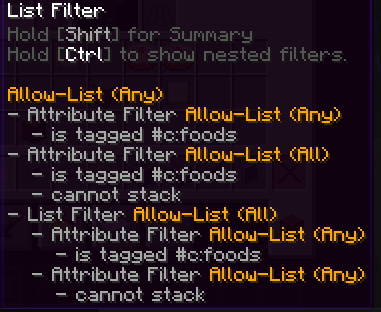
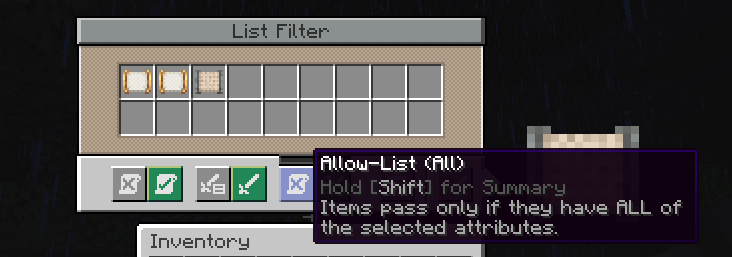
There is also the super useful addition of "Match All" to the List Filter, which when set, requires all of the filters to match inside of a List Filter instead of any of them for it to pass the filter.
Thank you to the incredible developers: Joseph Franci, rizek (radimous), and JustAHuman. As this is a port of the incredible original project, Vault Filters](https://www.curseforge.com/minecraft/mc-mods/vault-filters%29)!
New features coming soon when I have time!
Project description from CurseForge.
Pick your setup
Choose the version and loader you play, then open the matching release.
Check the dependencies, then try the file in a copied instance before changing a world you care about.
Recent files
16 Aug 2026
24 Mar 2026
12 Feb 2026
20 Jan 2026
27 Oct 2025
27 Oct 2025
26 Sept 2025
5 Sept 2025
21 Jul 2025
createfiltersanywhere-1.4.2.jar
12 Jul 2025
createfiltersanywhere-1.4.1.jar
3 Jul 2025
3 Jul 2025
Looking for an older file? The official CurseForge project page is in Resources.
 mod
modClient-side fix for TFC food ingredients missing in JEI usage index on dedicated servers
 mod
modAn addon for Mi Alliance, reworking a multitude of things about it while adding some new ones on top.
 mod
modBy modifying the configuration file, the power generation speed of different powah generators in different dimensions can be adjusted.