Minecraft version
Back to mods 
CurseForge · Minecraft mod
TSL Server Rules
A simple server side mod that adds /rules for players to understand the server better.
Choose a version Pick your version below, then grab the matching file.
Quick answer
Which TSL Server Rules release should I use?
Latest stable file TSL Server Rules 1.21.4
Game version 1.21.4
Loader NeoForge
TSL Server Rules 1.21.4 targets 1.21.4 with NeoForge. The project page does not say whether this file belongs on the client, dedicated server, or both. No extra mods listed for this file.
Where it goes
Is TSL Server Rules required on the client, server, or both?
The project page does not say whether this file belongs on the client, dedicated server, or both.
Client Source doesn’t say
Dedicated server Source doesn’t say
Loader for this release NeoForge
Required install it here Optional supported, not mandatory Not supported do not install here Source doesn’t say do not assume
The source does not explicitly classify this release as client-only or server-only.
What else does TSL Server Rules 1.21.4 need?
TSL Server Rules 1.21.4. Change the file and its required mods may change too.
This file does not list any required mods. Do not add a library just because a different file uses it.
This file does not list any required or optional mods.
Before you install it
Add TSL Server Rules without breaking your instance.
Built for TSL Server Rules 1.21.4. Pick another file and the loader, install side or required mods may change.
- 01
Stick to this file
Use TSL Server Rules 1.21.4. It targets 1.21.4 with NeoForge; another release may have different loader, side or dependency requirements.
- 02
Bring the mods it needs
This file does not list any required mods. Do not add a library just because a different file uses it.
- 03
Put it on the correct side
The project page does not say whether this file belongs on the client, dedicated server, or both.
- 04
Pick the file you checked
Use the “Get this file” button beside TSL Server Rules 1.21.4. It opens that exact file at the source.
About this project
What does TSL Server Rules add?
Enforce order and clarity on your Minecraft server with the TSL Server Rules mod! This simple yet powerful tool allows server owners to define and display server rules directly in-game, ensuring all players are aware of the expectations and guidelines. Say goodbye to confusion and welcome a more harmonious community.
Key Features:
- Server-Side Simplicity: TSL Server Rules is fully server-side! This means that players do not need to install anything on their client. It works seamlessly with any modpack (depending on version compatibility), making it incredibly easy to implement on any server!
- In-Game Rule Display: Players can access the server rules at any time using the simple
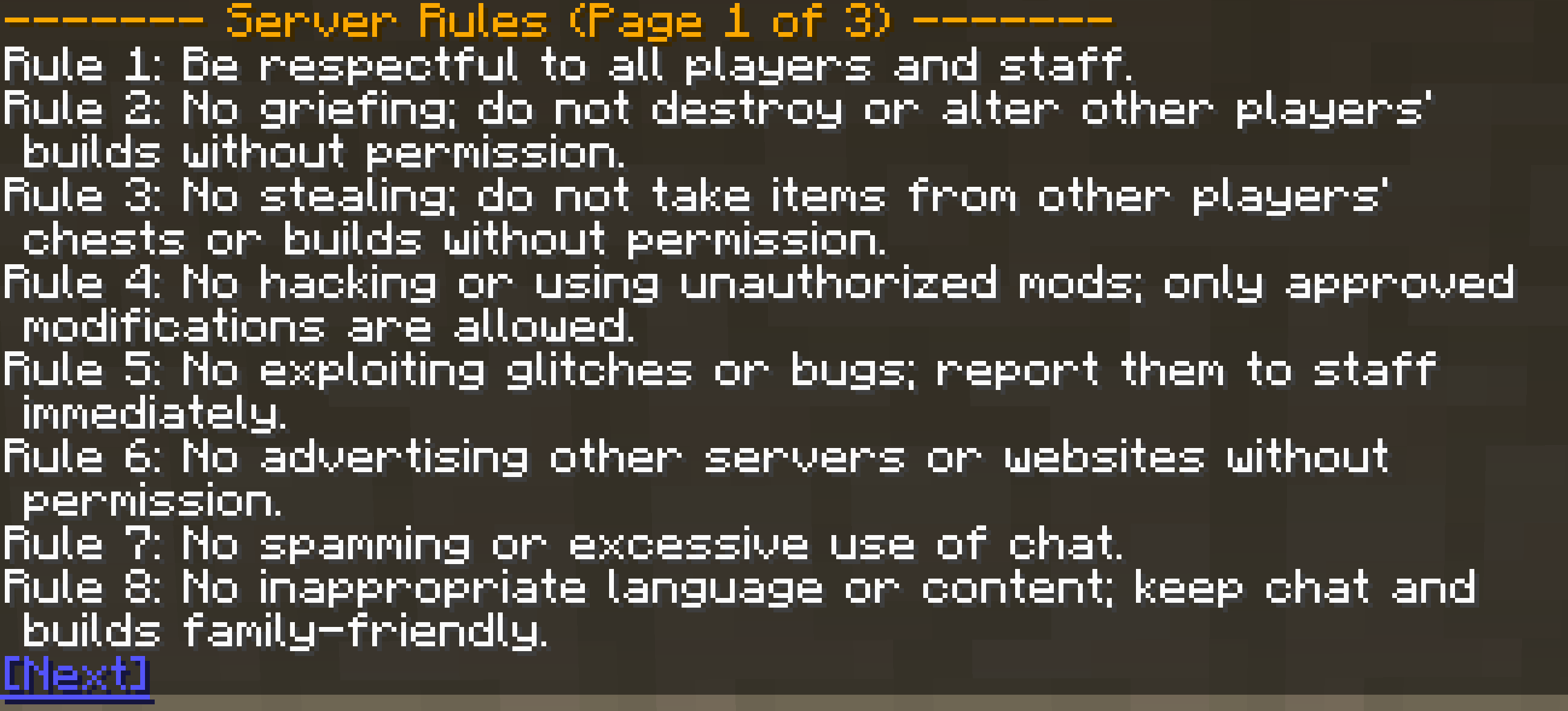
/rulescommand. Rules are displayed in a clear, paginated format, making them easy to read and navigate!
- Easy Configuration: Customize your server's rules effortlessly through the config file. Update rules anytime without server restarts.
How It Works:
TSL Server Rules adds a /rules command to your server. When a player executes this command, the mod retrieves the list of rules defined in the server's configuration file and displays them in the chat. If there are many rules, they are presented in pages, with navigation links to move between pages.
Configuration:
The mod's configuration file allows server owners to define the exact rules they want players to follow. To set up your server rules, edit the config file with the following structure:
serverRules = [
"Rule 1: Be respectful to all players and staff.",
"Rule 2: No griefing; do not destroy or alter other players' builds without permission.",
"Rule 3: No stealing; do not take items from other players' chests or builds without permission.",
"Rule 4: No hacking or using unauthorized mods; only approved modifications are allowed.",
"Rule 5: No exploiting glitches or bugs; report them to staff immediately.",
"Rule 6: No advertising other servers or websites without permission.",
"Rule 7: No spamming or excessive use of chat.",
"Rule 8: No inappropriate language or content; keep chat and builds family-friendly.",
"Rule 9: Follow staff instructions; their decisions are final.",
"Rule 10: Build within designated areas; respect build limits and boundaries.",
"Rule 11: Do not build excessively large or lag-inducing structures.",
"Rule 12: Do not create traps or hazards that harm other players.",
"Rule 13: Do not engage in PvP without consent; respect players' wishes.",
"Rule 14: Keep the server clean; dispose of unwanted items properly.",
"Rule 15: Use common sense; if it seems wrong, it probably is.",
"Rule 16: Do not impersonate staff or other players.",
"Rule 17: No automated machines that cause excessive server lag.",
"Rule 18: Do not build near spawn or other important locations without permission.",
"Rule 19: If you are caught breaking a rule you will be punished accordingly.",
"Rule 20: Trading only with other players, no trading with duped or glitched items.",
"Rule 21: Any player found abusing the economy will be banned.",
"Rule 22: Do not create farms that exceed a reasonable size.",
"Rule 23: Do not build in the nether roof without staff approval.",
"Rule 24: No AFK farming for extended periods of time."
]
Simply add or modify the rules within the serverRules list to fit your server's specific needs. Each rule should be a separate string within the list.
Installation:
- Download the TSL Server Rules mod.
- Place the mod's
.jarfile into themodsfolder of your server. - Start your server. The configuration file will be automatically generated.
- Edit the configuration file (
config/serverrules-common.toml) to define your server rules. - You are finished! The mod updates any edits made to the config automatically!
Project description from CurseForge.
Pick your setup
TSL Server Rules by Minecraft version and loader
Choose the version and loader you play, then open the matching release.
Minecraft version
1.21.3
1 loader buildMinecraft version
1.21.2
1 loader buildMinecraft version
1.21.1
1 loader buildCheck the dependencies, then try the file in a copied instance before changing a world you care about.
Recent files
TSL Server Rules versions and loaders
TSL Server Rules 1.21.4
serverrules-1.21.4-neoforge.jar
26 Mar 2025
Client Source doesn’t say Server Source doesn’t say Dependencies No extras listed Listed on Release listing
Check the 1.21.4 · NeoForge setup 1.21.4NeoForge release
TSL Server Rules 1.21.3
serverrules-1.21.3-neoforge.jar
26 Mar 2025
Client Source doesn’t say Server Source doesn’t say Dependencies No extras listed Listed on Release listing
Check the 1.21.3 · NeoForge setup NeoForge1.21.3 release
TSL Server Rules 1.21.2
serverrules-1.21.2-neoforge.jar
26 Mar 2025
Client Source doesn’t say Server Source doesn’t say Dependencies No extras listed Listed on Release listing
Check the 1.21.2 · NeoForge setup NeoForge1.21.2 release
TSL Server Rules 1.21.1
serverrules-1.21.1-neoforge.jar
25 Mar 2025
Client Source doesn’t say Server Source doesn’t say Dependencies No extras listed Listed on Release listing
Check the 1.21.1 · NeoForge setup NeoForge1.21.1 release
Looking for an older file? The official CurseForge project page is in Resources.
 mod
mod CurseForge + Modrinth · Minecraft
Cobblemon Pokedex Network
The mod introduces shared Pokémon discovery data, allowing players to see complete information about Pokémon scanned by others. It also adds catch info to the Pokédex, including who caught each Pokémon first and when
 mod
mod CurseForge + Modrinth · Minecraft
Super Factory Manager Retro
Build Super Factory Manager programs on a visual node canvas instead of writing SFML by hand. Drag nodes, wire them together, search items and fluids by name, and import/export programs you have already written.
 mod
mod CurseForge · Minecraft
Discord-Linker
MC Linker is the easiest way to connect your Minecraft server with Discord. NO custom bot creation or configuration files needed!