UniMixins Needed by Custom MOTD cmotd-1.0.1.jar
requiredMatching file found Matched file: UniMixins 0.3.1

CurseForge · Minecraft mod
Custom server MOTD for Forge 1.7.10.
Quick answer
Custom MOTD cmotd-1.0.1.jar targets 1.7.10 with Forge. The project page does not say whether this file belongs on the client, dedicated server, or both. All 1 required mods have matching files.
Where it goes
The project page does not say whether this file belongs on the client, dedicated server, or both.
The source does not explicitly classify this release as client-only or server-only.
cmotd-1.0.1.jar. Change the file and its required mods may change too.
Install UniMixins first. We found matching files for this game-version and loader setup.
We only count dependency files that match this setup. A file for another loader does not fill the gap.
Before you install it
Built for Custom MOTD cmotd-1.0.1.jar. Pick another file and the loader, install side or required mods may change.
Use cmotd-1.0.1.jar. It targets 1.7.10 with Forge; another release may have different loader, side or dependency requirements.
Install UniMixins first. We found matching files for this game-version and loader setup.
The project page does not say whether this file belongs on the client, dedicated server, or both.
Use the “Get this file” button beside cmotd-1.0.1.jar. It opens that exact file at the source.
About this project
A 1.7.10 Forge server-side mod to customize your server MOTD and player list!









1.0.1, UniMixins ( ,
 ,
 ) is a required dependency.
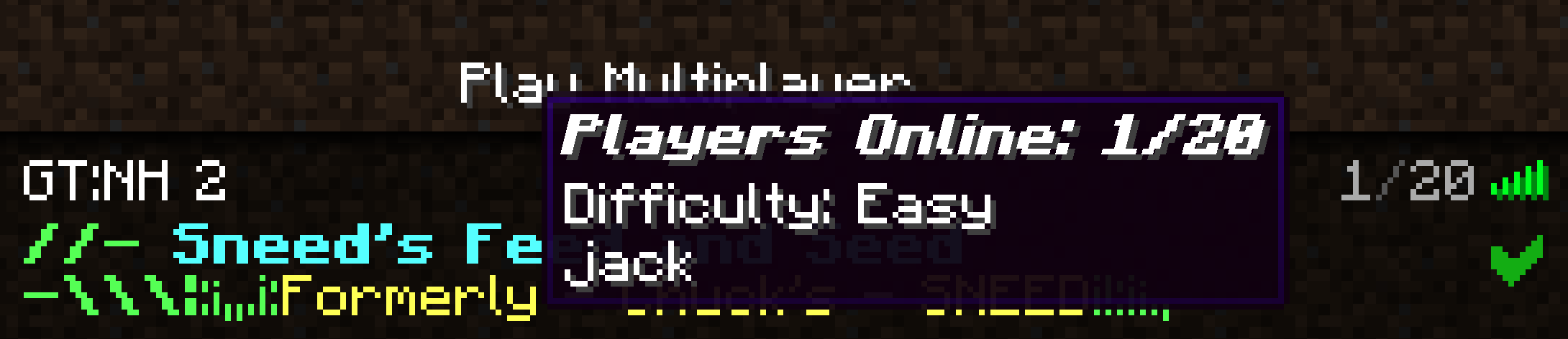
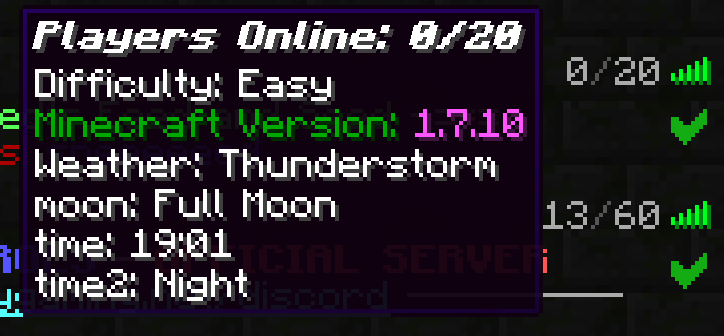
PlayerList tooltip{playerlist} variable backport, {weather}, {time}, {time_of_the_day}/cmotd_reloadTabFaces (, , ) compatOn first run, the mod will generate the two required files for MOTD customization in <server root dir>/CustomMOTD.
There are 2 files used for configuration: * customotdlist.txt * customplayerlist.txt
This mod supports multiline MOTDs (2 lines as per vanilla). To set a new line, use the pipe | character in the entry in custommotdlist.txt Each entry in custommotdlist.txt is a separate MOTD entry. customplayerlist.txt contains the replacement template for the player list tooltip.
{playercount} - number of players currently on the server{maxplayers} - maximum number of players the server supports{difficulty} - server difficulty level{mcversion} - server Minecraft version{radio} - obfuscated radio bars{playerlist} - list up to 10 players currently online{weather} - displays weather, formatting is configurable{time} - displays time, formatting is configurable{time_of_the_day} - displays the time of the day (e.g. Noon, Midnight){rt_bloodmoon} - Random Things Blood Moon, formatting is configurable{serene_season} - Serene Seasons season1.7.10 port of Serene Seasons is broken{lycanites_event} - Active Lycanites Mobs event in the overworld, formatting is configurable{tfc_season}, {tfc_day_of_month}, {tfc_day_of_week}, {tfc_day_of_year}, {tfc_month}, {tfc_month_name}, {tfc_year}, {tfc_hour}, {tfc_temperature}Feel free to reach out to me to propose new modded variables.
Full support for default Minecraft color codes and formatting using &.
You can comment out a line by prefixing it with #. Special characters | and &, as well as leading # can be escaped with a backslash (\).
This mod is based on p455w0rd's MOTD Customizer ().
LGPLv3.

Project description from CurseForge.
Pick your setup
Choose the version and loader you play, then open the matching release.
Check the dependencies, then try the file in a copied instance before changing a world you care about.
Recent files
22 Apr 2025
18 Apr 2025
Looking for an older file? The official CurseForge project page is in Resources.
 mod
Adjustments to specific mods in the BSP modpack to fix bugs until the author patches them.
 mod
An automatic ranking system designed to work with Luckperms and Forge
 mod
A teleport, home, warp mod to be used with the BSP Modpack offical server allowing teleporting between all servers within the network.