Minecraft version
Back to mods 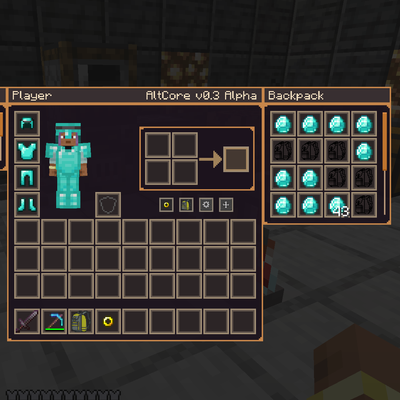
CurseForge · Minecraft mod
AltCore
Сompletely reimagines the inventory and container interfaces, making them more flexible and visually expressive without using texture packs
Choose a version Pick your version below, then grab the matching file.
Quick answer
Which AltCore release should I use?
Latest stable file AltCore-v0.3-Alpha-1.20.1
Game version 1.20.1
Loader Forge
AltCore-v0.3-Alpha-1.20.1 targets 1.20.1 with Forge. The project page does not say whether this file belongs on the client, dedicated server, or both. No extra mods listed for this file.
Where it goes
Is AltCore required on the client, server, or both?
The project page does not say whether this file belongs on the client, dedicated server, or both.
Client Source doesn’t say
Dedicated server Source doesn’t say
Loader for this release Forge
Required install it here Optional supported, not mandatory Not supported do not install here Source doesn’t say do not assume
The source does not explicitly classify this release as client-only or server-only.
What else does AltCore-v0.3-Alpha-1.20.1 need?
AltCore-v0.3-Alpha-1.20.1. Change the file and its required mods may change too.
This file does not list any required mods. Do not add a library just because a different file uses it.
This file does not list any required or optional mods.
Before you install it
Add AltCore without breaking your instance.
Built for AltCore-v0.3-Alpha-1.20.1. Pick another file and the loader, install side or required mods may change.
- 01
Stick to this file
Use AltCore-v0.3-Alpha-1.20.1. It targets 1.20.1 with Forge; another release may have different loader, side or dependency requirements.
- 02
Bring the mods it needs
This file does not list any required mods. Do not add a library just because a different file uses it.
- 03
Put it on the correct side
The project page does not say whether this file belongs on the client, dedicated server, or both.
- 04
Pick the file you checked
Use the “Get this file” button beside AltCore-v0.3-Alpha-1.20.1. It opens that exact file at the source.
About this project
What does AltCore add?
AltCore adds a custom player inventory screen, accessory slots, and backpacks whose slots are added to the player inventory. In addition, the mod overhauls many vanilla screens into a unified Universal GUI system with support for style presets, configurable spacing, sizes, positions, and the overall look of the interface.
What the mod already has:
- A custom inventory that fully replaces the default one;
- Full support for all standard Minecraft screens;
- A new player inventory screen;
- An accessory system and additional slots;
- Backpacks that expand the inventory;
- Built-in style presets and the ability to create your own;
- Flexible interface customization, including moving windows within each screen;
- Overhaul of many container and utility screens;
- A simplified
/gm 0,1,2gamemode command.


 AltCore is currently in **v0.3 Alpha**.
What is planned for future versions:
- Fixing effect display on the custom inventory screen;
- Configurable default panel positions on screens;
- Compatibility with JEI, NEI, and others;
- Automatic support for other modded containers;
- Further development of the accessory system;
- Further development of the backpack system with auto-pickup, placement in the world, and upgrades;
- More customization options, including custom textures in any screen, gradients, and animated colors;
- Support for changing the player HUD;
- Tactical-style layout presets similar to TaCZ and others;
- The ability to add any item as an accessory or backpack with custom properties via config;
- Implementation of the
/inv "name"command for server administrators.
Project description from CurseForge.
Pick your setup
AltCore by Minecraft version and loader
Choose the version and loader you play, then open the matching release.
Check the dependencies, then try the file in a copied instance before changing a world you care about.
Recent files
AltCore versions and loaders
AltCore-v0.3-Alpha-1.20.1
altcore-0.3 Alpha.jar
3 Jul 2026
Client Source doesn’t say Server Source doesn’t say Dependencies No extras listed Listed on Release listing
Check the 1.20.1 · Forge setup 1.20.1Forge release
AltCore-v0.1-Alpha-1.20.1-HOTFIX.jar
23 Apr 2025
Client Source doesn’t say Server Source doesn’t say Dependencies No extras listed Listed on Release listing
Check the 1.20.1 · Forge setup 1.20.1Forge release
AltCore-v0.1-Alpha-1.20.1.jar
22 Apr 2025
Client Source doesn’t say Server Source doesn’t say Dependencies No extras listed Listed on Release listing
Check the 1.20.1 · Forge setup 1.20.1Forge release
Looking for an older file? The official CurseForge project page is in Resources.
 mod
CurseForge · Minecraft
VivyVitals
A client-side HUD that shows the health of whatever you're looking at. Nameplate, health bar, absorption, armor, and damage numbers on every hit. Works on any server.
 mod
CurseForge · Minecraft
wayfarers_odyssey
Utility and compatibility library of the Wayfarer's Odyssey pack: Touhou danmaku weapons, sword spells, spell power scaling, boss music discs, water purity, Ender Dragon and PortLib fixes, Aerial Hell fix, stack and JourneyMap tweaks. Forge 1.20.1.
 mod
CurseForge · Minecraft
Adonis' Better Mounts Of Mayhem
Adonis: Mounts of Mayhem transforms standard travel into high-octane mounted warfare. Tame, customize, and ride a massive roster of ferocious beasts, siege-behemoths, and aerial predators—each equipped with unique combat abilities based on Mounts Of Mayhem